
Key takeaways
- Work order tracking provides real-time visibility into maintenance tasks, helping your team move from reactive to proactive operations.
- Digital tracking systems reduce administrative work, minimize errors, and ensure a complete audit trail for compliance.
- Effective tracking relies on standardizing work order inputs, using mobile tools for field updates, and analyzing performance data to find areas for improvement.
- A modern CMMS centralizes work order tracking with asset history, parts inventory, and reporting to reduce downtime and control costs.


The inability to track work orders often leads to a growing backlog for maintenance teams, which can quickly create unplanned equipment downtime and rising costs. However, with effective work order tracking, your team can prioritize tasks, address urgent repairs faster, and streamline daily operations.
Whether you're just starting with work order management or fine-tuning your current processes, tracking work orders makes it easier to complete maintenance tasks on time and keeps your teams' priorities aligned. A modern computerized maintenance management system (CMMS) makes tracking work orders easier, cuts down response times, and gives you clear sight lines into what's happening across your facility.
With the right CMMS solution, you can streamline workflows, monitor maintenance activities, and improve performance, all while maintaining compliance and lowering asset maintenance costs.
What is work order tracking?
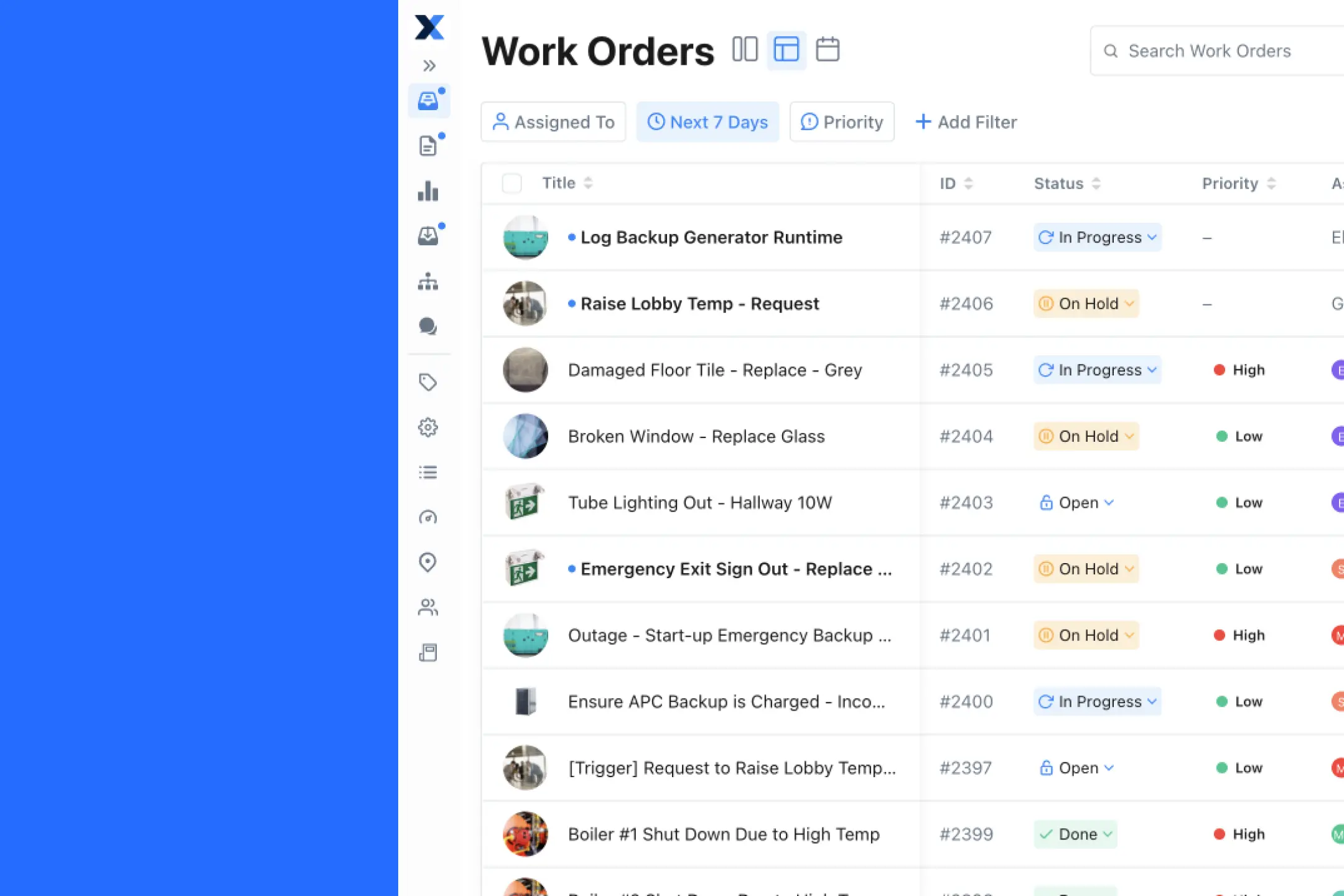
Work order tracking is the process of monitoring and managing maintenance tasks from start to finish, providing real-time visibility into maintenance activities across your facility. It involves creating, assigning, executing, and documenting all maintenance work to ensure nothing falls through the cracks.
For example, a technician might be fixing a broken HVAC system, but the work order is missing the model number for a filter replacement. The technician might pause the job, call for clarification, and wait for missing information. Without proper work order tracking, none of this activity is captured, meaning work orders can go missing, work is delayed longer than it should be, or data becomes skewed.
A smart work order tracking system keeps operations running smoothly. It puts everything in one place where your team can actually find it. This ensures technicians have the details they need when they need them, from equipment specifications to safety procedures.
Why work order tracking software is crucial for maintenance
Imagine trying to track down an old work order during an audit, only to spend hours sifting through stacks of paper stored in boxes. Many managers and administrators have faced this situation before switching to a digital work order tracking solution.
It's not uncommon for someone to spend an entire day locating the correct document for the fire marshal. But with a modern digital work order system, you can find what you need in minutes.
Good work order tracking software simplifies the process. Everything is on one platform, updates happen instantly, and teams can communicate with each other. You'll know you're tracking maintenance tasks properly, finishing them on time, and can easily find them when you need them.
Here's how work order tracking software transforms your maintenance operations:
Increase efficiency and accuracy
Stop wasting time on paperwork and manual tracking, and let your team focus on skilled technical work. Work order tracking software cuts out manual errors and streamlines how you handle maintenance so you can have fewer delays while making better use of your team and budget.
With your digital standard operating procedures in one place, you can easily assign tasks, follow progress, and avoid overlooking critical steps. Put those procedures into action with powerful digital tools that automate workflows, reducing the time spent on administrative tasks.
Receive important updates in real-time
When an operator receives an urgent notification that a conveyor belt in your production facility is overheating, they can send an instant update through the work order tracking system. This lets you quickly assign a technician to investigate the issue.
An efficient work order management system with tracking tools lets you monitor equipment conditions and task statuses as they occur. Your team can respond quickly to any situation and make necessary adjustments on the spot.
Immediate visibility helps you make informed decisions and prevents minor issues from becoming big ones. By staying informed, your maintenance teams can work proactively and keep projects on track.
Enable swift communication and collaboration
Work order tracking software makes team communication smoother. All maintenance tasks live on one platform where everyone can see them. When managers and technicians can view the same information and message each other directly, they can work together more effectively and reduce miscommunication.
The best platforms include built-in messaging tools and notification options that let everyone stay informed, helping to prevent delays, and keeping maintenance teams aligned.
Types of work orders to track
Managing maintenance operations effectively means tracking all types of service requests. Each type provides different insights into your team's workload and asset health. Centralizing them in one system gives you a complete picture of your maintenance needs.
Preventive maintenance
These are scheduled tasks designed to prevent equipment failure, such as routine inspections, lubrication, and parts replacements. Tracking preventive maintenance (PM) work orders helps you ensure that your team completes proactive work on time, which is key to reducing unexpected outages and extending asset life.
Effective PM tracking has helped companies like Karn Custom Woodwork move from reactive "fly 'til failure" approaches to managing over 350 preventive work orders across more than 200 assets.
Corrective maintenance
Also known as reactive maintenance, you create these repair assignments in response to an equipment failure or reported issue. Tracking corrective maintenance helps you identify assets with recurring problems, analyze failure trends, and measure your team's response time to unplanned events.
Inspection work orders
These tasks involve checking an asset's condition to determine if further maintenance is needed. They can be part of a compliance requirement or a routine check.
Tracking inspection work orders provides a clear record of asset health over time and helps you catch potential issues before they become major failures.
Emergency work orders
These are high-priority tasks that address immediate threats to safety, production, or the environment. Tracking emergency work orders is critical for understanding the frequency of major failures.
This data helps identify opportunities to improve your preventive maintenance strategy to avoid future emergencies.
Key features of a work order tracking system
A solid work order tracking platform comes with tools that keep maintenance operations moving smoothly. From digital work order creation to real-time reporting, these tools let you see what's happening and make your entire operation more efficient.
These five key features help make a work order system an effective asset to your maintenance efforts:
Digital work orders
Digital work orders make creating, assigning, and tracking maintenance activities easy with just a few clicks. They eliminate the need for paper forms, reduce manual input, and are accessible from anywhere.
When you digitize forms like maintenance requests and job tickets, these benefits help your team stay productive and focused:
- The system automatically creates maintenance requests from preset triggers.
- Digital forms reduce the chance of data entry mistakes.
- Automated workflows improve response times for your team.
- Centralized information keeps operations running efficiently.
- Real-time dashboards streamline the tracking of tasks and progress.
Reporting and analytics
A good work order software provides reporting and analytics tools that monitor both equipment performance and team efficiency. These tools help you make data-driven decisions, such as adjusting preventive maintenance schedules or reallocating resources to high-priority tasks.
You can empower your team to make smarter maintenance decisions with detailed breakdowns of completed tasks, downtime, and resource usage. These insights help you track key performance indicators (KPIs) for team evaluations and identify patterns to spot areas for improvement.
Analytics tools also enable you to schedule preventive maintenance and inspections at optimal times. This improvement helps you make the best use of resources, reduce unnecessary costs with better planning, and maintain accurate parts tracking for inventory management.
Work order templates
Work order templates standardize the work order creation process, saving time and keeping maintenance operations consistent across departments. By using templates, you can quickly generate repair assignments without missing important details.
Benefits of using work order templates include:
- Templates provide consistent formatting for all work orders.
- Pre-filled fields reduce the time you spend on repetitive tasks.
- Required fields minimize the risk of overlooking crucial information.
- Customizable templates adapt to your specific maintenance needs.
Work order history
Maintaining a detailed work order history is crucial to the work order management process, letting you track progress and stay compliant with industry standards. With a complete maintenance history, you can document processes to meet regulatory requirements.
A comprehensive work order tracking system enables you to keep a complete record of completed tasks and compare the frequency of preventive maintenance versus corrective maintenance work orders. The system also tracks recurring issues and spots patterns over time.
This historical data provides documentation for audits and compliance checks while identifying areas for improvement in your maintenance strategy. Additionally, the system tracks parts and inventory for asset management efforts.
Native mobile app
A mobile work order management system puts power in the hands of facility managers and maintenance teams. A native mobile app allows you to access maintenance activities and update live progress from any location.
This flexibility helps maintenance teams stay connected and responsive no matter where they are. With mobile access, your team can quickly reprioritize corrective and preventive maintenance work orders based on changing conditions.
Mobile capabilities enable technicians to monitor progress in real time, provide updates and attach photos from anywhere, and improve communication across the maintenance department. These features help teams track and complete work orders on the go, reducing delays and improving overall efficiency.
Best practices for effective work order tracking
Adopting work order tracking software is the first step. To get the most value from it, you need to establish clear processes for your team to follow. The following best practices will help you create a consistent and efficient tracking system.
Standardize work order creation
Every maintenance request should include the same essential information: asset name, location, problem description, priority level, and required parts. Using digital forms and templates makes it easy for anyone to submit a complete request.
This standardization reduces the need for follow-up questions and clarification, saving valuable time for both requestors and maintenance teams.
Establish clear priority levels
Define what constitutes a high, medium, or low-priority task for your facility. This classification helps your team understand which jobs to tackle first, ensuring that your team addresses critical repairs quickly. Clear priority levels also help your team handle routine tasks efficiently without disrupting operations or causing unnecessary downtime.
Use mobile devices for real-time updates
Equip your technicians with an app they can access from their mobile devices so they can update work order status, add comments, log time, and attach photos directly from the field. This eliminates end-of-day paperwork and gives you immediate visibility into task progress.
Mobile updates keep everyone informed without interrupting your team's workflow or requiring them to return to a central office.
Analyze your work order data
Regularly review key performance metrics to identify improvement opportunities. Focus on metrics that directly impact your maintenance effectiveness and operational efficiency. Critical metrics to monitor include:
- Work order completion rates: The percentage of completed versus assigned tasks shows team productivity.
- Mean time to repair (MTTR): Average time from equipment failure to full restoration indicates response efficiency.
- Backlog analysis: Monitoring open work orders prevents overwhelming your team and highlights resource needs.
- Recurring failure patterns: Identifying repeat issues helps focus preventive maintenance efforts.
This data helps you identify recurring equipment issues, evaluate team performance, and make informed decisions to improve your maintenance strategy.


How to track work orders effectively with MaintainX
Effectively tracking work orders takes the right tools and strategies. With MaintainX, you can streamline processes from start to finish, making it easier to manage tasks, communicate with teams, and monitor current conditions.
One case study shows how SanTan Brewing Co. closed over 450 work orders after just six months of using MaintainX. They've streamlined work order processes across several locations using the platform
"MaintainX was number one," says Plant Engineer Adam Soltis "When I landed on the MaintainX free trial, honestly, it was love at first sight for me."
Here are five key ways that MaintainX helps your business improve its work order flow:
Create digital work orders with ease
With MaintainX, creating digital work orders is fast and simple. You can quickly assign tasks to the right people and include all necessary details, such as priority levels, due dates, and standard operating procedures (SOPs).
Digital work orders help ensure your team doesn't miss anything and that they focus on what's important. The platform enables instant task creation with full details and auto-assigns tasks to the right team members based on availability and skill sets.
MaintainX provides up-to-the-minute updates for task progress and completion while standardizing work order creation with customizable templates. The system includes asset details, location, priority levels, and deadlines for clear communication. You can use digital forms to attach photos and detailed information, and schedule preventive maintenance tasks in advance to reduce downtime.
Assign work orders to the right staff
MaintainX simplifies the task of assigning maintenance activities. Maintenance managers can easily delegate tasks to the right team members based on skill level, availability, or job priority.
The platform gives you confidence that the right people are handling the right jobs through instant notifications for assigned tasks and automatic assignment based on predefined criteria. This improves task management for maintenance managers and reduces the risk of tasks slipping through the cracks.
Immediately execute work orders and track progress in real-time
Technicians can efficiently execute work orders using the MaintainX mobile app, providing immediate updates to ensure accuracy. They can log updates, attach photos, and mark tasks as complete directly from the field, helping keep work organized and reducing downtime.
For managers and executives, MaintainX provides live visibility into the effectiveness and efficiency of maintenance processes. Automated notifications and updates keep everyone in the loop, allowing for better oversight and quicker decision-making.
This real-time monitoring provides confidence that your team will complete service requests on time and to standard.
Learn from your work order data
MaintainX offers powerful reporting and analytics capabilities to accurately evaluate work order data and improve processes. Environment, Health, and Safety (EHS) professionals and executives benefit from current insights into task performance, equipment usage, and downtime.
With detailed reports, you can identify trends and recurring issues that impact overall productivity. The system helps improve resource allocation and preventive maintenance schedules based on actual usage patterns.
Analytics tools track technician productivity with performance metrics and forecast future maintenance needs based on historical data. This enables continuous improvement of overall maintenance strategies for long-term success.
Maintain compliance every step of the way
With MaintainX, your team follows regulations and industry standards by keeping detailed historical maintenance data. This comprehensive documentation helps companies like Breeze Thru Car Wash maintain ISO 9001 compliance through recertification processes with all SOPs centralized in one system.
EHS professionals can track every step of the maintenance process, helping everyone abide by safety protocols. The platform provides complete audit trails for regulatory reviews and instant access to work order history for inspections.
This documented proof of compliance with safety standards includes streamlined reporting for easier recordkeeping and regulatory submissions.
Transform your maintenance operations with better work order tracking
Effective work order tracking transforms maintenance operations from reactive to proactive. By moving away from paper and spreadsheets to a centralized CMMS software platform, you give your team the tools they need to manage tasks, communicate clearly, and keep assets running reliably.
This improved visibility helps you reduce unplanned downtime, control costs, and make data-driven decisions that support operational excellence. MaintainX's mobile-first platform keeps the physical world running by empowering frontline teams with the technology they need to succeed.
Work order tracking for maintenance teams FAQs
What is maintenance work order tracking software?
Maintenance work order tracking software is a digital tool that helps teams manage a variety of maintenance tasks from start to finish. It lets you create work orders and assign them to the right team members for the task. Work order software also enables you to monitor the progress of work orders in real time so you can be sure teams are staying on schedule. These platforms also offer valuable insights into resource use, worker performance, and maintenance history. You can use this information to tighten up workflows and improve team communication, leading to better asset management and reduced downtime.
What is the best work order tracking software?
The work order tracking software that works best for you depends entirely on your organization's needs. Top platforms like MaintainX stand out by offering features like mobile access, cloud-based data storage, and real-time tracking. These systems streamline task management and let you monitor operations. Look for a software solution that provides mobile access and combines well with other systems, allowing your team to stay connected and productive wherever they are.
What are the best practices for manufacturing work order tracking?
Manufacturing work order tracking relies on clear communication and streamlined processes to do its job well. To improve efficiency, consider using a digital work order tracking system that assigns tasks automatically, monitors real-time progress, and provides detailed reporting. Best practices include:
- Standardizing work order templates for consistency.
- Prioritizing preventive maintenance over reactive responses to reduce downtime.
- Regularly reviewing work order data to identify trends and areas for improvement.
- Integrating the system with inventory management tools for timely parts availability.
Following these practices keeps manufacturing operations running smoothly and helps manage resources more effectively.
Can I track work order progress with MaintainX’s mobile app?
Yes, MaintainX’s mobile app lets you track work order progress in real time from any location. Managers can create work orders and send them directly to specific team members. Technicians can update tasks, add photos, and log details directly in the app, providing instant updates to managers. The mobile app also sends notifications for task completion, delays, or changes, keeping everyone informed and on schedule. Whether in the field or the office, the app helps your team stay connected and productive, streamlining communication and task management.
What are the four main types of work orders in industrial maintenance?
For maintenance professionals in manufacturing and asset-intensive industries, the four primary work order types are preventive (scheduled tasks to prevent failures), corrective (repairs after equipment failure), inspection (condition assessments for compliance), and emergency (urgent repairs for safety-critical issues). Tracking all four types provides maintenance managers with complete visibility into workload and asset health across their facilities.
How does work order tracking improve compliance for manufacturing facilities?
CMMS software creates detailed, time-stamped digital records of all maintenance activities, providing maintenance managers with complete audit trails. This documentation proves what work your team completed, who performed it, and when they performed it—essential for demonstrating compliance with OSHA, FDA, and industry safety standards during regulatory audits.
What is the first step for maintenance managers starting a work order tracking system?
Document your current work order management process from request to completion, identifying pain points like lost requests or poor communication between shifts. Choose a mobile-first work order software that technicians will actually use in the field, then start by digitizing your most common preventive maintenance tasks to build momentum across your maintenance team.

Marc Cousineau is the Senior Content Marketing Manager at MaintainX. Marc has over a decade of experience telling stories for technology brands, including more than five years writing about the maintenance and asset management industry.


.webp)