

Every asset has dozens of ways it could fail, but not every potential failure deserves the same amount of attention. A failure mode and effects analysis (FMEA) template gives maintenance teams a structured way to score potential failure modes before anything breaks, so you can focus your time and PM budget on the failures most likely to cause damage, downtime, or a safety incident.
Below, you'll find a free FMEA template built specifically for maintenance teams. We'll walk through how to fill out each section step by step, using a hypothetical equipment failure as a worked example, cover how to choose a scoring scale that fits your equipment, and show what to do with a failure mode once it scores high.
Key takeaways
- An FMEA template is a scoring matrix that ranks potential failure modes for an asset before anything breaks.
- The FMEA process requires you to list failure modes, identify causes and effects, score severity/occurrence/detection, calculate the risk priority number (RPN), and assign a follow-up action.
- Most teams should start with a 1–10 scoring scale for their FMEA rather than 1–5, as it gives finer resolution across equipment with mixed criticality, at the cost of a little more setup time.
What is an FMEA template?
An FMEA template is a worksheet that scores every potential failure mode for an asset across severity, occurrence, and detection, so you can prioritize which ones need action first. Unlike an equipment failure report, which documents a single incident after it happens, an FMEA looks ahead by capturing everything that could go wrong before it does.
For a full breakdown of what FMEA is and when to use it, see our guide What Is FMEA?
FMEA template vs. other maintenance templates
FMEA is one of several templates maintenance teams use, and each one is built for a different job. Which one you need depends on whether you're anticipating failures or responding to one that already happened. Here's how FMEA compares to the others:
Most mature maintenance programs end up using more than one of these analyses. By layering proactive analysis like FMEA with reactive tools like RCA, you can build a more complete, resilient picture of how your equipment fails and why.
How to fill out the FMEA template (step by step)
The template walks you from identifying the asset to scoring its potential failure modes to assigning actions for the highest risks. Here's how to fill out each part.
1. Set up the header
The header creates a paper trail for future maintenance work and audits. Keeping it standardized saves your team time later, since anyone can quickly find the analysis, see when it was done and what asset it covers, and know who to ask about the scores.
In this section, fill in:
- Date: When the analysis was done, so it's clear how current the scores are.
- Asset/component name and Asset ID: Be specific, naming not just the type of asset but the exact one you're analyzing (e.g., Conveyor motor, Line 3, Asset ID CM-0312). If your CMMS tracks assets by ID, use that ID here so this FMEA can be pulled up alongside the asset's work order history.
- Location and system/subsystem: Matters most for assets that show up more than once across your facility.
- Completed by: Name the person (or people) who did the scoring. FMEA scores are judgment calls, and knowing who made them matters if someone needs to ask why a failure mode was scored the way it was.
2. List the asset's potential failure modes
Capture every way the asset could fail, along with what would cause it and what would happen as a result. Cast a wide net here. Most assets have multiple failure modes, and it's easier to rule out an unlikely one later than to miss one that matters.
For each row, fill in:
- Failure Mode: How the asset could fail. Be specific enough that someone reading it later knows exactly what you mean. "Motor fails" is too vague. "Motor bearing seizes" or "motor overheats and trips" gives the next two columns something concrete to work with.
- Cause: What would produce that failure mode. A single failure mode can have more than one plausible cause. If it does, add a separate row for each one, since they may call for different fixes and different scores.
- Effect: What happens to the asset, the line, or the process if that failure mode occurs. A bearing seizure might cause both unplanned downtime and a safety exposure, and those should be captured as separate rows.
For example, if you were running an FMEA on a conveyor motor, one failure mode might be a bearing seizure. This could be caused by a lack of lubrication, and the effect would be an unplanned conveyor stoppage, since the line has no redundant motor to fall back on.
3. Score severity, occurrence, and detection
For each failure mode, assign a score from 1 to 10 for Severity, Occurrence, and Detection using the scoring key on the template.
- Severity (S): How bad the effect would be if the failure mode occurred, from negligible (1–2) to a safety hazard or regulatory violation (9–10).
- Occurrence (O): How likely the failure mode is to happen, from rare (1–2) to very high, occurring weekly or more (9–10).
- Detection (D): How likely current controls are to catch the failure mode before it causes the effect. A low score (1–2) means it's always caught in advance. A high score (9–10) means there's currently no way to detect it.
For the conveyor motor bearing seizure, a team might score Severity as 7, since it results in unplanned downtime. Occurrence is a 4, since the bearing has failed before but not frequently. Detection is a 5, since there's no vibration monitoring in place to catch early wear.
4. Calculate RPN and assign action
Multiply Severity, Occurrence, and Detection to get the risk priority number for each failure mode. For the bearing seizure example, that's 7 x 4 x 5 = 140.
Complete the calculations for all of the failure modes you identified, which should tell you which ones are the most critical to address first. Many teams set a threshold, often somewhere between 100 and 125, above which a failure mode automatically gets an action assigned rather than left to a judgment call.
With your failure modes prioritized, fill in:
- Recommended Action: What will be done to reduce the risk. This might be a new or adjusted PM task, a work order to fix an existing condition, or a change in maintenance strategy for that asset.
- Owner: Who is responsible for completing the action.
For the bearing seizure, a team might assign the recommended action of adding a lubrication check to the weekly PM route, with the maintenance tech as the owner.
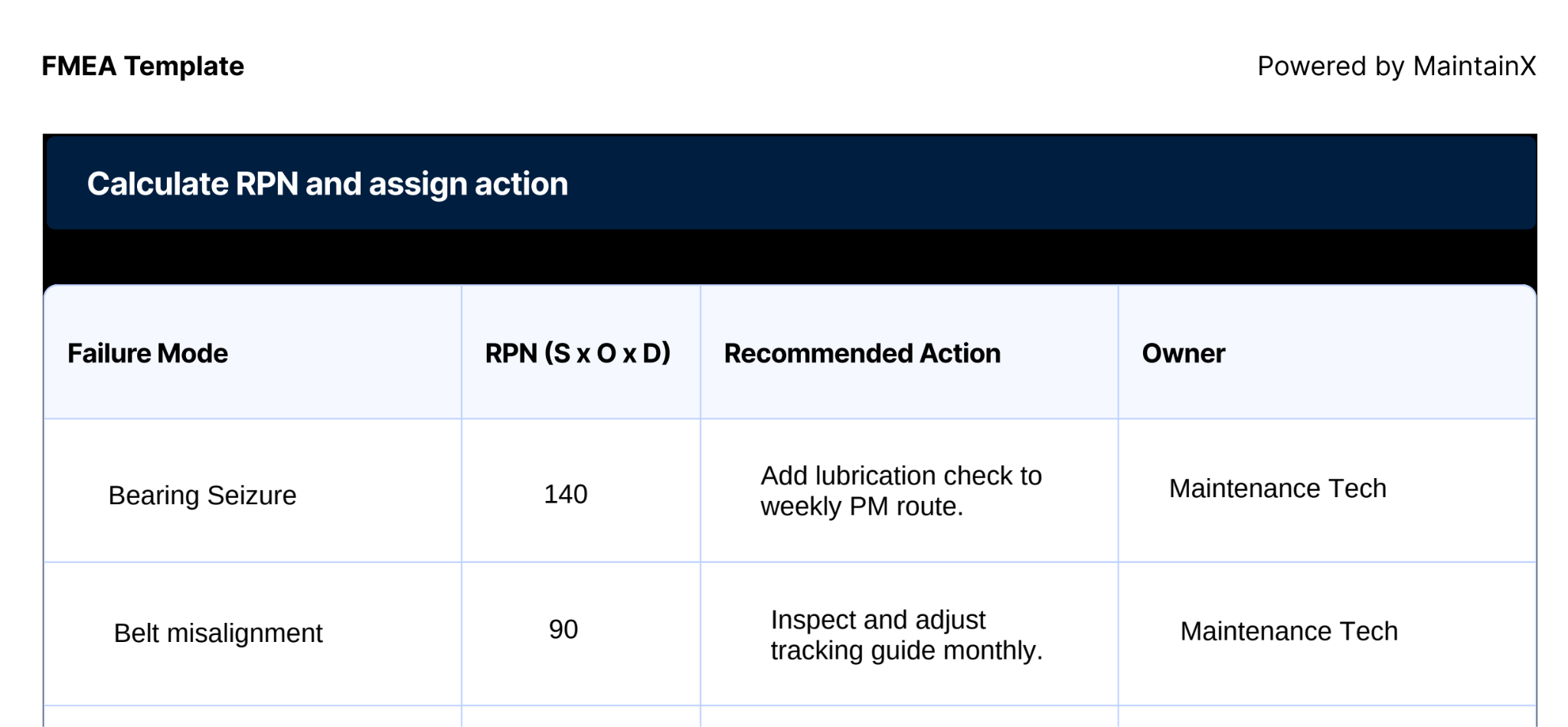
Once every failure mode above your threshold has a recommended action and an owner, the FMEA is complete. Revisit it on a set cadence, or any time equipment conditions change, to confirm actions were completed, and scores still reflect appropriate risk.
What to do with a high-RPN failure mode
High-RPN failure modes should be the first tasks or changes you tackle, as they represent the failures most likely to cost you downtime, damage, or a safety incident if left unaddressed. Depending on what's driving the risk, that usually means one of a few things:
- A new or adjusted PM task: If routine maintenance can catch the failure mode before it happens, add or update the task that does it.
- A work order: If there's already a condition contributing to the failure mode (worn part, missing guard, known leak), address it directly rather than waiting for the next PM cycle.
- A maintenance strategy review: If you can't meaningfully reduce the risk with routine maintenance alone, it may be time to reconsider the overall approach for that asset or component.
If you're not sure which of these fits a given failure mode, our guide to Reliability-Centered Maintenance (RCM) can help you decide the right maintenance strategy once you know which failure modes matter most.
How MaintainX supports FMEA
For modern maintenance teams, a paper or spreadsheet FMEA isn’t giving you the full benefit of the analysis process. These standalone reports get stale fast as equipment conditions change, failure history piles up in work orders you'd have to dig back through, and nobody remembers to revisit the scores.
A CMMS like MaintainX keeps your FMEA connected to the data and workflows around it. This includes:
- Centralizing the failure and asset history that should inform your scoring. Pull up an asset's full work order and downtime history before you score Occurrence, instead of relying on memory or scattered notes.
- Turning high-RPN action items into work orders or PM schedule updates directly. Assigning a corrective action and creating the work that fulfills it happens in the same system, instead of two disconnected steps.
- Surfacing the reliability trends that should trigger a rescore. Asset Health Insights ranks the biggest causes of unplanned downtime for each asset and flags your most problematic equipment based on failures and downtime hours, so a failure mode that's becoming more frequent shows up in your data instead of someone remembering to reopen the FMEA.
All of this means that your maintenance operations will save time and effort, and become more proactive in addressing maintenance issues before they lead to downtime or unnecessary costs.
Book a tour today to see how MaintainX connects FMEA scoring to the work orders and PM schedules that act on it.
FMEA template FAQs
What is a good RPN threshold?
There's no universal number as it depends on your industry, your asset criticality, and the scale you're using. On a 1–10 scale, many teams set their threshold somewhere in the 100–125 range, meaning any failure mode scoring above that gets an action assigned automatically rather than left to a judgment call. The right number for your team is less important than picking one consistently and revisiting it as you build more scoring history.
How is FMEA different from FMECA?
FMECA (failure mode, effects, and criticality analysis) adds a formal criticality analysis on top of standard FMEA. Instead of relying on the RPN score alone, it ranks each failure mode's criticality using failure rate data and the severity of its effects. It's more common in aerospace, defense, and other industries with strict reliability requirements.
For most maintenance teams, FMEA's severity/occurrence/detection scoring is sufficient. See our FMECA guide if you need the added rigor.
Should I use a 1–5 or 1–10 scale?
Use a 1–10 scale if you're scoring failure modes across equipment with a wide range of criticality. Use a 1–5 scale if you're a smaller team or just starting out and want something faster to fill in, though you'll sacrifice some precision. Most teams that start on 1–5 eventually move to 1–10 as their FMEA program matures.

Marc Cousineau is the Senior Content Marketing Manager at MaintainX. Marc has over a decade of experience telling stories for technology brands, including more than five years writing about the maintenance and asset management industry.


.webp)