

When a critical asset goes down, the goal is to get it running again, fast. But if you skip straight to a fix without digging into why the failure happened, you're just buying time until it happens again. A root cause analysis (RCA) is how maintenance teams stop reacting to failures and start preventing them.
The RCA templates below were designed specifically for maintenance teams, giving you the steps you need to take to identify points of failure, investigate them with the right method, assign a corrective action, and verify that the fix held. Used consistently, RCA turns recurring downtime into a solvable problem instead of a cost of doing business.
Key takeaways
- The best maintenance root cause analyses include specifics like which asset failed, how long it was down, and what that downtime cost.
- Not every equipment failure needs the same investigation method. Simple, single-cause failures are best traced with a linear 5 Whys approach, while failures with several possible contributing factors call for a fault tree analysis.
- Use a CMMS like MaintainX to keep your RCA connected to the asset and work order, and to turn your analysis directly into an updated maintenance schedule or procedure.
What is a root cause analysis template?
A root cause analysis template is a structured worksheet that walks you through the steps for tracing a failure back to its actual cause, not just the symptom that showed up first. With an RCA template, your team works through the same core elements and process every time, determining what failed, how the failure was investigated, what's being done about it, and whether it worked.
There are a variety of RCA tools, each with its own pros and cons. The main types of RCA tools include:
- 5 Whys: A linear drill-down, best for straightforward, single-cause failures
- Fault tree analysis: Maps multiple contributing conditions at once, best when more than one factor could be at play
- Fishbone diagram: A team brainstorming tool, best for complex failures with input from multiple people or departments
- FMEA: Best for safety-critical or recurring failure modes
This guide includes templates and instructions for the 5 Whys and fault tree analysis, the two methods that cover most day-to-day equipment failures. If you’d prefer one of these other analyses, you can find more information in our guides to fishbone diagrams and FMEA analyses.
Why generic templates fall short for equipment failures
Most generic RCA templates fall short for maintenance teams because they were built for business problems, not physical assets. They ask for a "problem statement" and give you space to brainstorm causes. Instead, maintenance professionals need to:
- Track key details like asset ID, failure mode, downtime hours, and cost
- Tie solutions back to PM schedules
- Confirm the failure doesn't come back
The templates below are built around the data and workflow maintenance teams actually need.
How to use these root cause analysis templates
Each of the templates below walks you through one part of the RCA process, from documenting the failure to confirming that the fix worked. Work through them in order, using the method (either 5 Whys or fault tree analysis) that fits the failure you're investigating. For now, you don't need to figure out which method applies to your situation; that's covered in step 3 below.
1. Identify the failure
Start every RCA by capturing the basic facts so the entry is searchable later. It also helps you prioritize which failures are worth a full investigation.
- Work order number and date: Link the RCA to the work order so your investigation stays tied to your maintenance history.
- Asset ID and location: Use the specific asset ID so you catch a failure mode repeating across multiple assets.
- Failure mode: Record how the asset failed (e.g., "motor overheated," "bearing seized," "sensor stopped detecting"). Save the cause for the investigation; this field is just the symptom.
- Downtime hours and estimated cost: Include lost production, labor, and the repair cost.
- Severity and safety classification: Flag any safety risk here (e.g., minor/no injury risk, near miss, injury occurred, regulatory/environmental exposure). This determines whether the RCA needs to feed into a safety incident record.
- Completed by: Name whoever filled out this section, in case it needs to be picked back up later.
With the failure documented, you're ready to bring in the people and history that will help you find the cause.
2. Gather your investigation team and data
Before you start investigating, pull together the people and records that will give you a full picture of what happened.
- Team members and roles: Include the operator who was running the asset, the technician who responded, and an engineer if the failure is complex enough to need one.
- Maintenance history and prior work orders: Pull the asset's full history to spot any evidence of patterns or previous analyses.
- Technician notes and observed conditions: Capture what the technician saw and heard on arrival, including anything they noticed that didn't make it into the work order, like unusual noise, smell, or vibration before the failure.
If you skip this step, you might end up repeating this same investigation in six months because the original was under a different work order number.
3. Write your problem statement and choose your method
Your problem statement should be a specific, factual description of the failure. Describe exactly what happened, for example, "conveyor motor overheated and shut down." Avoid a vague statement like "HVAC broke down." A precise problem statement keeps the investigation focused and makes it easier to spot when your whys or fault tree branches have drifted off topic.
Once you have your problem statement, choose the method that best fits for diagnosing that particular failure:
- 5 Whys: Use this for a failure with a single, likely cause, where you expect a straightforward sequence of events to lead to the problem. A jammed sensor or a tripped breaker are good candidates.
- Fault tree analysis: Use this when more than one condition could have contributed, or when you're not sure yet how many causes are in play. A catastrophic motor failure or a failure with several plausible explanations is a better fit here.
If you're not sure which applies, start with the 5 Whys. If your answers start branching into more than one direction, that's a sign the failure needs a fault tree instead.
4a. Find the root cause with the 5 Whys
A 5 Whys RCA is a simple process that helps maintenance professionals get to the heart of what really caused the failure.
Start with your problem statement, and ask yourself why that problem occurred. Then take that statement and ask yourself again why that occurred, and so on and so forth until you find the true root cause of the problem.
Here’s an example of what that might look like:
Problem statement: The conveyor stopped running after the proximity sensor failed to detect a passing product.
Why #1: Why did the sensor fail to detect the product?
- Answer #1: The sensor face was covered in built-up debris.
Why #2: Why was debris allowed to build up on the sensor?
- Answer #2: The sensor wasn't included on any scheduled cleaning route.
Why #3: Why wasn't the sensor included on a cleaning route?
- Answer #3: The sensor was added during a line upgrade last year, and the PM checklist was never updated to include it.
Why #4: Why wasn't the PM checklist updated after the upgrade?
- Answer #4: There's no standard step in the line upgrade process for reviewing and updating PM checklists.
Root cause: Line upgrades don't include a step to review and update PM checklists, so new components get missed.
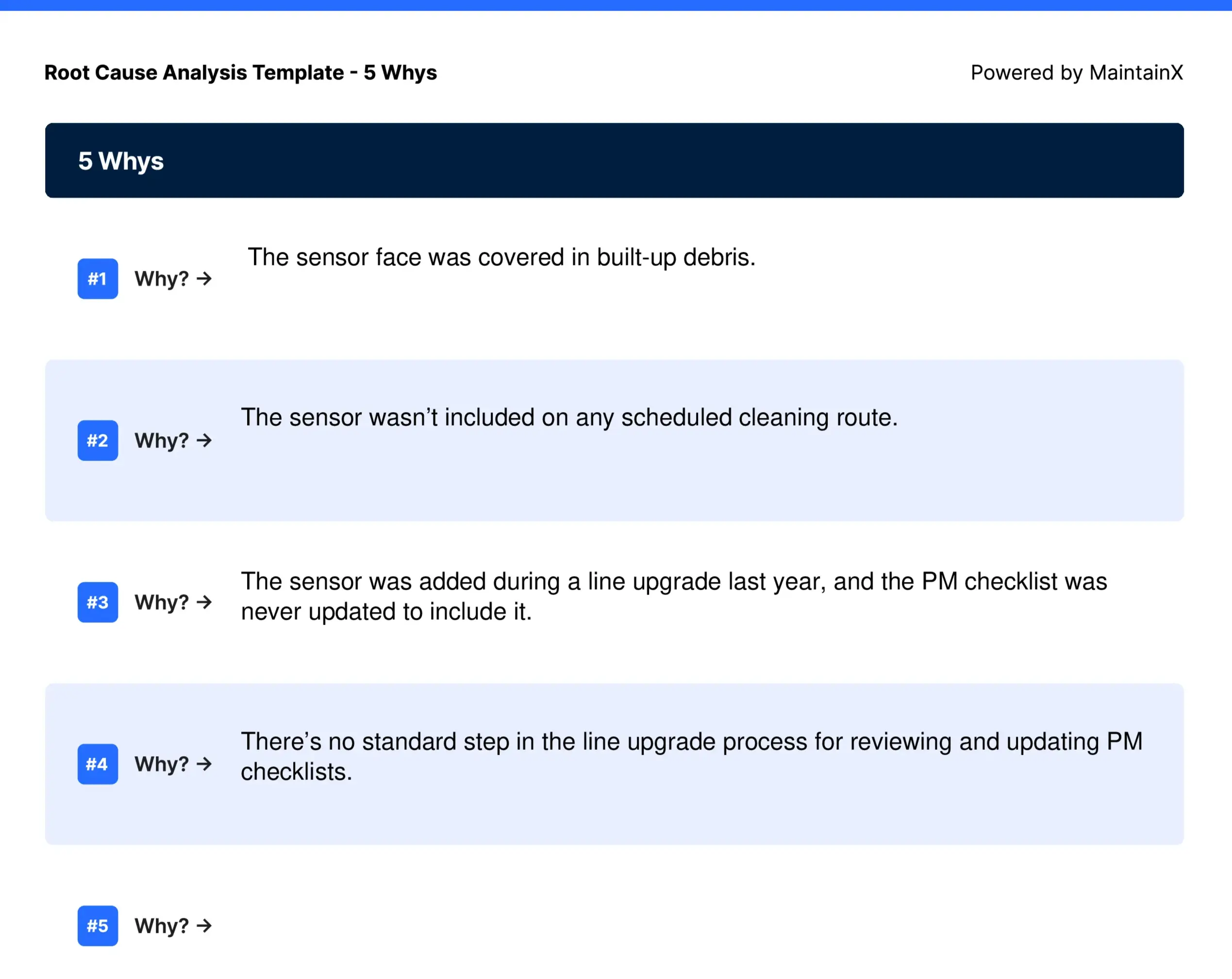
Notice the chain stops once it reaches something concrete and fixable, adding a checklist review step to the upgrade process, rather than stopping earlier at "debris built up" or "nobody cleaned it," which are symptoms of that problem, not the cause itself. Also, although it is called “5 Whys,” you are not obligated to go to 5, nor should you stop at 5 if you have not found the root cause.
4b. Find the root cause with a fault tree analysis
Unlike the 5 Whys, a fault tree analysis lets you visualize several symptoms of a failure at once, tracing each one down to the cause behind it. It's a better fit when a failure shows up in more than one way, or when you're not sure yet how many factors were involved.
To complete the template, work from the top down and fill in the following pieces of information:
- Problem: The specific failure you wrote out as your problem statement
- Symptoms: The distinct ways the failure showed up, like an overload trip, a hot bearing housing, or unusual vibration. Each symptom gets its own branch.
- Possible root causes: For each symptom, list the conditions that could have produced it. These are candidates, not conclusions. Get every plausible cause on the page before you start ruling them out.
- Actual root cause: The one possible cause you confirmed was responsible for that symptom
- Solution: The corrective action or actions that address the confirmed root causes across all branches
Here's a simplified example using a pump failure:
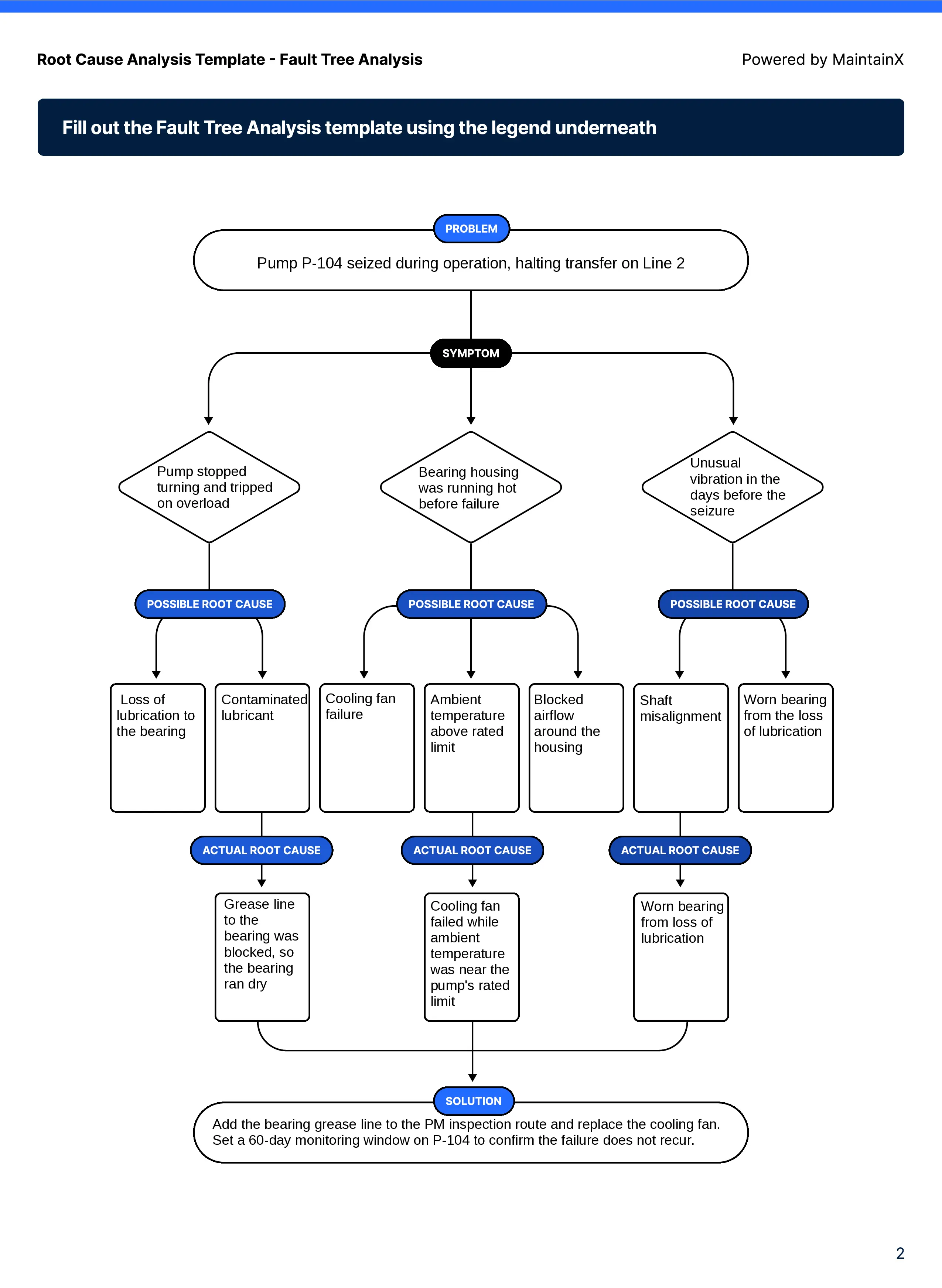
In this example, three symptoms all trace back to the same underlying problem: a blocked grease line that starved the bearing, made worse by a failed cooling fan. Because the analysis maps each symptom separately, the team can see that the vibration and the overload trip weren't separate issues, but the same root cause showing up in different ways.
5. Assign corrective action
Now that you’ve identified the root cause, turn the analysis into work that actually gets done, not something that gets lost once the RCA is filed away. To do this, you'll need to include:
- Description of fix: Describe the specific action that addresses the root cause. If the root cause was a missing PM checklist step, the corrective action is adding that step. If the fix requires updating a PM schedule or SOP, note that update here as part of the action.
- Owners: Name the person or people responsible for completing the corrective action. Without a named owner, corrective actions tend to sit unassigned and incomplete.
- Due date: Set a specific date. A corrective action without a deadline competes with every other task on someone's list and usually loses.
A root cause without a corrective action is just documentation. The point of the analysis is to change something about how the asset is maintained so that the failure does not happen again.
6. Verify the fix worked
A root cause analysis report is complete once you've confirmed that the fix has prevented the failure from recurring. To make sure that this loop is closed, fill in:
- Test and results: Set a specific window, typically 60 to 90 days, to monitor the asset after the corrective action is in place. Record whether the same failure mode shows up again, and note any measurable improvement, like a change in MTBF or a drop in unplanned downtime for that asset.
- Signature and completed date: Once the tracking window closes without a repeat failure, close out the RCA with a sign-off. This creates a record that the fix was verified, which matters if the same asset or failure mode ever needs to be referenced in an audit.
If the failure recurs during the tracking window, that's a sign the root cause wasn't fully addressed, or that there was a second contributing cause that wasn't caught the first time. Reopen the analysis rather than starting a new one from scratch.
*Disclaimer: This template is to be used only by those with appropriate training, expertise, and professional judgment. You are solely responsible for reviewing this asset to ensure that it meets all professional standards and legal requirements, as well as your needs and intent.


Common mistakes when using an RCA template
Most RCAs fail for the same handful of reasons, and they all come down to stopping the process early. The common mistakes include:
- Stopping at the causal factor: A causal factor explains how a failure happened, not why the error was allowed to happen in the first place. "The bearing wasn't lubricated" is a causal factor. "Lubrication wasn't on the PM schedule" is the root cause. Stop the RCA too early, and you'll keep fixing the same failure under a new work order number.
- Skipping the PM/SOP update step: A corrective action that doesn't change a PM schedule, SOP, or other standing process leaves the same conditions in place for the next failure.
- No follow-up verification: Closing the RCA as soon as the corrective action is complete assumes it worked. Without a tracking window, there's no way to confirm the root cause was actually eliminated rather than just masked for now.
You can learn more about how best to implement a root cause analysis with our RCA examples.
How a CMMS supports root cause analysis
A paper RCA gets filed away after the sign-off, and the record is only useful if someone remembers that it exists. A CMMS keeps the RCA connected to the asset, the work order, and everything that happens next.
Using a CMMS like MaintainX means your team can go from RCA to corrective action to prevention automatically. With MaintainX, you can:
- Centralize failure history and work orders per asset: Every RCA lives on the asset record it was written for, alongside every prior work order, so it's easy to spot a recurring failure mode even if it was investigated under a different work order number.
- Turn corrective actions into PM tasks automatically: Create a new PM task or SOP update directly from the RCA, so the fix becomes part of the standard workflow the same day the analysis is finished.
- See failure history at a glance before starting a new RCA: Pull up an asset and immediately see whether this failure mode, or something close to it, has happened before, without digging through old paperwork.
A CMMS means less time spent digging through old paperwork to figure out whether a failure has happened before, and more corrective actions that turn into changed processes.
Book a tour to see how MaintainX connects your RCAs to work orders, PM schedules, and asset history in one place.
Root cause analysis template FAQs
What is a root cause analysis template used for?
A root cause analysis template is used to investigate equipment failures in a structured way, from identifying what failed to verifying the fix held. Teams use it any time a failure is worth digging into beyond a quick repair, especially for recurring issues, costly downtime, or anything with a safety implication.
What's the difference between 5 Whys and fishbone diagrams?
The 5 Whys follows a single chain of questions to trace one failure back to one root cause. A fishbone diagram is a brainstorming tool, usually done with a group, that maps out possible causes and ideas across several categories at once, like equipment, process, people, and materials. Use the 5 Whys for a focused investigation with a likely single cause. Use a fishbone diagram when you want broader input before narrowing down to a cause.
Is a root cause analysis template the same as an 8D report?
An 8D report is a broader problem-solving framework, typically used for formal corrective action requests, especially in supplier quality or automotive contexts. It includes steps like containment and team formation that a standard maintenance RCA doesn't cover. A root cause analysis template is usually one part of an 8D report, not a replacement for it.
How do I know when I've found the actual root cause vs. a causal factor?
You've likely found a causal factor if your answer still points to another failure upstream, like a part wearing out. You've reached the root cause once the answer lands on a gap in a process, such as a missing PM task or an unclear procedure that let the failure happen in the first place.
What software can I use to run a root cause analysis?
A CMMS like MaintainX lets you run an RCA directly from the asset and work order it's tied to, and turn the corrective action into a PM task without leaving the platform. Paper templates and spreadsheets work too, but they don't automatically connect the RCA to your maintenance history or PM schedule.
How long should a root cause analysis take?
It depends on the failure. A straightforward 5 Whys for a minor issue might take 15 minutes. A fault tree analysis report for a complex or safety-critical failure, with input from multiple people, can take a few hours or span a few days if it requires gathering data first.

Marc Cousineau is the Senior Content Marketing Manager at MaintainX. Marc has over a decade of experience telling stories for technology brands, including more than five years writing about the maintenance and asset management industry.


.webp)