
Closed-circuit television (CCTV) systems rarely degrade all at once. The process happens slowly, as cameras drift out of alignment, firmware falls behind on patches, or storage drives fill up. None of these issues triggers a single alert, which is why a proactive CCTV maintenance routine is critical to keep surveillance systems operational.
This structured CCTV maintenance checklist provides clear directions to help security and maintenance teams know what to check and when.
Key takeaways
- Regular CCTV maintenance is critical because any failure, from a smudged camera lens to a firmware vulnerability, can compromise image quality and cause costly problems for your organization.
- Modern IP cameras are susceptible to network vulnerabilities that put your organization at risk of a cyber breach, so firmware updates and credential audits are as important as routine lens cleaning.
- Digital task tracking in a computerized maintenance management system (CMMS) assigns clear ownership across security, IT, and facilities teams and creates the verification records your CCTV maintenance report depends on..
How to use this checklist
Customize for your facility
This checklist is a template that covers the basics of CCTV maintenance. Adjust inspection frequency based on camera criticality and environmental exposure. Outdoor cameras in coastal or industrial environments typically require more frequent cleaning and weatherproofing checks. Add manufacturer-specific tests for specialized cameras like license plate readers, PTZ cameras, or thermal imaging units.
Factor in your regulatory requirements as well. Financial institutions and healthcare facilities often face stricter retention and documentation standards for CCTV footage. Organizations storing highly sensitive data are especially vulnerable to cyber threats from poorly maintained CCTV equipment, so conduct network security checks at a cadence that matches your threat profile.
Use a CMMS
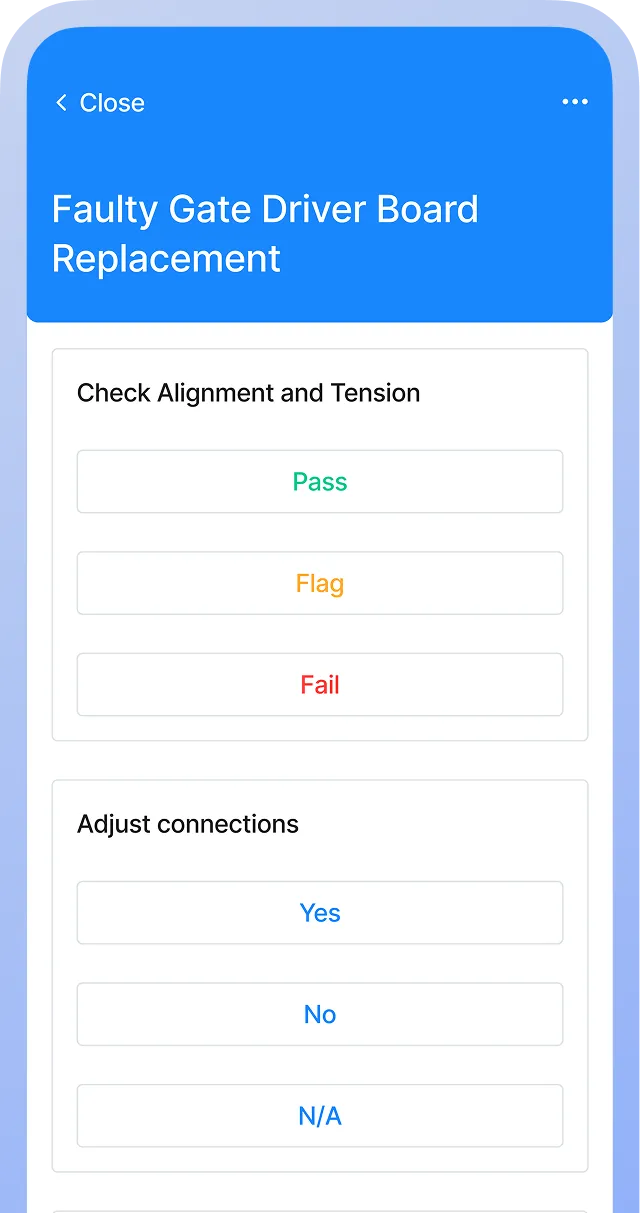
Printed checklists may be acceptable for smaller CCTV setups, but for best results, upload to a CMMS. Using this checklist with a CMMS lets you automate inspection scheduling and generate work orders when defects are found. Digital checklists allow technicians to capture timestamped evidence, including camera screenshots and condition photos, creating the audit trail insurers and regulators typically require.


CCTV maintenance checklist
Camera hardware and housings
Recording and storage systems
Network and cybersecurity
Power supply and backup
Cabling and connections
Monitoring and display systems
Coverage and field of view
Documentation and compliance
This checklist is to be used only by those with appropriate training, expertise, and professional judgment. You are solely responsible for reviewing this checklist to ensure that it meets all professional standards and legal requirements, as well as your needs and intent.
Why CCTV systems fail invisibly, and how to catch it early
CCTV cameras can fail without alarms or unusual sounds. A camera can lose night vision clarity, drift out of alignment, or record corrupted footage for weeks without anyone noticing.
The problem surfaces only when someone pulls CCTV footage after an incident and finds unusable video or blind spots. By then, it's too late. Insurance companies deny claims, investigations stall, and auditors uncover compliance gaps.
Remote monitoring misses the small degradations that compound silently over time, but regular camera inspection catches issues like:
- Gradual lens fogging
- Loose mounting brackets
- Spider webs blocking IR sensors
- Corroded weatherproofing seals
To catch these issues early, schedule regular verification tests for teams to review recorded footage quality, rather than just confirming cameras are powered on.
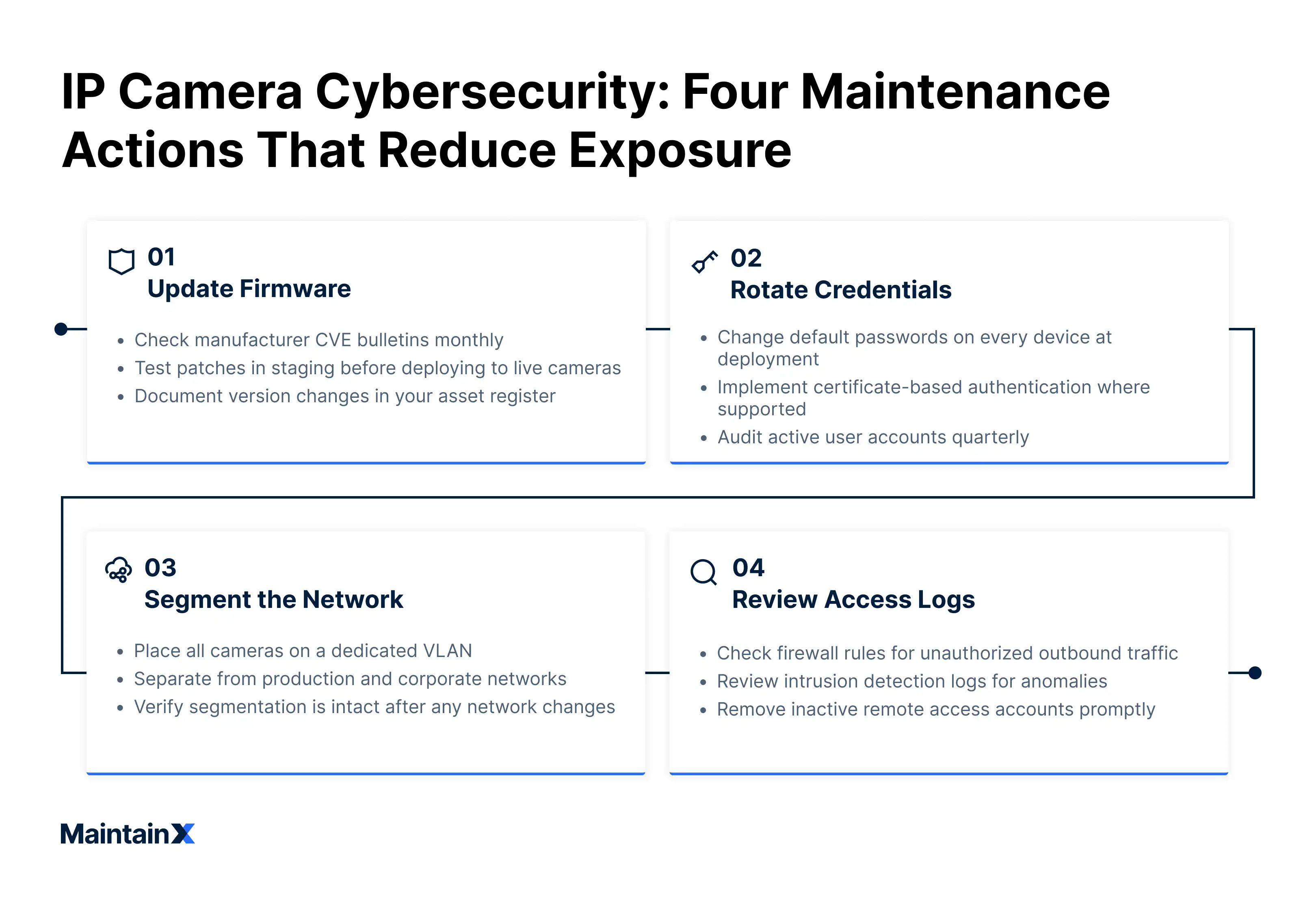
Cybersecurity maintenance for IP camera systems
Because modern CCTV systems are network devices, each IP camera represents a potential entry point into the broader facility network. Attackers actively scan for cameras running outdated firmware or factory-default credentials, making regular firmware updates and credential management a core part of any CCTV maintenance routine.
Effective cybersecurity maintenance covers three areas:
- Firmware updates from manufacturers patch known vulnerabilities that automated scanning tools can exploit.
- Credential audits confirm that default usernames and passwords have been replaced with strong, unique alternatives and that remote access permissions are current.
- Network segmentation checks verify that camera traffic stays isolated from sensitive business systems.
These tasks often fall into a gray zone between IT and security teams. Without clear ownership, firmware goes unpatched for months. Treat IP cameras as managed network assets with the same update cadence as servers or workstations.
How to verify your CCTV system actually works
True verification goes beyond confirming power and cable connections. Effective testing includes reviewing actual recorded CCTV footage from each camera at different times of day.
Night recordings can reveal failing IR illuminators that daytime checks miss entirely. Playback tests confirm that storage capacity is sufficient, that the system retains footage for the required duration, and that recordings aren't silently overwritten or corrupted.
Pay special attention to motion detection zones. Landscaping changes, new signage, or shifted furniture can render trigger zones ineffective. Teams should regularly walk test paths through each camera's field of view, then confirm the system flagged the movement.
Track multiple security maintenance touchpoints with a CMMS
A CCTV maintenance schedule spans physical hardware, network security, and storage systems — tasks that typically fall to different teams with different skill sets. When ownership is unclear, camera maintenance quickly becomes nobody's responsibility.
MaintainX gives each task a clear owner and deadline. Firmware updates route to IT. Camera lens cleaning and bracket inspections go to facilities. Access credential reviews land with security teams. After completion, each task carries a timestamp and a technician's name.
A complete documented maintenance history for each aspect of the CCTV system demonstrates that your organization maintained its surveillance infrastructure when an insurance review or compliance audit asks. Digital checklists can also reduce long-term costs by extending equipment lifespan and helping you avoid compliance fines and denied claims.
Keep your CCTV system in top condition for when you need it most with MaintainX. Book a tour to see how we can help.
CCTV maintenance checklist FAQs
What should a comprehensive CCTV maintenance checklist include?
A complete CCTV maintenance checklist should cover three core areas:
- Camera inspection: lens cleanliness, image quality, mounting stability, cable connections, and physical damage
- Technical verification: recording equipment function, storage capacity, backup systems, power supply, and motion detection accuracy
- Cybersecurity tasks: firmware updates, password rotation, remote access audits, and network segmentation checks
Assign clear ownership for each category to prevent accountability gaps between security, IT, and facilities teams.
What are the NFPA 731 requirements for CCTV system maintenance?
NFPA 731 mandates annual testing of camera functionality, recording devices, and storage systems. Facilities must document all inspections, verify that image quality meets operational needs, and confirm backup systems function properly during testing cycles.
Note: This is a general informational summary only and does not constitute legal, regulatory, or compliance advice. Consult a licensed inspector, qualified contractor, or legal counsel to determine the specific obligations applicable to your jurisdiction and equipment.
How often should a CCTV maintenance routine be performed?
Clean camera lenses monthly in standard environments and weekly in dusty or high-traffic areas. Conduct quarterly checks covering focus, alignment, and recording verification. Annual maintenance should address firmware updates, cable integrity, and power supply testing.
Facilities with high-security requirements or regulatory obligations may need a more frequent CCTV maintenance schedule.
What are the most common CCTV system failures, and how can preventive maintenance address them?
The most common failures are silent recording gaps from failed storage, degraded image quality from dirty camera lenses, and network vulnerabilities from outdated firmware. Without proactive maintenance, these issues tend to surface only after an incident, during insurance or compliance investigations.
What documentation should be maintained for CCTV system compliance and liability protection?
Retain inspection logs capturing the date, technician, and tasks completed. Document image quality samples, recording verification results, and firmware update history. These records prove due diligence when insurance claims, legal proceedings, or regulatory audits question system reliability, and form the basis of a complete CCTV maintenance report.
How does regular CCTV maintenance reduce long-term costs?
Preventive care typically extends cameras from a five-year lifespan to a decade of use. Addressing minor issues like loose wiring, dust buildup on camera lenses, and software updates prevents expensive emergency replacements and avoids incident-driven system overhauls that cost significantly more.

The MaintainX team is made up of maintenance and manufacturing experts. They’re here to share industry knowledge, explain product features, and help workers get more done with MaintainX!



.webp)