
.png)
Your team makes dozens of decisions every day, and each one goes better when the right information is close to hand.
Our latest updates provide more detailed answers from MaintainX Assist, helping technicians and managers make more confident decisions when the stakes are high.
End-to-end Purchase Order management on mobile devices, and new required Parts fields, also bring more flexibility and control to managing spares in MaintainX.
Here's what's new for October.
Get deeper insights and recommendations with MaintainX Assist
Your team often needs specific answers about previous work orders and the status of equipment to help them take the right action.
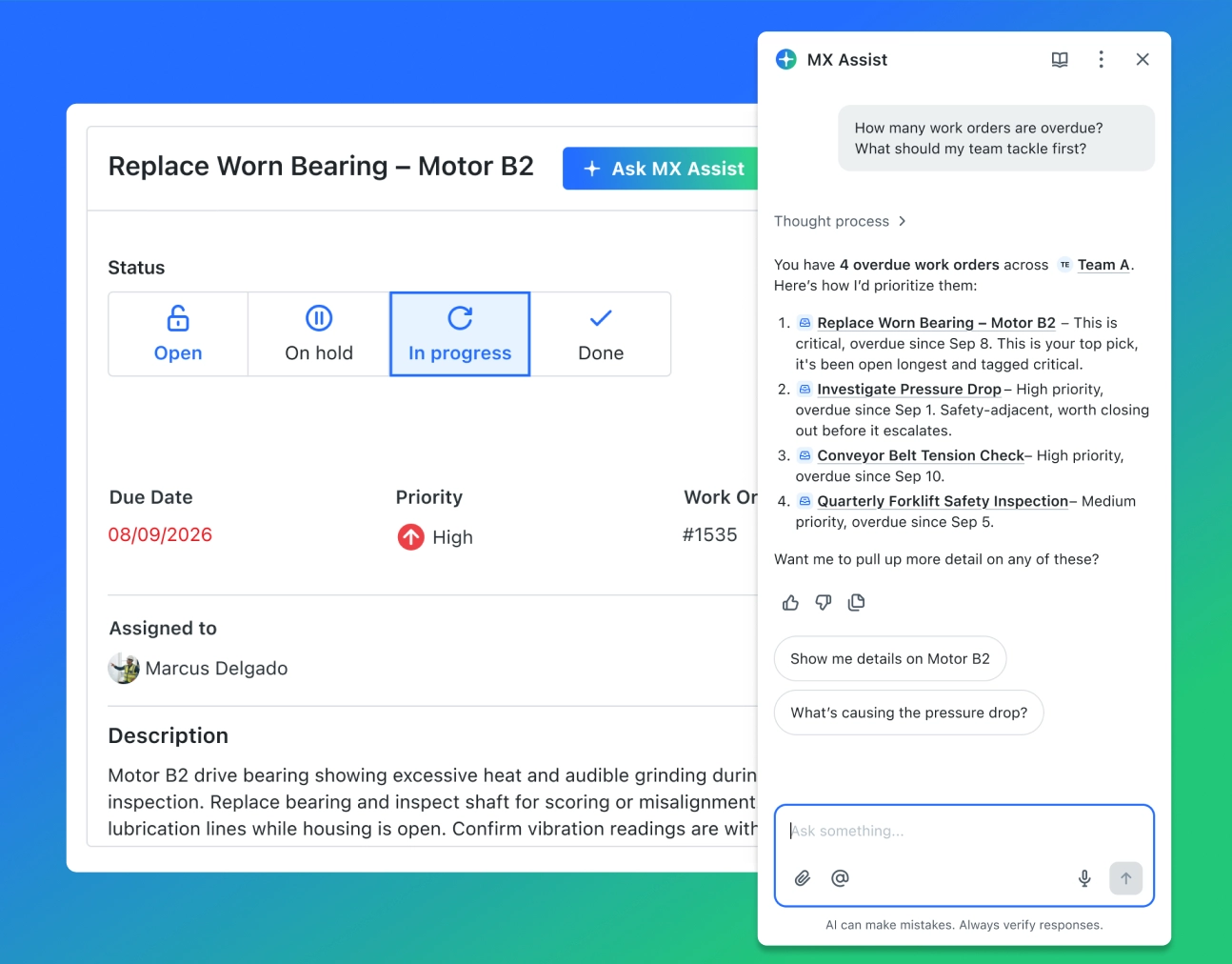
MaintainX Assist now gives more detailed answers, and allows your team to ask follow-up questions in the same chat. A manager can ask how many work orders are overdue, and get a full count broken down by priority. Then they can ask which ones to tackle first, without having to start over.
What this gives you:
- Exact answers about your work orders and assets, like how many are overdue, or when an asset went offline and what its status is now
- Step-by-step instructions for tasks in MaintainX, like adding a sub-work order, with a heads-up if you're missing a permission you'd need
- Sources shown with every answer, so you can see where the information came from
- Translation of a technician's comment or work order summary into your organization's default language, right in the chat (the work order itself stays in its original language)
MaintainX Assist also works without a manual. It draws on your institutional knowledge, including comments, work order summaries, and maintenance history, looking at similar assets elsewhere in your organization when it needs to. And it gives recommendations only, so that your team has the final say on what to do.
MaintainX Assist is available as an add-on for Enterprise customers. To learn more, read our Help Center.
Create, edit, and send Purchase Orders from your phone
Maintenance doesn't stop and wait for you to get back to a desk. When a part runs out mid-job, or an approver is driving between sites, your Purchase Orders (POs) shouldn’t get delayed as a result.
You can now take POs from creation to completion in the mobile app. With our latest app update, you can:
- Create a PO from the Home screen, the PO list, a Part, a Vendor, or a Work Order, with details pre-filled from wherever you started
- Add several parts in one pass, including one-off parts that aren't in your inventory
- Edit a PO on your phone instead of waiting until you're back at a desk
- Send the PO to the vendor by email with CC recipients, or export it as a PDF
Taxes, shipping, and additional costs calculate the same way they do on your desktop, and approving, fulfilling, and completing POs work as before.
Managing PO settings, like approval rules, are still managed on web.
POs on mobile are available on iOS and Android for customers using the Premium or Enterprise plan.
To learn more, read our Help Center.
Keep Parts records complete with required fields
When parts get created without a description, part type, or minimum quantity, everything downstream inherits the gap. Reorder points don’t fire, nobody can tell what the part is or where it lives, and someone ends up having to clean up the data months later.
With Default Part Fields, admins can mark fields as required, so a part can't be created or saved until they're filled in. It works the same way required fields already do on Work Orders and Assets.
How it works:
- Choose from 11 fields to require: Description, Unit Cost, Area, Minimum Quantity, Maximum Quantity, Average Lead Time, Barcode, Part Type, Teams, Assets, and Vendors
- Location fields (Area, Minimum Quantity, Maximum Quantity) are required for every location a part is stocked in
- Requirements apply wherever parts are created or edited: web, mobile, CSV imports, and the API
- Every field is optional by default, so nothing changes until an admin turns one on
Admins can find the setting under Settings → Features → Parts Inventory → Customize Parts Field. Default Part Fields are available on Premium and Enterprise plans.
To learn more, read our Help Center.
Moving Maintenance Forward
This month's releases are about getting your team the right answer, the right tools, and complete data at the moment they need them.
Have questions about any of these updates? Visit the Help Center or connect with your Account Manager.
And if you're not yet using MaintainX, book a tour today.

Colin Strachan is Lead Product Marketing Manager at MaintainX, helping global enterprises advance their maintenance maturity through industrial IoT, AI, and connected operations. A former journalist with nearly a decade in SaaS marketing, he has spoken at smart manufacturing conferences and been published in leading industry outlets.
.png)
.webp)
.png)
.webp)