

Broken equipment is bad. Broken communication makes it worse.
How many times have you been driving home after a shift and remembered that you forgot to create a work order for something an operator told you about in the break room?
Unfortunately, most maintenance teams hear about breakdowns or necessary repairs through sticky notes or a quick conversation in the hallways of their facilities. Not only are crucial details and context completely lost, the work itself usually falls through the cracks as memory fades and paper reminders get lost or buried.
This shouldn’t be the case in an era where digital communication is second nature. That’s why this article explores how to create a digital work request portal. You’ll learn how to set up a maintenance request portal to get the information you need, how to get people at your facility to use the digital form, and how to manage the requests you get.
Key takeaways
- A maintenance work request portal replaces informal requests with a single digital intake point, helping teams capture better information, reduce missed work, and respond faster.
- The best work request forms collect only the details requesters can reliably provide, and adoption improves when the portal is easy to access, simple to use, and reinforced with training and clear expectations.
- To get real value from a portal, maintenance teams need a process for prioritizing, routing, automating, and tracking work requests so they can improve response times, spot patterns, and make better maintenance decisions.
What is a maintenance work request portal?
A maintenance work request portal gives operators, production leads, and other non-maintenance staff a simple way to submit requests digitally without chasing someone down, sending texts, or relying on hallway conversations.
A strong portal helps you:
- Capture the right details up front
- Reduce missed or duplicate requests
- Prioritize work faster
- Create a cleaner record for planning and reporting
For example, instead of getting “Line 3 is acting up,” you get a request with the asset, issue type, photo, timestamp, and location attached.
After a request is submitted, maintenance managers and planners are notified so they can review, prioritize, and schedule the work.
That matters because better intake leads to better execution. Your team spends less time sorting through vague requests and more time doing the right work at the right time. Over time, that also gives you better data on recurring issues, response patterns, and where reactive work is really coming from.
How to set up a work request form for maintenance
A good work request form makes it easier to capture the right information the first time. The goal is to give maintenance enough detail to act quickly without adding friction that slows adoption.
What fields to include in your work request form
Adding the right fields to your work requests allows you to gather the information you need, in the way you need it, so you can quickly prioritize and act on the work request. Here are seven fields you should add to your maintenance request form:
- Request title: It’s a good idea to specify a naming convention for request titles, such as request type, location, and asset. For example, Repair, Main office, smoke detector. This allows you to more easily sort and report on maintenance requests.
- Requester: Knowing who requested maintenance allows you to update them and/or follow up if more information is needed.
- Location: The location of the equipment or repair is essential, especially in large facilities or properties with multiple similar areas.
- Asset: Indicating the specific asset on a maintenance request eliminates confusion and reduces repair times if there are multiple of the same or similar pieces of equipment.
- Description: Have the requester describe what the problem is and the action they want taken.
- Contact information and notifications: This information allows you to update the requester or get more details from them without chasing them down in the hallway or on the plant floor.
- Attachments: Give requesters the option of attaching photos, files, meter readings, or any other key information that might help you prioritize requests and allow technicians to quickly and confidently prepare and troubleshoot work orders.
Below is an example of a work request form with a maintenance request that is about to be submitted:
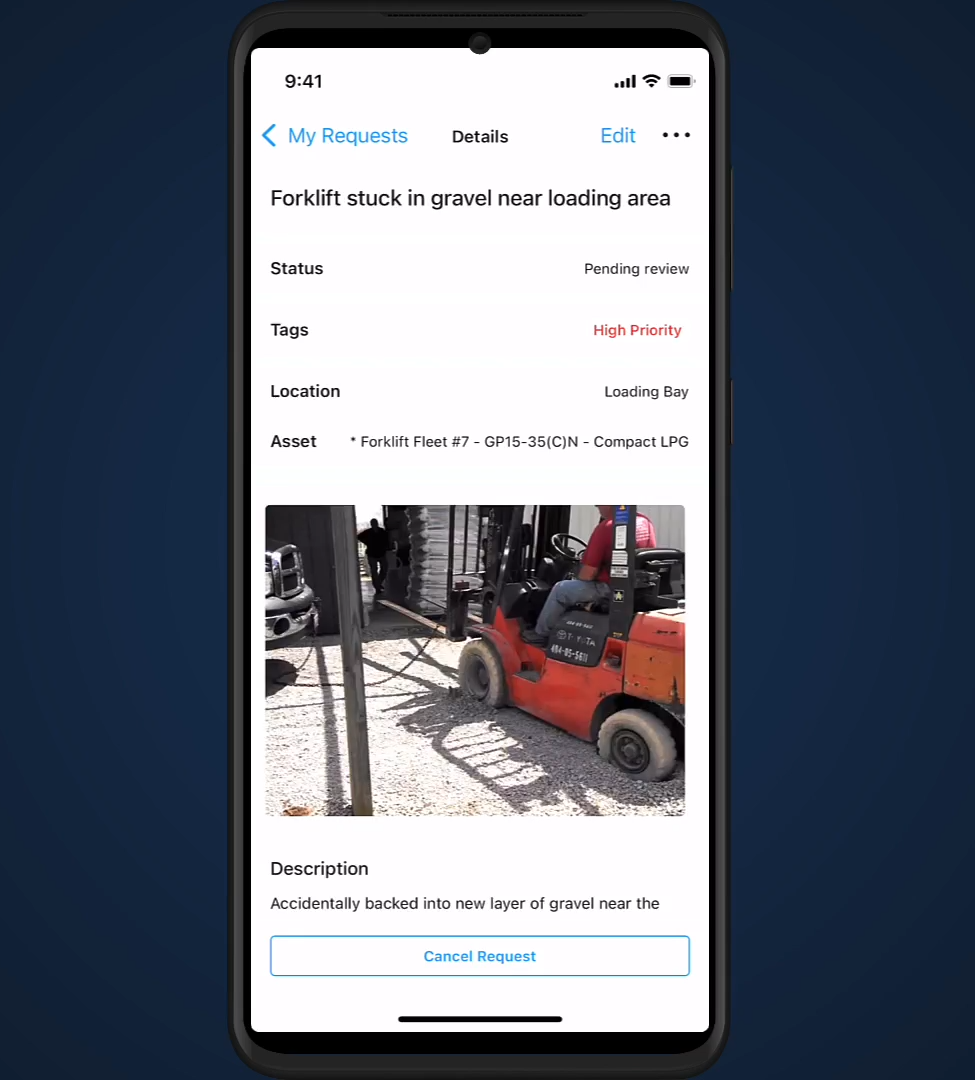
There are also some fields that you might not want to add to work request forms. That includes a priority field as this will likely increase the number of ‘urgent’ requests, creating noise for the maintenance team. Other fields that aren’t recommended include maintenance type and deadline.
How to increase adoption of a maintenance request form
A work request portal is only valuable if people use it. If employees continue to shout out requests as they pass you on the plant floor or leave scribbled notes on your desk, then the entire process will remain broken. Take these steps to help staff adopt the maintenance portal:
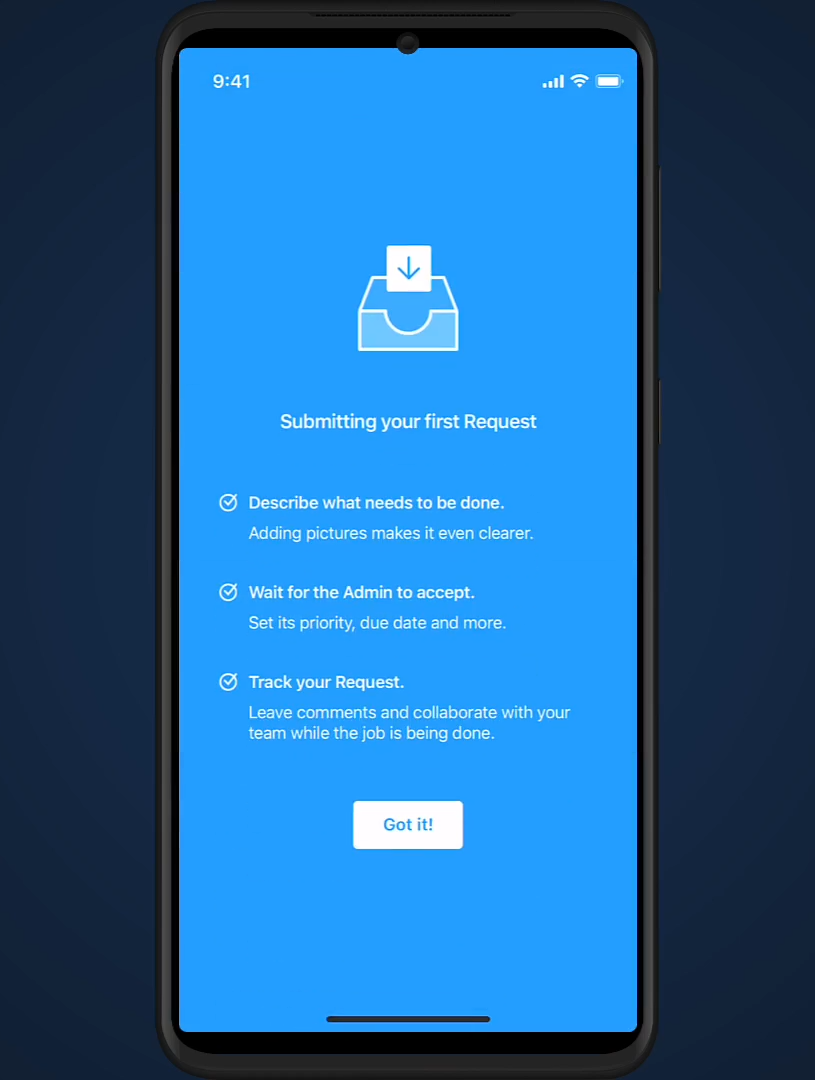
- Add instructions: Have clear and concise instructions on how to fill out a work request at the top of the form whenever someone opens it on their computer or mobile device, like this example:
- Standardize options: Create standard selections (ideally in a drop-down format) for fields like asset or location so requesters can submit accurate information.
- Create mandatory fields: Make all fields mandatory to complete before submitting the work request form so you can get all the information you need.
- Print QR codes: Make the maintenance request portal quick and easy to access by linking to it from a QR code. You can put these QR codes in all environments around your facility so staff can access the portal from anywhere without having to remember a specific URL or save a link.
- Do regular training: Send out clear and detailed instructions for how to use the work request portal and why it’s important. Continue to send out reminders and best practices to keep the process front of mind during the transition.
- Track KPIs: Measure metrics, like response time and work requests completed, to show staff that using the work request portal allows the maintenance team to address their issues faster.
How to manage maintenance work requests
Submitting a work request is only the start. To get real value from the process, teams need a clear system for prioritizing, routing, automating, and tracking work from intake through completion.
Prioritizing and routing work requests
Once a work request is submitted, the next job is to decide when it should be done and who should complete the work. That starts by prioritizing the work requests based on operational impact, not by when it was submitted. A practical priority framework looks at:
- Safety: Does this create immediate risk for people?
- Production: Is it affecting throughput, uptime, or a critical asset?
- Environment: Could it cause a spill, leak, or compliance issue?
Priority levels are usually broken down into four categories: Urgent, High, Medium, and Low. Priority levels are often dependent on the situation and can change day to day. For example, the priority of a work request will be different if production is scheduled on a broken asset or if it’s not. Fixing a broken air conditioning unit in a certain part of the office might be an urgent priority if there are customer meetings planned for that area.
Make sure all work orders are tagged by priority level and maintenance type. That gives the team cleaner reporting later and makes it easier to spot patterns in reactive work, recurring failures, and response times.
Routing matters too. The right work request should go to the right person based on:
- Availability
- Location
- Skill set
- Permits, certifications, or required training
In a digital system, that routing should also trigger a notification so the responsible technician or team can act quickly instead of letting the request sit unnoticed.
Automating work orders from maintenance requests
Work order automation is about using rules to handle the repeatable parts of the process so work moves faster and more consistently. In practice, that means automatically:
- Turning a work request into a work order
- Routing it based on asset, issue type, location, or skill set
- Scheduling follow-up work based on urgency, due date, or production windows
- Notifying the right technician, supervisor, or team
A good place to start is with high-volume, low-ambiguity workflows, like standard issues, repeat asset failures, and common routing decisions. A few more best practices include:
- Keep the rules simple at first
- Automate only what your team can standardize
- Review exceptions instead of forcing every job through automation
- Track whether automation improves response time, consistency, and backlog control
Tracking and analyzing work requests
Tracking a work request means following it all the way from submission to assignment, and then to completion. It’s always a good idea to notify the requester when the work is done to close the loop on the process and give your team a clean record of what happened. Here’s an example of how maintenance managers and supervisors can use work order software to keep requesters up to date on the progress of their request:
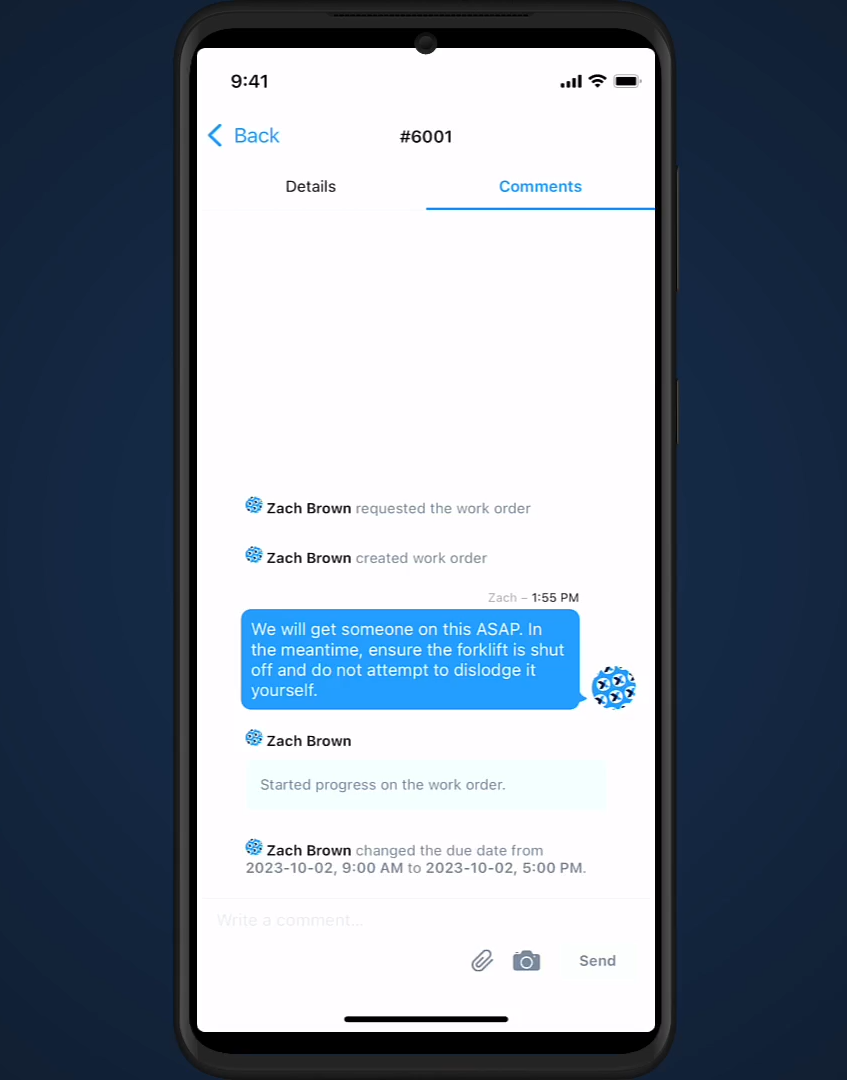
To make that data useful later, create a tag for these work orders that mark it as a follow-up to a work request. Add other tags, like maintenance type, so you can segment reporting and compare trends across request categories, priorities, assets, and areas of the facility.
It also helps to have technicians add notes and images as they complete the work. Those details make future troubleshooting faster, create a visual record of asset condition, and give you better context when the same problem shows up again.
When you analyze work requests, start with a few practical KPIs:
- Response time
- Completion time or mean time to repair (MTTR)
- Completion rate
- Downtime
- Costs
- Work orders by priority level
Here’s an example of what these metrics like look like on a dashboard:
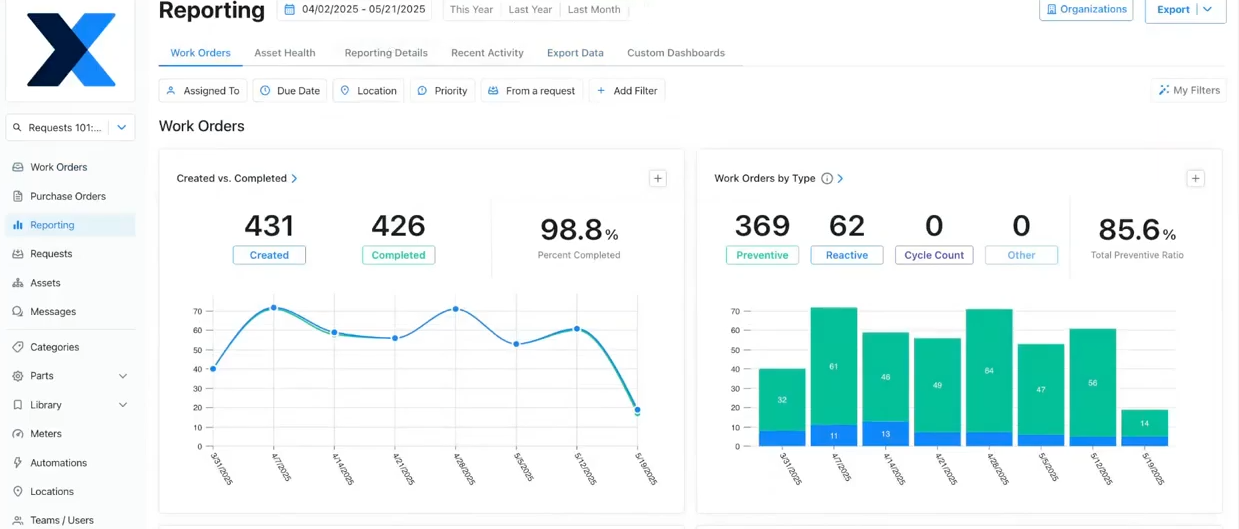
Then look for patterns. Are requests clustering around one line, asset, or part of the plant? Those patterns can show where adoption is strongest, where risk is increasing, and where you may need to adjust PM intervals or stock levels. Better tracking helps you show the value of maintenance in business terms and improve the system behind the work itself.
What are the benefits of a maintenance work request portal?
A work request portal gives you a more reliable way to capture maintenance demand. Instead of chasing emails, radio calls, sticky notes, and hallway conversations, your team gets one intake point with the details needed to act. That creates a few clear benefits:
- Faster response: Requests get logged, routed, and reviewed sooner
- Better data quality: Asset, location, issue details, and photos are captured up front
- Less missed work: Fewer requests get lost in someone’s inbox or memory
- Better prioritization: Maintenance can triage based on safety, production, and risk
- Stronger reporting: You can track request volume, response time, repeat issues, and downtime trends
- Better cross-functional communication: Operators and maintenance work from the same record
The bigger benefit is what happens over time. A portal helps standardize how work enters the system, improve technician follow-through, and give leaders better visibility into where reactive work is coming from. That makes it easier to reduce downtime, control cost, support compliance, and make better decisions about labor, parts, and preventive maintenance.
Build a work request system that eliminates ambiguity for your maintenance team
A work request portal works best when it does more than collect problems. It should help your team capture the right details, move work to the right people, and generate data you can use to improve maintenance over time. When intake, execution, and reporting are connected, you get fewer missed requests, faster response, and better control over reactive work.
FAQs about maintenance work requests
What should a work request include?
There are a few key pieces of information that should be included on a work request. The most important of which is to outline the scope of the work needed. Requester name, contact information, work department, location, budget considerations, and priority level are other pieces of information found in a work request.
What is the purpose of a work request?
The purpose of a work request is to alert the maintenance and operations team of work that needs to be completed. It scopes out the work that the requester would like done, including potential costs, the location of the asset, and the priority level of the request.
How does CMMS software help manage work requests and repairs?
A Computerized Maintenance Management System (CMMS) automates work request handling, tracks maintenance progress, and generates real-time reports. It improves maintenance efficiency by assigning tasks, monitoring work order completion, and ensuring timely repairs.
How can maintenance managers improve work request quality in multi-site manufacturing operations?
Standardize your submission process with required fields for asset location, problem description, and visual documentation. Provide brief training sessions for floor operators and supervisors, emphasizing that detailed requests lead to faster resolution times and reduced equipment downtime.
How does digital work request tracking help maintenance directors justify budget allocations?
Digital systems create detailed records linking every request to labor hours, parts costs, and downtime impact. This data enables you to analyze spending patterns by asset type, identify high-maintenance equipment, and build data-driven cases for preventive maintenance investments or equipment replacement decisions.

Marc Cousineau is the Senior Content Marketing Manager at MaintainX. Marc has over a decade of experience telling stories for technology brands, including more than five years writing about the maintenance and asset management industry.




.webp)