

Most maintenance teams saw unplanned downtime hold steady or increase last year, with 79% reporting no improvement, according to MaintainX's 2026 State of Industrial Maintenance report. Often, that's because a confirmed root cause gets written down but never turned into scheduled, owned work. A corrective action plan translates a root cause into an assigned fix with an owner, a due date, and a way to confirm it's held.
This template picks up where a root cause analysis leaves off, taking a failure from a documented cause to an assigned, verified fix. As a result, your team spends less time re-diagnosing failures you've already solved once, and more time confirming corrective actions were effective.
Key takeaways
- A corrective action plan should document specifics like the affected asset, the owner responsible, a due date, and an estimated cost, not just a general description of the fix.
- Root cause should come from a completed RCA or FMEA. A corrective action plan documents the fix.
- A CMMS like MaintainX can turn a corrective action into a scheduled work order automatically, so the fix gets assigned instead of sitting in a file, and you can pull up an asset's history to see if the failure comes back.
What is a corrective action plan?
A corrective action plan documents four things: the confirmed root cause, the specific fix, who owns it and by when, and how the team will confirm it worked. Where a root cause analysis explains why a failure happened, the corrective action plan is the record of what changed because of it.
Most templates stop at "What's the fix?" A maintenance corrective action plan needs more, because the fix has to survive contact with a shift schedule, a parts order, and a technician who's already got five other work orders queued. That means the plan needs to specify:
- The confirmed root cause, carried over from a completed investigation
- A containment action separate from the corrective action
- An owner and due date, so the fix doesn't sit unassigned
- A follow-up window to confirm the failure doesn't recur
Done this way, a corrective action plan gives your maintenance team a record they can point to the next time the same asset fails.
How to use this corrective action plan template
This template moves you through three sections: identifying the asset and failure, documenting what happened and why, and defining the fix through ownership and sign-off.
1. Fill in the problem details
This header ensures anyone can pull up this plan later from the asset's history and immediately know what work order it ties to and how serious it was. Six fields go here:
- Work Order Number
- Date Started
- Asset ID
- Sub-system/Component (if applicable)
- Priority/Severity
- Reviewer/Approver
Most of these come straight from the work order. If your team scores severity as part of an existing FMEA or criticality process, carry that number over. If this asset hasn't been through that process, set it based on what actually happened: did the failure stop production or put anyone at risk (High), slow things down without stopping the line (Medium), or cause no real operational impact (Low)?
2. Identify the trigger and describe the failure
Flag how the problem was first identified, which matters later if you're trying to spot patterns, such as an asset that keeps generating plans from failed inspections rather than outright failures. Check one:
- Equipment failure: The asset broke down or stopped performing during normal operation.
- Failed inspection: A scheduled or routine inspection caught a defect before it caused a breakdown.
- Audit finding: An internal or external audit identified a gap or non-conformance tied to this asset.
- Customer complaint: An external report of a problem, such as a product defect or missed delivery, led back to this asset.
- Safety incident: The failure caused or nearly caused injury, exposure, or an environmental release.
There is no calculation here. If more than one applies, for example, a customer complaint that turned out to trace back to a safety incident, select the option that best describes the original trigger, and note the rest in the comments field later on.
From there, describe what happened under "Describe what happened." Keep this factual and specific so the next person to read this plan can picture the failure without needing to ask follow-up questions. Record the Date Discovered as well, since it can differ from Date Started if the failure was found before the work order was opened.
3. Define the corrective actions and complete the assessment
To define corrective actions and complete this assessment, start by answering four specific questions:
- Root cause statement: The confirmed finding from a completed 5 Whys, fishbone diagram, or FMEA. This should be a specific mechanism, not a guess or a symptom restated as a cause.
- Immediate containment/action: What was done right away to stop the failure from continuing or recurring in the short term, such as a temporary swap or a workaround.
- Root cause corrective action: The actual fix that addresses the root cause itself, distinct from the containment step, so the failure does not return once the temporary fix is removed.
- Resources or process changes needed: Flag anything beyond the repair itself that the fix depends on, such as a spec change, a procedure update, or additional training, so the corrective action does not quietly fail again for a reason outside the repair.
Here's what that would look like for a hypothetical failure:
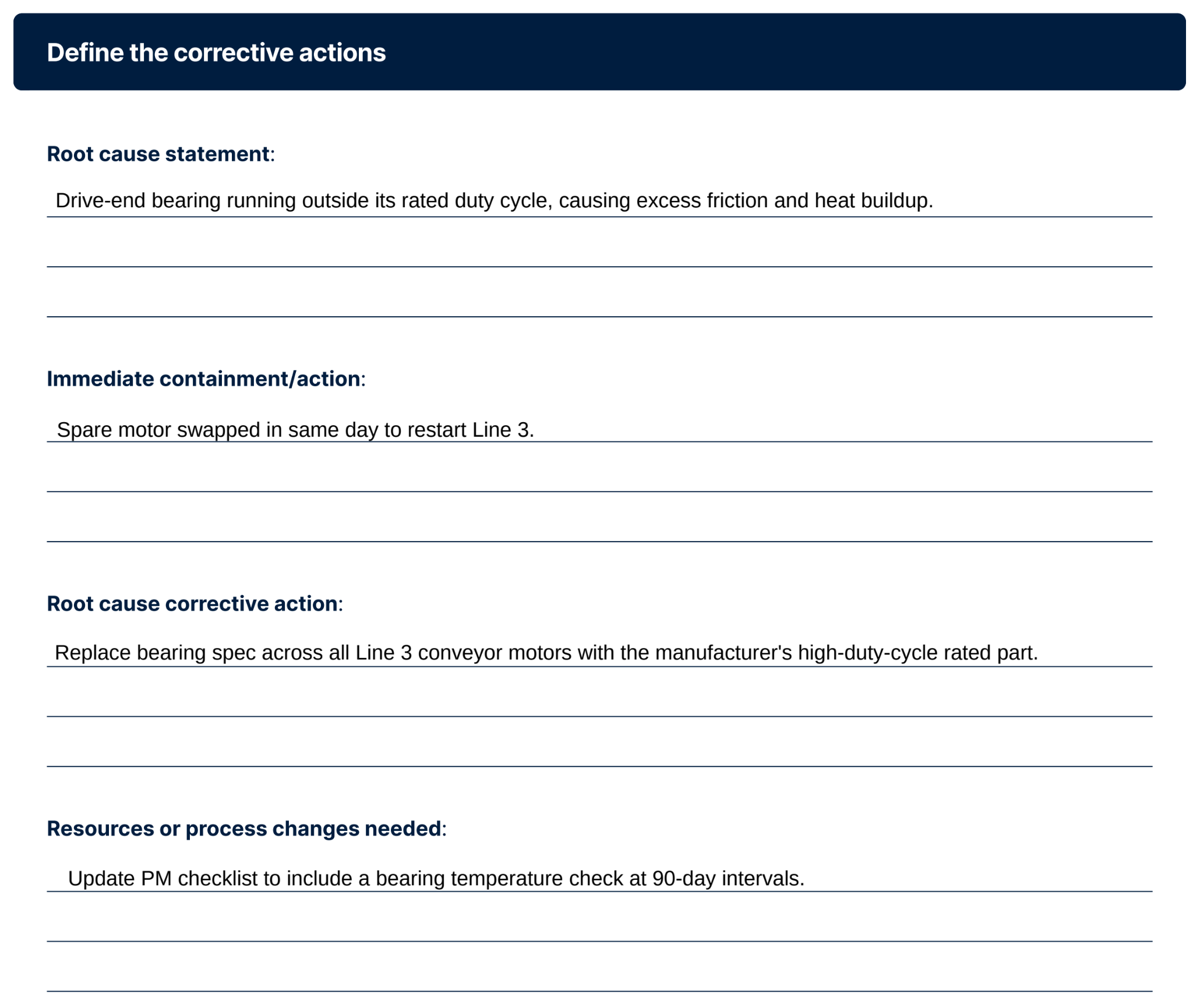
From there, give the fix a due date and an estimated cost so it can be scheduled and prioritized against other work rather than left open-ended. It’s also important to name a single owner accountable for seeing it through. Use the additional notes/comments field for anything that doesn't fit elsewhere, such as a parts backorder or a follow-up inspection that has been scheduled.
Common mistakes when using a corrective action plan
When a corrective action plan doesn't work, it's usually for one of three reasons:
- Treating it as paperwork, not tracked work: If the corrective action isn't turned into a scheduled, assigned work order, it competes with everything else on a technician's list and might slip.
- Jumping to a fix without identifying the actual root cause: Skipping straight to "replace the part" treats a symptom, not the cause. If the root cause field is filled in with a guess instead of a finding from a completed 5 Whys, fishbone, or FMEA, the rest of the plan is built on an assumption.
- No defined follow-up window: Without a set review period, there's no way to confirm the failure is actually gone rather than just delayed.
A corrective action plan is only as strong as the review that follows it. Build in that follow-up window from the start, and a failure that used to eat a shift's worth of downtime becomes a line item you can point to and say: fixed, verified, closed.
For more on how corrective and preventive work fits into a broader maintenance workflow, see our guide to corrective and preventive action work orders.
How a CMMS supports corrective action
A CMMS keeps a corrective action plan attached to the asset, so the next person working on that machine has it on record. This helps you when your team needs to:
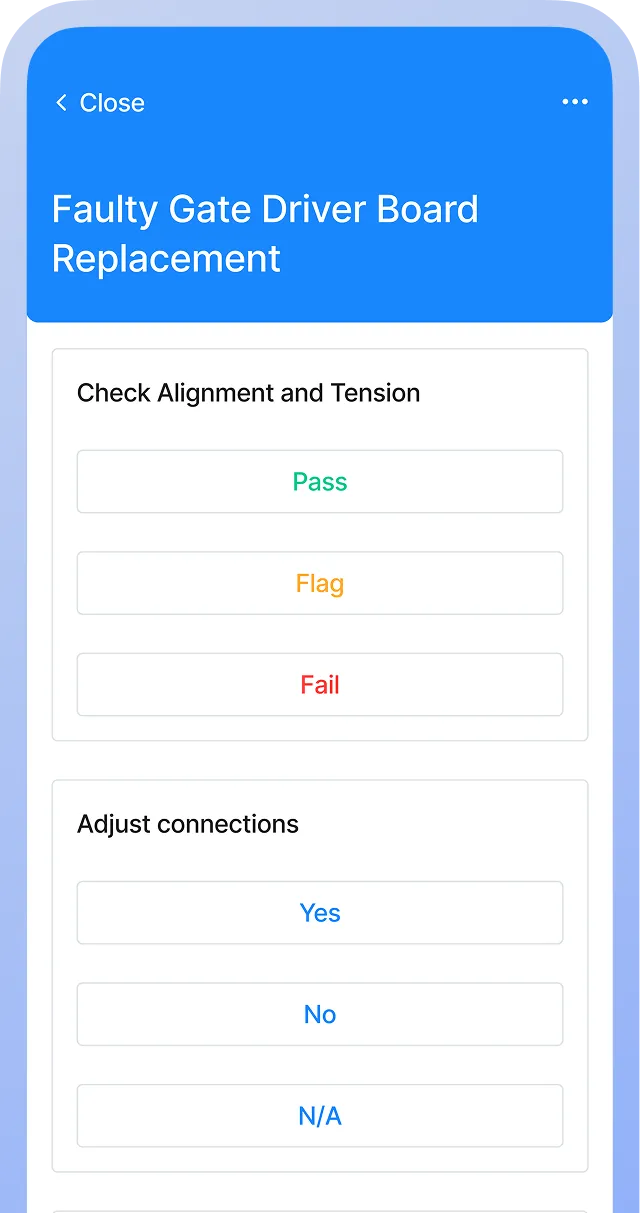
- Turn the plan into a work order: MaintainX carries over the asset, priority, and location details, so the technician isn't starting from a blank ticket.
- Check an asset's record: If the same failure mode shows up again, your team can see it in the asset's work order history, even if the earlier fix was logged under a different work order.
- Track whether the fix worked: Schedule a follow-up work order or inspection for the review window, then check the asset's work order and downtime history against it to confirm the failure hasn't recurred.
Companies that have deployed a modern CMMS/EAM reduce mean time to repair by 36% and increase mean time between failures by 32% on average.
Book a tour to see how MaintainX can help modernize your maintenance operations, including helping you make the most out of your corrective action plans.
Corrective action plan FAQs
What's the difference between corrective and preventive action?
Corrective action responds to a failure that's already happened, fixing the cause so it doesn't recur. Preventive action anticipates a failure before it occurs, addressing a risk or a weakness in a process or asset that hasn't caused a problem yet.
Is a corrective action plan the same as a CAPA report?
A CAPA (Corrective and Preventive Action) report is a broader quality-management framework, often used in regulated industries like pharmaceuticals and medical devices, that documents both the reactive fix and the preventive steps taken to reduce risk elsewhere. A corrective action plan is typically the corrective half of a CAPA process, focused on a single confirmed failure rather than the full preventive and systemic review a CAPA report requires.
Who should be involved in creating a corrective action plan?
At minimum, the technician or engineer who completed the root cause investigation and a supervisor or reviewer who can approve the plan and assign ownership. For complex or safety-related failures, include anyone with authority over the affected process, since the corrective action may require a schedule, procedure, or resource change beyond what a single technician can approve.

Marc Cousineau is the Senior Content Marketing Manager at MaintainX. Marc has over a decade of experience telling stories for technology brands, including more than five years writing about the maintenance and asset management industry.



.webp)