

Most condition-based maintenance programs fail at the same point: setting thresholds. Teams invest in sensors and monitoring systems, then guess at the trigger values—or worse, copy numbers from OEM manuals that weren't designed for their specific operating conditions.
CBM programs that catch problems early are the ones that establish, validate, and refine threshold values carefully. Programs that skip these steps create false triggers, alarm fatigue, and data that is ignored until something goes very wrong.
This guide walks through the process of building baselines from actual equipment data, setting initial thresholds, and using work order history to continuously improve your trigger points.
What are condition-based maintenance thresholds
Condition-based maintenance thresholds are specific values, like amps, temperature, or pressure, associated with the performance and health of machine components, like motors, conveyors, or fans, that trigger maintenance actions when equipment behavior drifts outside normal ranges.
Rather than performing maintenance on a fixed calendar schedule, condition-based monitoring tracks what the equipment is actually doing and creates work orders only when the data signals a potential problem.
For example, the maintenance team at Hudsonville Ice Cream uses this approach to create work orders based on temperature or amps on a motor, so they can catch and repair minor failures before they stop production. The threshold itself is simply the numeric line in the sand, like when the operating temperature climbs past a defined limit, that automatically generates a work order for the maintenance team.
Why OEM manuals fall short for condition-based thresholds
OEM manuals provide useful starting points for hour-based intervals, but they rarely include specific guidance for condition-based thresholds. Most manufacturer documentation tells you to perform maintenance at certain hour counts or cycle intervals. It doesn't tell you what temperature reading indicates an emerging bearing problem, or what amp draw suggests a motor is working harder than it should.
Every facility operates differently, too. A motor running in a climate-controlled environment behaves differently than the same motor in a hot production area. Your ambient conditions, production loads, and usage patterns are unique to your operation. That means the thresholds that work for one facility won't necessarily work for yours.
How to establish optimal baselines for your equipment
Baselines come from observing healthy equipment and identifying which values are showing up when assets are operating at their best. Ideally, you set thresholds based on the average trend line when equipment is operating at its optimum condition. Context matters too. Capture data in the ideal operating state, including when equipment has been recently serviced, is under normal production loads, and is being operated according to best practices.
Identify equipment operating at peak performance
The right moment to capture baseline data is when equipment is running well. Choose assets that have just completed preventive maintenance and are operating under typical conditions—not idle or overloaded.
Document the production context when you capture baselines. The shift, load level, and ambient temperature all affect readings. This helps you understand if a deviation represents a genuine problem or simply different operating conditions.
Collect data over an extended period
Single snapshots provide limited insight. You want trend data captured over a meaningful period across multiple operating cycles.
The best way to do this is by using a SCADA system, like Ignition, to collect all the data, like amps on motors, machine hours, and temperatures. That allows you to capture data every minute or even every few seconds so you can get enough data to base decisions on averages. For example, a motor's amp draw might fluctuate throughout a production run, and your baseline data captures that normal variation rather than a single point-in-time reading.
Document baseline values for key parameters
Record and store baseline values where technicians and planners can access them. Create a record of normal ranges for each critical parameter and link that documentation to specific assets in your maintenance system, like a computerized maintenance management system (CMMS).
When a condition-triggered work order fires, technicians benefit from seeing what normal looks like for that specific piece of equipment. Without that reference point, they lack important context for diagnosis.
Setting your initial condition-based thresholds
Once you have baseline data, you can translate it into actionable thresholds. The goal is catching problems early without generating excessive false alarms.
Use baseline data to define acceptable ranges
Set upper and lower limits based on observed baseline values. Thresholds typically sit slightly outside the normal operating range, at the point where deviation indicates a potential problem rather than normal fluctuation.
Consider the P-F interval, which is the time between when a problem becomes detectable and when failure occurs. Leave enough lead time to respond before failure. And document the reasoning behind each threshold, since you'll likely adjust these values as you gather more data.
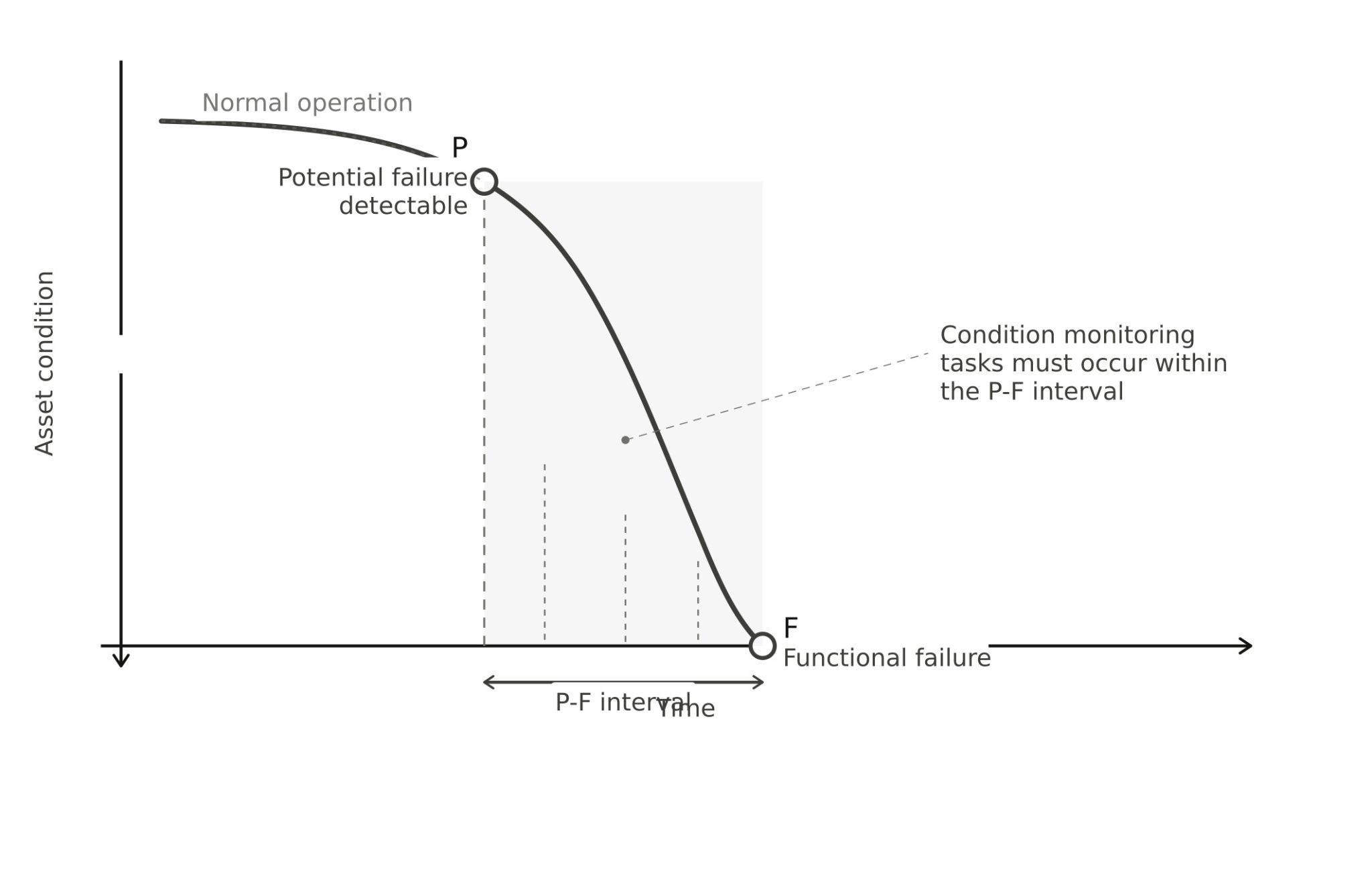
Account for normal operational variation
Parameters fluctuate during normal operations. Production loads cause normal fluctuations in amps and temperature. Seasonal changes affect baseline readings. Avoid setting thresholds so tight that they trigger constantly. A threshold that fires all the time loses its value, technicians start ignoring alerts, and the system becomes noise rather than signal. For example, you may only trigger an alarm and generate a work order when a threshold has been surpassed five times in 10 minutes or less.
Build calendar-based backstops for safety
Pair condition triggers with calendar-based safety nets. For example, you can set up a condition-based trigger based on runtime hours, but also set a calendar-based PM that triggers every 90 days.
This "OR" logic provides confidence during the transition from time-based to condition-based maintenance. Equipment won't go too long without inspection while you confirm that your condition triggers are working correctly.
Validating condition-based maintenance thresholds using work order data
The real test of any threshold is whether it catches problems before they cause failures. An analysis of work order history tells you if your thresholds are working.
Link condition triggers to maintenance outcomes
Connect the dots between a condition-triggered work order and what technicians actually found. Review work order notes to see if triggered PMs revealed actual issues.
One way to do this is by tracking the number of alarms triggered and the percentage of those that led to corrective work that repaired a minor failure. If condition-based triggers don’t lead to meaningful maintenance activities, there’s something wrong with the process, which is often that you have the wrong thresholds.
Compare downtime patterns before and after setup
Historical work order data shows the impact of condition-based thresholds on unplanned downtime. After implementing condition-based maintenance, review downtime by asset against a baseline from before implementation. Downtime should be trending down because you are able to identify failures earlier, better plan for them, and avoid both major disruptions and wasted labor usage.
Assess whether thresholds catch issues before failures
The ultimate question is if your thresholds are giving you enough warning to prevent unplanned failures? Here’s a good rule of thumb to get an answer:
- Thresholds too loose: You're still experiencing failures that PMs could have caught
- Thresholds too tight: PMs consistently find nothing wrong
The goal is finding issues during planned maintenance, not during production.
How to adjust thresholds based on maintenance results
Threshold optimization requires ongoing adjustments based on what the maintenance data tells you.
When to tighten your thresholds
Tighten thresholds when reactive work orders appear for problems that your PMs should catch. If equipment fails before the condition threshold triggers, you set the threshold too loose. For example, you might be triggering a PM after 500 runtime hours, but the asset is breaking down weekly. You might want to trigger that same PM after 300 runtime hours instead to catch those failures.
When to loosen your thresholds
Extend intervals or raise thresholds when PMs consistently find no issues. In the previous example, if the triggered PM after 500 runtime hours wasn’t finding any issues, you could try increasing that threshold to 550 runtime hours.
Take an incremental approach here. For example, don’t increase the threshold by more than 10% at a time to keep risk at a minimum while preserving labor and resources. Continue extending until you start finding issues again, then pull back slightly. This iterative process helps you find the optimal threshold for each piece of equipment.
How long to wait before making changes
The Hudsonville Ice Cream maintenance team suggests waiting between three to five cycles, or what would normally be the length of three to five PM intervals, to understand if their thresholds are right or if they need adjustment. This provides enough data to identify patterns. Avoid making changes based on a single data point, and document each adjustment along with the reasoning behind it.
The goal isn't perfection on the first try. Start with conservative thresholds, confirm with work order data, and adjust incrementally.
Common parameters for condition-based monitoring
Here are the most commonly used values that maintenance teams use for asset monitoring:
Motor amperage
Amp draw indicates motor health and load conditions. Rising amps often signal bearing wear, mechanical binding, or electrical issues. Create a baseline for amps during normal operation and set thresholds for sustained elevated amps, not momentary spikes during startup.
Operating temperature
Temperature monitoring applies to motors, bearings, refrigeration systems, and other heat-sensitive equipment. Elevated temperatures often precede mechanical failures. Temperature monitoring is particularly critical for both equipment health and regulatory compliance.
Pressure readings
Pressure monitoring works well for hydraulic systems, compressed air, piping, and refrigeration. Pressure drops may indicate leaks, filter clogging, or pump degradation. Pressure spikes can signal blockages or valve issues.
Vibration levels
Vibration monitoring often detects bearing wear before other symptoms appear.
How MaintainX supports condition-based maintenance programs
MaintainX integrates with SCADA systems like Ignition and pulls in tag data for meters and condition triggers. Smart Tag Mapping uses AI to detect units of measurement and suggest relevant asset associations. This simplifies setup.
When a parameter breaches a threshold, MaintainX automatically creates and assigns a work order. Technicians receive and complete work orders on their mobile devices, capturing findings instantly. This creates a rich work order history that makes it easy to check thresholds by reviewing what technicians found.
As teams expand their condition-based maintenance program, tools like the AI-powered Procedure Generator help quickly create new PMs.
FAQs about condition-based maintenance thresholds
How do you determine the right threshold for condition-based maintenance?
Establish baselines by monitoring equipment during optimal operation, then set thresholds slightly outside normal ranges. Check against work order history and adjust based on whether PMs are finding issues or if unexpected failures are still occurring.
How often should condition-based thresholds be reviewed?
Review thresholds after three to five trigger cycles to gather enough data for meaningful adjustments. Also review thresholds whenever you notice changes in work order findings or patterns of unplanned failures.
What is the difference between time-based and condition-based maintenance?
Time-based maintenance triggers on calendar or usage intervals regardless of the asset's actual condition. Condition-based maintenance triggers only when monitored parameters like temperature, vibration, or amperage exceed predefined thresholds.
What are common examples of condition-based maintenance?
Common examples include:
- Triggering motor inspections when amperage exceeds baseline values
- Scheduling bearing replacements when vibration increases
- Performing refrigeration maintenance when operating temperatures rise
- Cleaning filters when pressure drops across a system

Marc Cousineau is the Senior Content Marketing Manager at MaintainX. Marc has over a decade of experience telling stories for technology brands, including more than five years writing about the maintenance and asset management industry.



.webp)