
.webp)
QR codes are one of the most underrated pieces of technology for maintenance teams. They’ve been around for more than 30 years and will never get the headlines or boardroom callouts that other tools receive. However, they are a simple way for maintenance teams to complete and document work quicker and more accurately.
They do this by delivering frontline workers the information they need, when they need it. This opens several opportunities for companies to cut waste from the repair process and minimize downtime.
This article explores nine ways maintenance teams can QR codes to move faster, gather more data, and increase uptime.
Key takeaways
- QR codes link assets, locations, and parts to the right digital destination so teams can quickly view work history and procedures, then create or complete work without hunting for information.
- They streamline both maintenance execution and materials management by making it easy to request service, log inspections and readings, and find, update, and reorder parts with fewer errors.
- Scanning QR codes speeds troubleshooting, standardizes execution, strengthens safety compliance, and improves data quality, which reduces downtime, rework, and costs.
- A quick rollout of QR codes starts with a focused pilot, clean asset data in a CMMS, consistent scan outcomes, durable labeling, and ongoing reviews to sustain success.
What are QR codes for maintenance?: A 30-second explainer
QR codes are images made of pixels that can be scanned by the camera on a mobile device, which directs you to information associated with that image. QR codes are a compact way to store data (usually a URL or an ID). When you scan one, your device reads the pattern, decodes the information, and then uses it to display the right resource, like a webpage or a specific record.
In maintenance, that “right thing” is often tied to a physical asset. Stick a QR code on a pump, panel, or forklift, and scanning it can instantly open the asset’s profile, including its work order history, PM checklists, manuals, or parts lists The big win is speed and accuracy as it means no more hunting through binders or guessing serial numbers while you’re on the floor.
Nine ways to use QR codes in maintenance (with examples)
See existing work orders for an asset
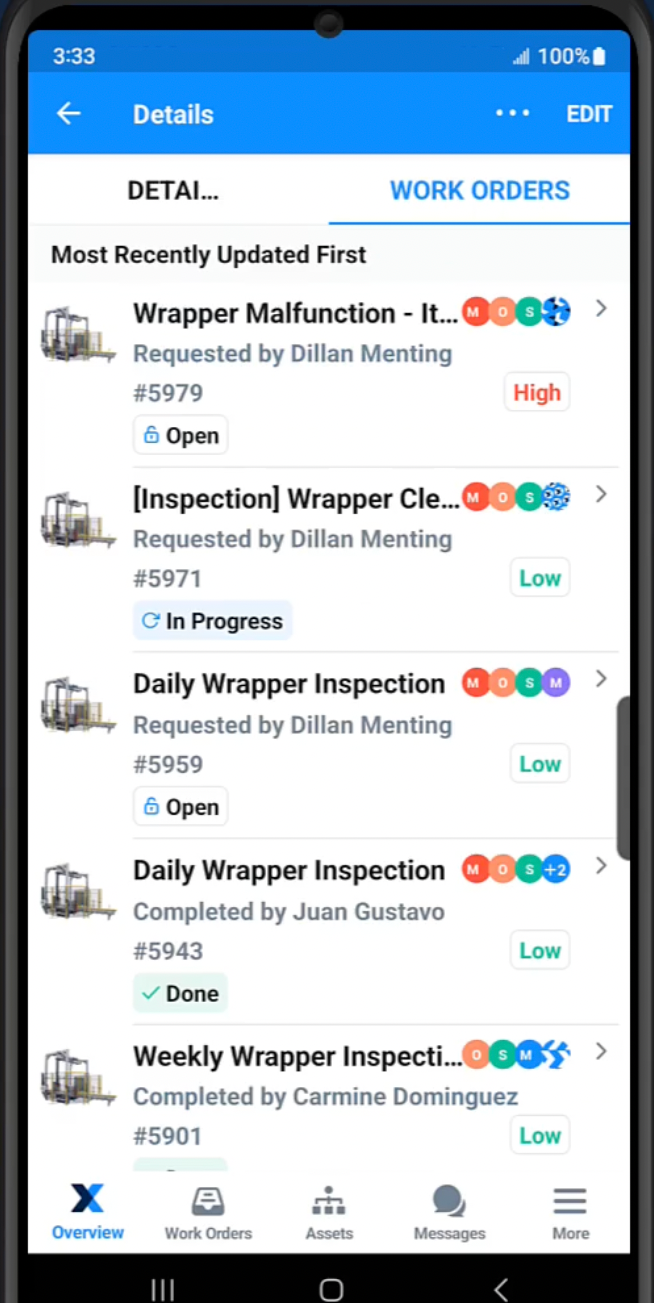
Attaching QR codes to an asset allows technicians to scan it and immediately see if there are any open or upcoming work orders for that piece of equipment. They’ll be able to see all the details of open work, including the due date, who it’s assigned to, a description of the work, maintenance procedures and checklists, and a bill of materials.
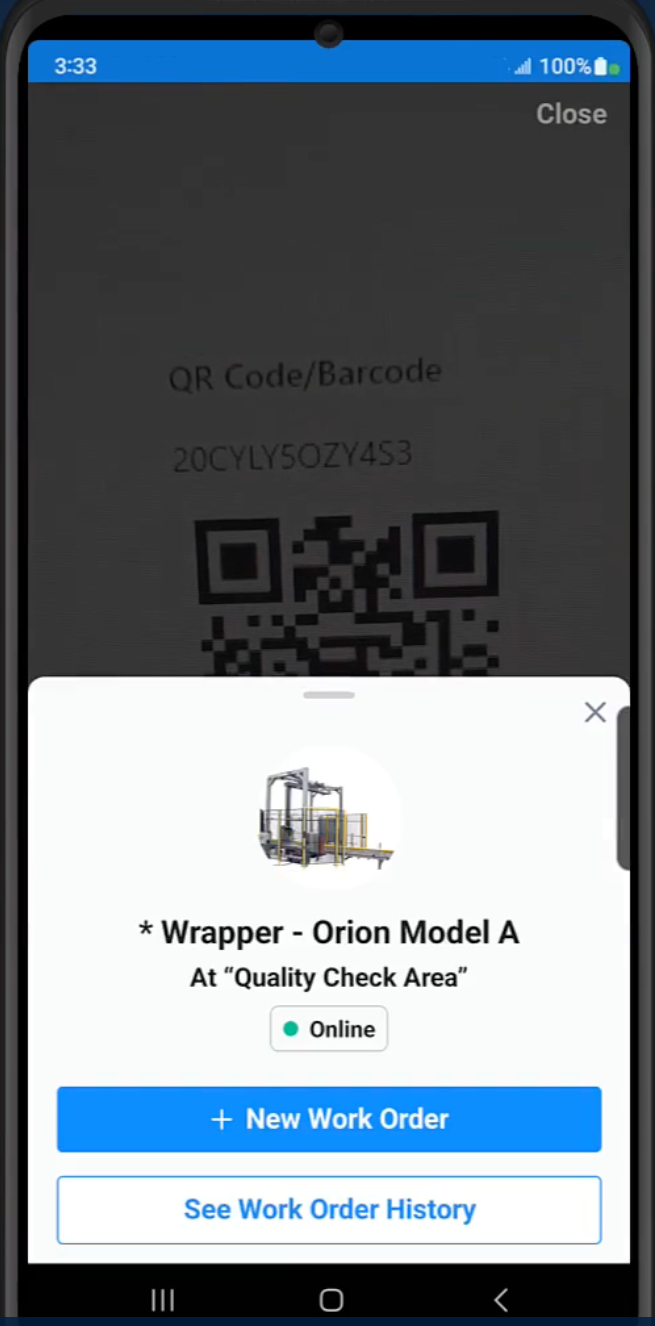
In the example below, a technician has scanned a QR code on a wrapper. This brings up a list of all open work orders for the asset. They can select either the most immediate one or the one that is assigned to them to see all the information needed to complete the work order.
Create a new work order for an asset
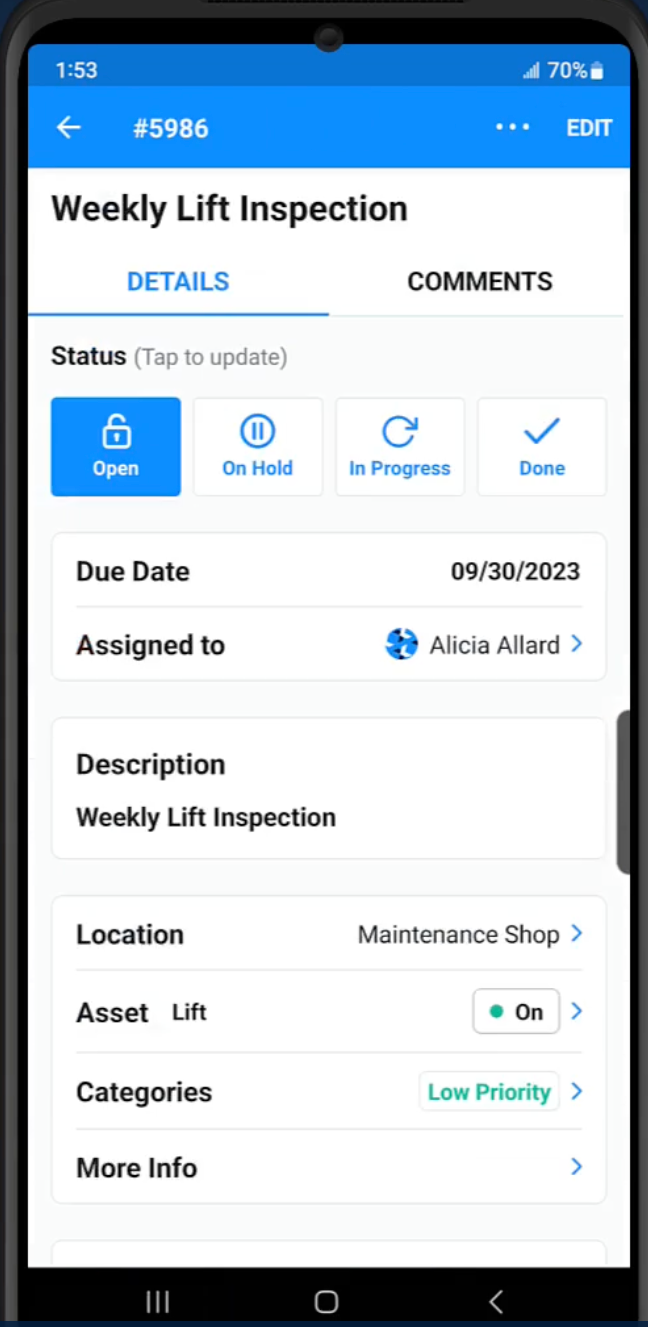
QR codes can help technicians or maintenance managers quickly create new work orders on an asset. They can scan the QR code for the machine or component, which will prompt them to choose between seeing existing work orders or creating a new one. When they choose to create a new work order, the asset’s information will be automatically added to the work order, like the asset’s location.
In this example, a maintenance manager scanned the QR code and set up a new weekly inspection for a lift.
See and update asset information
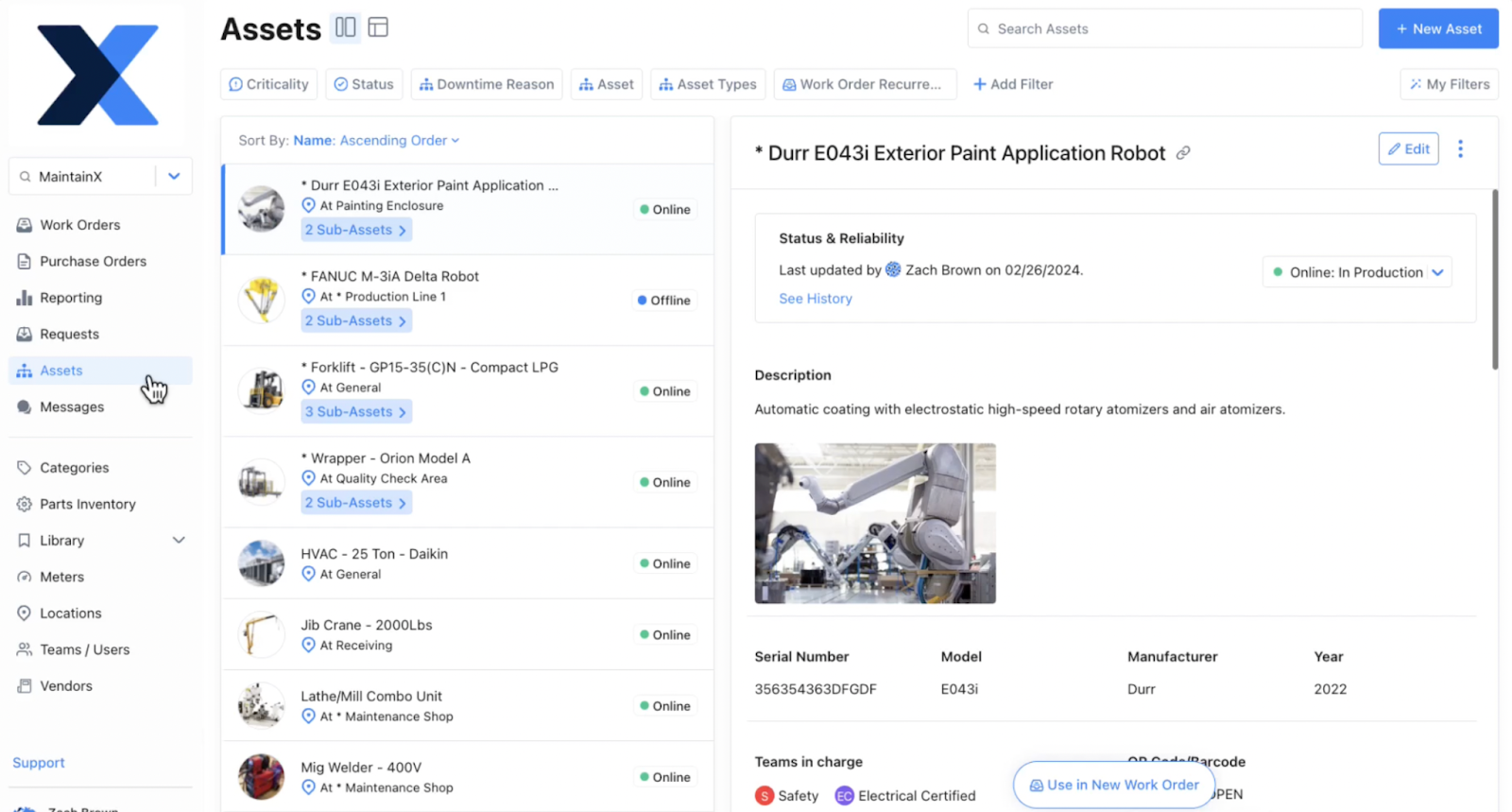
A technician or maintenance manager can scan a QR code on an asset and instantly get all the information about it without having to search for it in a CMMS, spreadsheet, or filing cabinet. When an asset’s profile is set up, maintenance managers can add a serial number, associated manuals and procedures, related parts, maintenance records, and more. Then, a QR code can be generated and placed on the asset to link back to this information.
The image below shows an example of the type of asset information that is available when scanning a QR code for a paint application robot, including the asset’s status, a description, the manufacturer, and the teams in charge of the asset.
Create a maintenance request
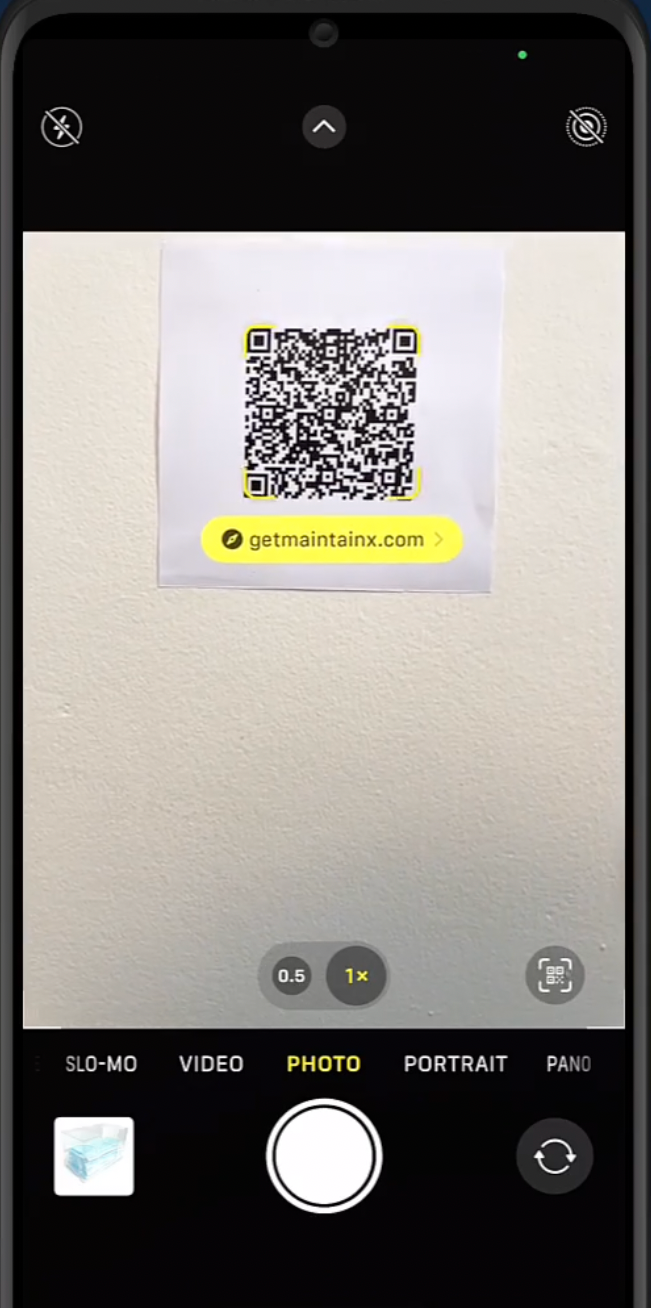
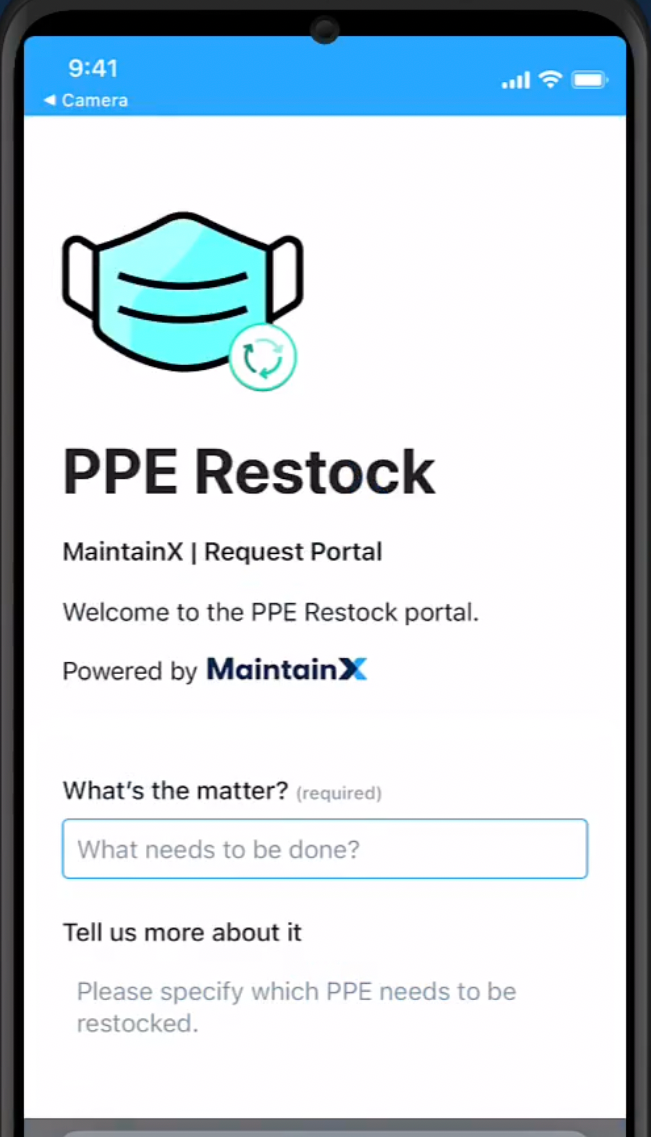
QR codes can be placed on assets or in certain locations in a facility to direct employees to a maintenance request form. This gives staff easy access to a templated work order request form that not only makes it quick for requests to be submitted, but also allows maintenance to control the information on the request, and how it is routed to the maintenance team.
In the example below, an employee scans a QR code that leads them to a maintenance request form to restock personal protective equipment (PPE). The form has several custom fields and can be submitted to the maintenance team.
See and update parts inventory information
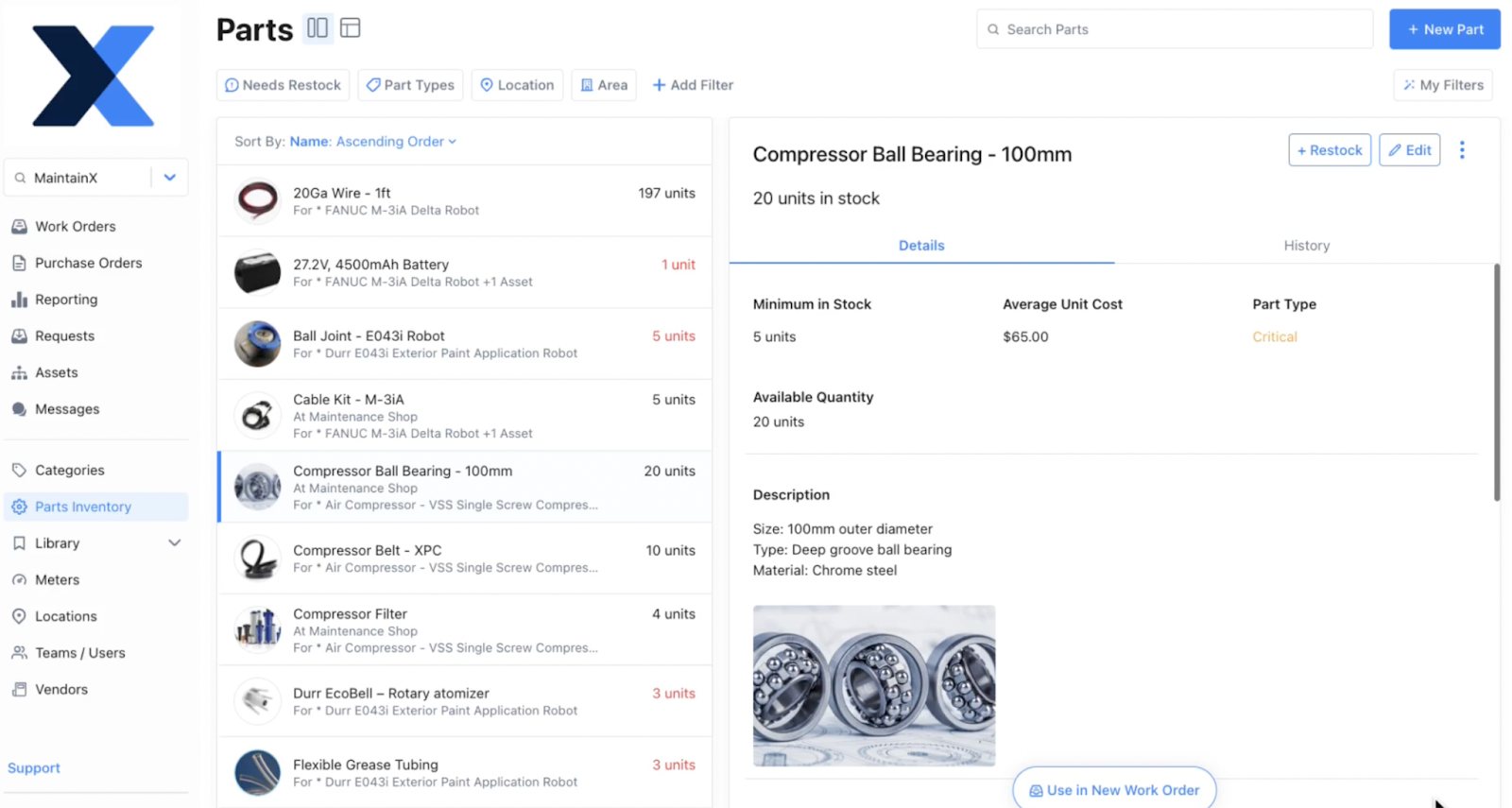
QR codes can be added to storeroom shelves or bins to help maintenance teams organize parts and quickly access information about inventory on their mobile device. Once a QR code is scanned, you can see a part’s stock level, associated assets, related work orders, vendor, and more. This makes it easy for maintenance staff to understand what a part or component is used for, make sure the right parts are in the right place, and accurately update cycle counts.
In the example below, a QR code is scanned, directing a technician to a compressor ball bearing. This allows them to quickly get the right part, for the right job, and update consumption to ensure minimum levels are maintained.
Purchasing parts inventory
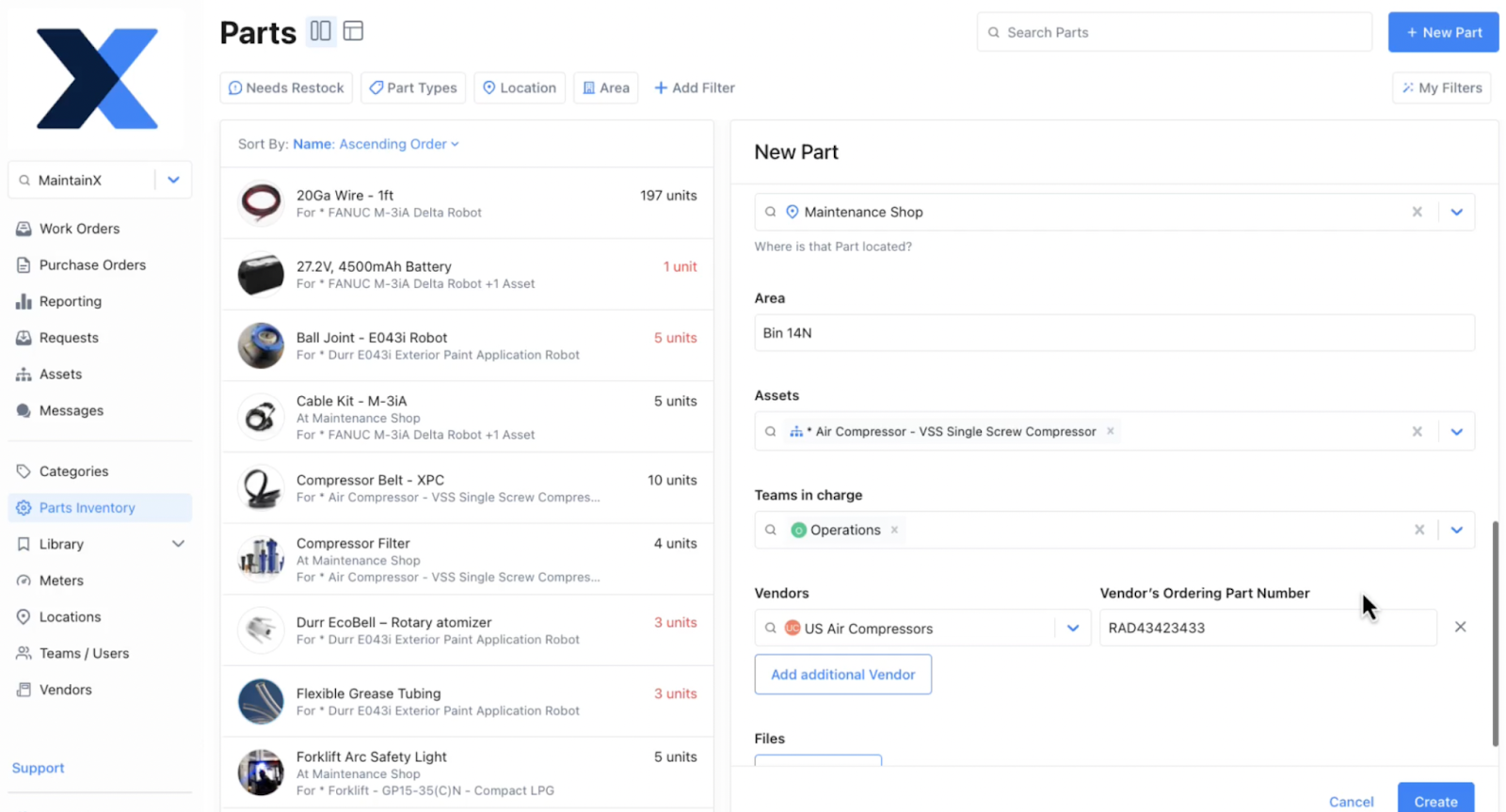
QR codes can make it easier for maintenance managers or the purchasing team to order parts inventory. They can scan a QR code on a shelf or bin to see if the part needs to be purchased (if it falls below minimum counts, for example), the vendor, typical usage of the part, the cost, the lead time, and more. This cuts the time it takes to order parts while ensuring inventory isn’t over or understocked.
In this example, the part being created includes a vendor and vendor ordering number to accelerate purchasing in the future.
Safety and compliance SOPs
If safety and compliance tasks fall through the cracks, it can mean failed audits, expensive fines, or preventable accidents. QR codes keep these activities visible and enable technicians to complete them quickly and effectively. When safety or compliance activities are created, they can be associated with a QR code. This QR code can be attached to an asset and be scanned to show technicians the required safety procedures, a step-by-step checklist, and related PPE. It can also be used by maintenance managers or plant managers when preparing for audits. Scanning a safety and compliance QR code will bring up past work orders associated with an asset, creating a digital audit trail.
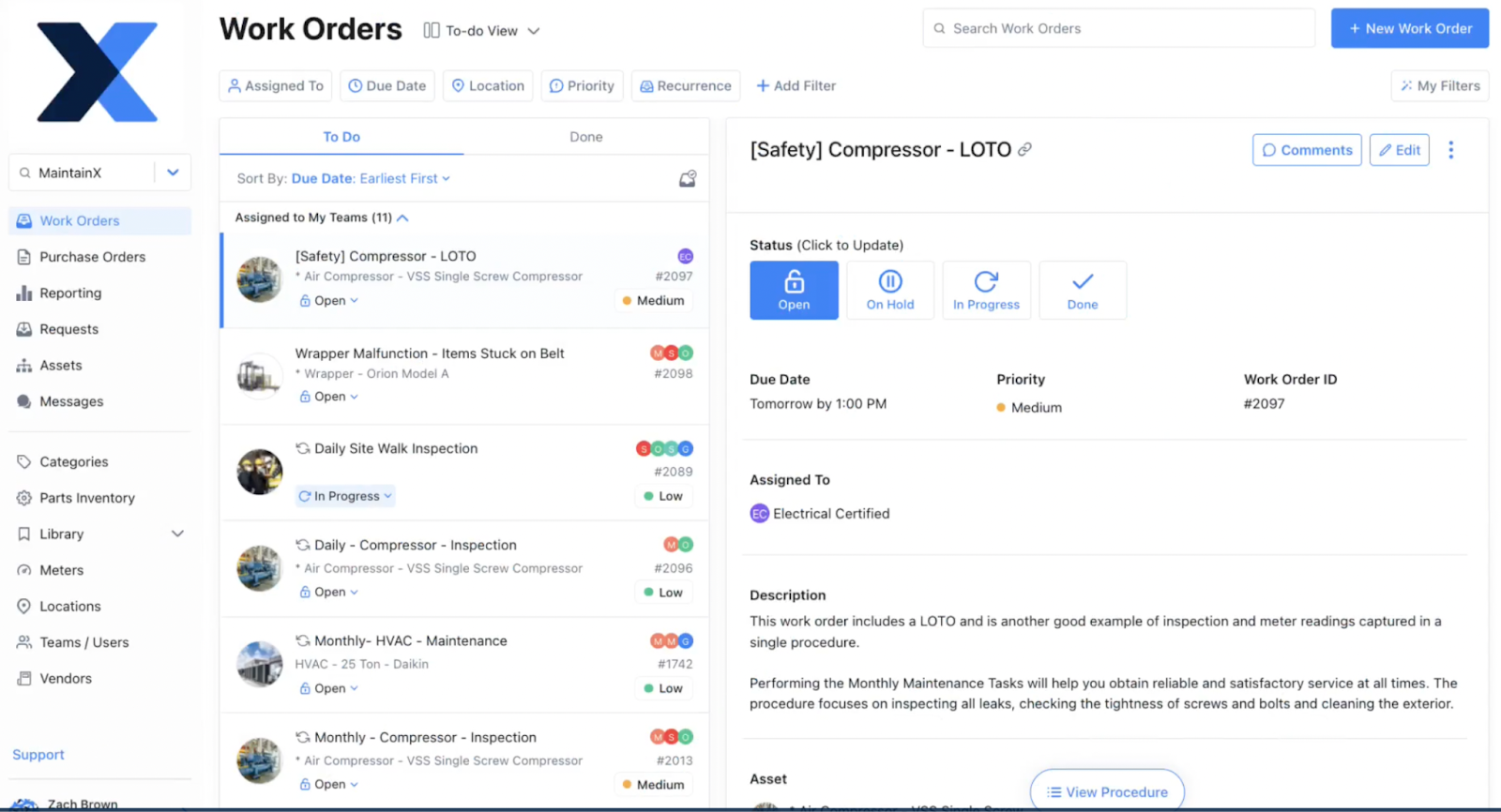
In the example below, a work order has been created for a lock-out tag-out procedure for a compressor. A QR code can link to the procedure and show a task list and/or checklist, and the safety equipment needed. It can also include a sign-off to ensure the work is completed.
Operator inspections
Including operators in routine maintenance helps identify asset failure while it’s small, increasing efficiency for the entire operation. It’s also a fundamental part of building a total productive maintenance (TPM) program. QR codes can assist in this process by giving operators a quick, step-by-step guide to routine maintenance activities. Operators can scan the QR code, be shown a pass/fail work order, and complete it on their mobile device in a minute or two.
Log meter readings
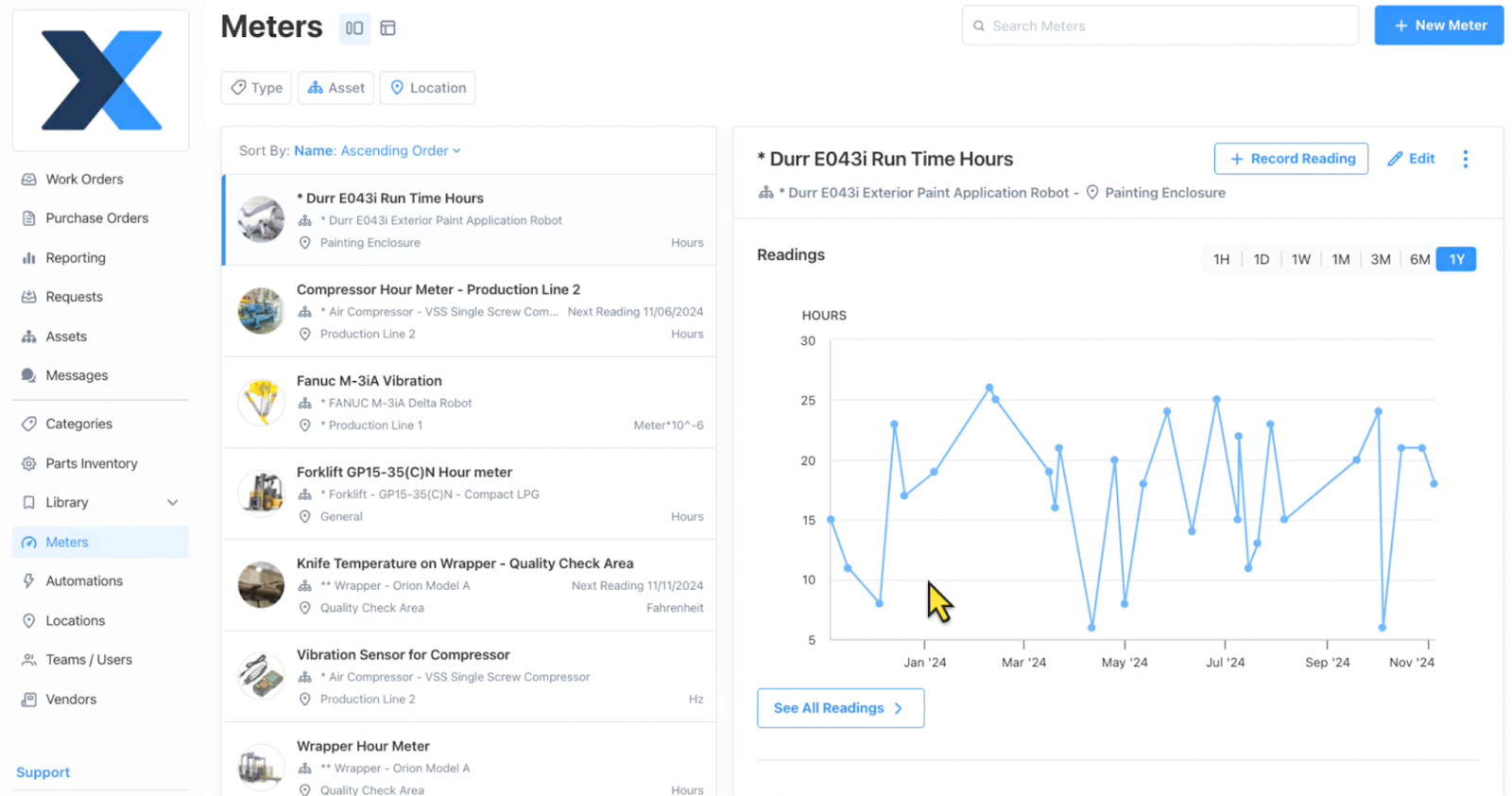
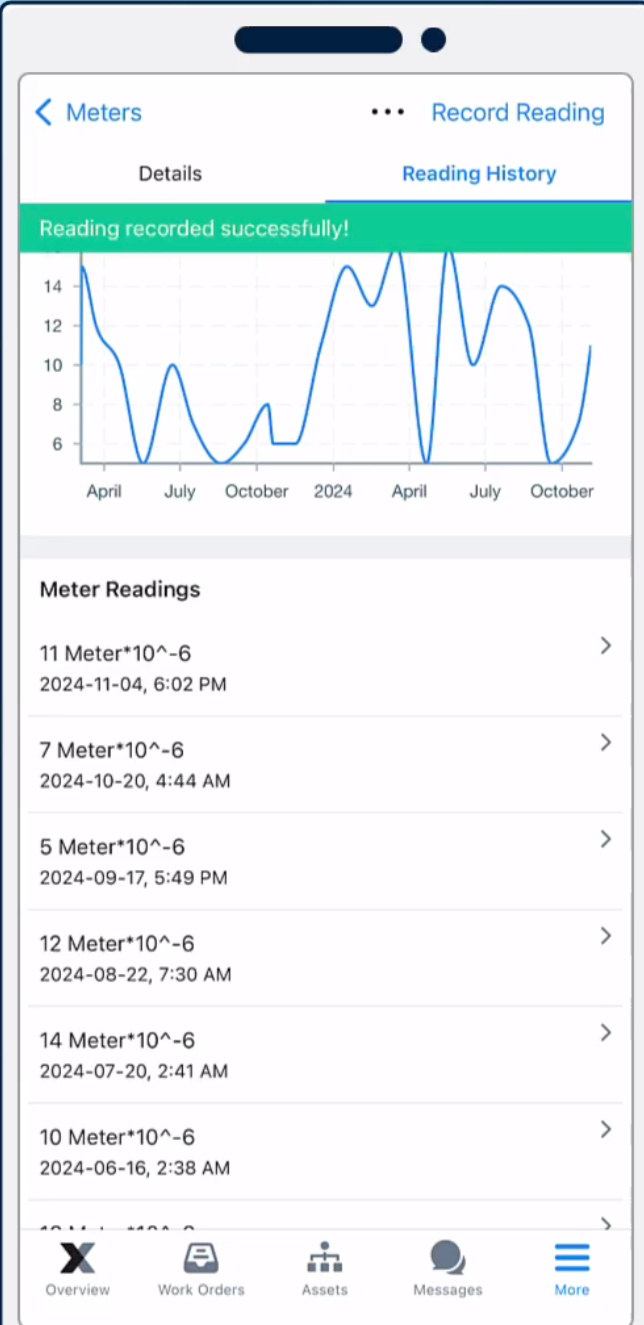
A full work order isn’t always necessary for logging key asset information. This is the case when it comes to logging meter readings, such as vibration levels or run time hours. This often happens dozens or hundreds of times between preventive maintenance inspections. QR codes can direct technicians or operators straight to a meter reading input for an asset. They can add the meter reading, which gets logged as part of ongoing condition monitoring. If a meter reading is outside the normal or expected bounds, it can automatically trigger the creation and scheduling of a work order.
In this example, maintenance is tracking the run time hours of a paint application robot. A QR code links to the meter reading input, which is logged by a technician. If runtime hours exceed a certain amount, either in total or in a time period, a work order for preventive maintenance will be created.
Seven benefits of QR codes in maintenance
1. Faster response and troubleshooting
QR codes put the right information at the point of work. Technicians can instantly access manuals, PM checklists, recent work orders, and known issues. That cuts time spent hunting for documents or guessing what was done last. The result is quicker diagnosis, shorter repair cycles, and less unplanned downtime, which protects production capacity and reduces costs.
2. Standardized work execution
When every asset links to the same approved procedures, work gets done consistently, no matter who is on shift. Checklists accessed with QR codes help technicians follow the right steps, capture readings, and document completion the same way every time. That reduces rework, prevents missed tasks, and improves reliability, which means fewer repeat failures.
3. Improved safety and compliance
Scanning a QR code can bring up lockout tagout steps, required PPE, inspection forms, and compliance documentation before work begins. That makes safe behavior easier to follow in the moment. The result is fewer incidents, near-misses, fines, shutdowns, costly production interruptions, and resource-intensive audits.
4. Higher data accuracy and visibility
QR codes ensure work is logged against the correct asset and location, reducing errors from manual entry. When technicians scan instead of typing IDs, the data stays cleaner across work orders, parts usage, and downtime tracking. Accurate records improve planning and prioritization, which leads to fewer repeat visits, smarter parts decisions, and lower total maintenance costs.
5. Better reporting and continuous improvement
Clean, consistent data makes your metrics meaningful. With QR codes driving accurate work history and failure details, it is easier to spot trends, track MTTR and MTBF, and identify root causes. That turns reporting into action, including better PM intervals, fewer recurring breakdowns, and improved asset reliability that translates into more uptime and capacity.
6. Smoother onboarding and handoffs
New technicians, contractors, and operators can scan QR codes on an asset to see the latest procedures, common failure modes, and recent notes without tracking down the right person. Shift-to-shift handoffs improve because context lives with the asset. The result is fewer mistakes, faster ramp time, and more consistent output with less supervision.
7. Stronger TPM support
QR codes make it easier to involve operators in basic care without slowing production. A quick scan can guide autonomous maintenance tasks, capture abnormal conditions, and quickly route issues to the right team. That improves early detection and prevents small problems from becoming major downtime events.
A five-step starter’s guide to setting up QR codes for maintenance
1. Pick a focused starting point
Choose one area where faster, more consistent work will pay off, like the line with the most downtime. Define what ‘better’ looks like. For example, faster response time or higher PM completion. Starting small keeps the rollout manageable and gives you proof before you scale.
2. Clean up the basics in your system of record
QR codes only work as well as the information behind them. Make sure assets, locations, and parts are uniquely identified and organized in a simple hierarchy. Attach the essentials, like PMs, manuals, safety steps, and recent work history. A CMMS is ideal here because it gives each asset a single place to store, update, and access this content.
3. Decide what a scan should do
For each code, define the outcome, like opening an asset profile or a work request form. Keep it consistent so technicians know what to expect. If you use maintenance software, set codes to deep link directly to the right record or workflow, so scanning turns into action in one step.
4. Generate, label, and verify in the field
Create QR codes tied to the correct asset, part, or location, then print labels built for your environment (heat, washdown, chemicals, etc.). Place them where they are easy to scan without creating a safety hazard. After installation, scan every label to confirm it opens the right destination and is readable from a practical distance.
5. Train, track adoption, and maintain
Teach simple scan-to-action habits. For example, when to scan, what to log, and how to capture notes or photos consistently. Monitor usage and outcomes to show value and refine workflows. Schedule periodic audits to replace damaged labels and keep procedures and asset data current.
The final word: QR codes can be your maintenance team’s quickest win
QR codes are a simple layer of instant context that turns the point of work into the point of action. When technicians and operators can scan equipment to see work orders, procedures, parts details, safety steps, and meter logs, they stop losing time to searching, guessing, and re-entering information. That translates directly into shorter repair cycles, fewer repeat failures, cleaner compliance records, and better decisions based on reliable data. Combine QR codes with a well-organized CMMS and you get a practical system that scales: faster work today, stronger reliability tomorrow, and more uptime to support production.

Marc Cousineau is the Senior Content Marketing Manager at MaintainX. Marc has over a decade of experience telling stories for technology brands, including more than five years writing about the maintenance and asset management industry.
.webp)

.png)

.webp)