Key takeaways
- Poor maintenance team collaboration often starts with silos, which lead to missed work orders, duplicate effort, and wrong parts on the job.
- Paper forms and spreadsheets double data entry, get lost or damaged, and leave no reliable record of asset performance.
- A CMMS puts work orders, asset history, and dashboards in one place, so every team member works from the same real-time data.
- Automated scheduling and asset prioritization reduce double-booking and keep critical equipment at the top of the work queue.
- Built-in messaging and mobile notifications give technicians one place to raise issues, share files, and solve problems together.


You might assume that getting your organization on board with a Computerized Maintenance Management System (CMMS) is all about reducing the hard copy paper trail. And, while CMMS software is beneficial for creating digital documentation and building consistency in your workflows, one of the best outcomes of adopting a CMMS system is vastly improved collaboration.
Benefits of CMMS in maintenance collaboration
- Increased productivity
- Better utilization of resources
- Enhanced team coordination
- Improved accountability
The ability to share and act on information in real time shouldn’t be underestimated. As businesses across the globe continue to experience challenging economic conditions, identifying areas to cut costs and improving the efficiency of maintenance planning continues to drive business success.
A recent survey from Plant Engineering reveals that almost 60% of plant engineers, managers, and maintenance professionals use a CMMS, with a further 39% using more sophisticated Enterprise Asset Management (EAM) software. This shift towards digital maintenance management solutions naturally delivers better visibility of metrics like Mean Time to Repair (MTTR) and a more holistic view of asset performance.
However, the clear and transparent communication that a CMMS brings shores up this data, solving a host of common problems and creating a more positive and collaborative work environment for your team.

The challenges in maintenance collaboration
It’s all too easy for busy maintenance workers, supervisors, and managers to operate in silos, resulting in scattered priorities, missed work orders, and disjointed goals.
Most workplaces have experienced the fallout from these issues: wasted time on site due to lack of communication, two techs working on the same problem, or turning up to jobs with the wrong part.
Many common problems stem from difficult, slow, unclear, or disparate communication methods:
Difficulty sharing information
Decentralized maintenance teams can be geographically isolated, relying on phone calls, email, and infrequent visits to the workshop to share vital information with colleagues and supervisors. Critical information can easily be missed, forgotten, or lost in the chaos of day-to-day maintenance tasks.
Inefficiency due to manual, paper-based documentation
When everyday tasks like work order management, preventive maintenance, and asset management tasks are completed using paper forms and checklists, your business misses a vital opportunity to track the performance of assets over time. Companies that require maintenance crews to fill out a paper form and then repeat this process by entering the information into a spreadsheet are creating twice the work for employees. Paper-based documents can also be easily damaged, lost in the trunk of work vehicles, or left behind on site.
Communication barriers
Communication and social hierarchies can have an impact on your team’s efficiency. It can be unnecessarily confrontational for a maintenance worker to approach a supervisor when it is clear that the supervisor is a roadblock in getting things done.
When there is no transparent system in place to manage communication and responsibilities, the onus falls on individuals to feel comfortable enough to raise issues.
Scheduling conflicts
Both remote and in-house teams can experience scheduling overlaps or wasted downtime, especially when maintenance work is scheduled on a whiteboard or a combination of incompatible online calendars.
Missed jobs, impractical maintenance schedules, and double-booking are more prevalent when organizations rely on emails, paper systems, and phone calls to communicate upcoming work.
So how can businesses overcome these collaboration issues?

The role of CMMS software in collaborative maintenance
Communication and collaboration are critical in maintenance work, streamlining workflows and ensuring your maintenance team meets their KPIs and delivers maximum uptime.
Companies ready to commit to digital transformation are ahead of the game. Combining IOT-connected equipment and cloud-based apps with organizational and cultural change is the key to optimizing maintenance processes.
Maintenance management software can bridge these gaps within your maintenance operations, bringing communication, context, transparency, and efficiency to your maintenance activities.
How a CMMS facilitates better collaboration
1. Offers a centralized information system
Real-time data accessibility and customizable dashboards give everyone a clear overview of what needs to be done and by whom. Standardized data input and retrieval eliminates isolated paper documentation processes–everything is in one place.
2. Improved scheduling and task allocation
Always be on top of who is doing what and when. Automated scheduling helps speed up workflows by automatically slotting future predictive maintenance tasks into each tech’s schedule. Automatic prioritization of tasks helps you repair critical assets first.
3. Provides one efficient communication platform
No more searching through emails, binders, or text messages for information, job sheets, or manuals: an integrated messaging system provides notifications and alerts on an employee’s mobile device. Maintenance teams and supervisors can also take advantage of instant chat functionality.
Boost collaboration with MaintainX
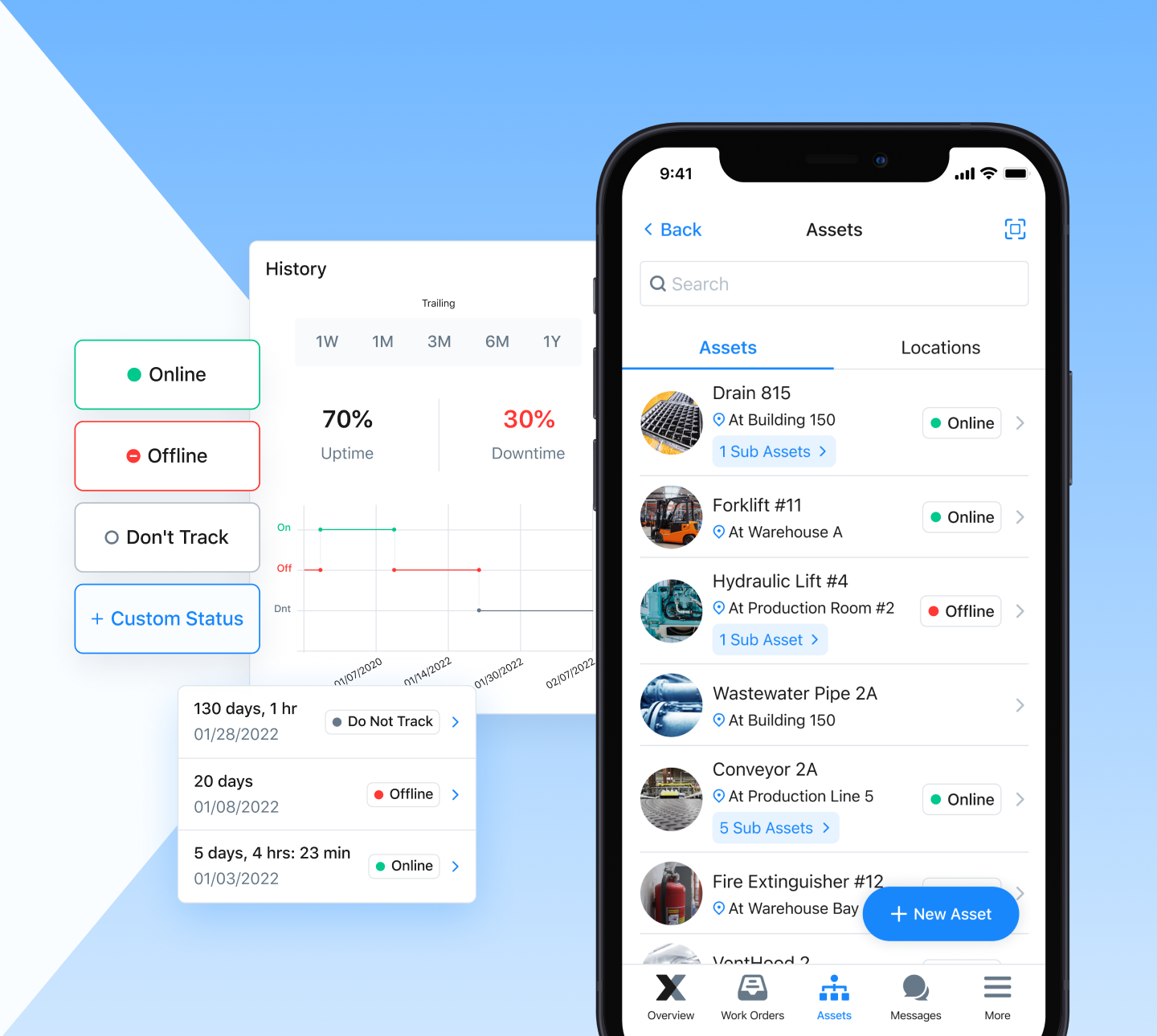
Your software should do more than just work order scheduling: technicians should feel confident communicating, problem-solving, and uploading files related to maintenance requests.
A user-friendly CMMS designed for maintenance crews is the key to better team collaboration. MaintainX meets this requirement for maintenance-heavy organizations, automating workflows, streamlining team communication, and tracking maintenance activities across all your equipment and facilities.
Maintenance team collaboration FAQs
What is maintenance team collaboration?
Maintenance team collaboration is how technicians, planners, supervisors, and managers share information, coordinate work, and solve equipment problems together. Strong collaboration means everyone works from the same priorities, asset data, and schedule. It reduces duplicate work, missed jobs, and delays caused by lost information.
How does a CMMS improve maintenance team collaboration?
A CMMS gives the whole team one central system for work orders, asset history, schedules, and communication. Technicians update jobs from their phones, and managers see progress in real time. This shared view reduces miscommunication and helps teams respond faster to equipment issues.
What are the biggest barriers to collaboration on maintenance teams?
Common barriers include information silos, paper-based documentation, rigid hierarchies, and scheduling conflicts. Decentralized teams often rely on phone calls and email, so key details get lost. Whiteboards and separate calendars also lead to overlapping jobs and double-booked technicians.
Why should maintenance teams move away from paper work orders?
Paper work orders often get lost or damaged, and someone usually has to re-enter the data into a spreadsheet. That doubles the work and leaves gaps in asset history. Digital work orders capture data once and make asset performance easy to track over time.
What CMMS features matter most for team communication?
Look for built-in messaging, mobile notifications, and the option to attach photos and files to work orders and requests. Customizable dashboards and standardized data help teams stay aligned across shifts and sites. Mobile-first tools matter most because technicians spend their day on the floor, away from a desk.

Caroline Eisner is a writer and editor with experience across the profit and nonprofit sectors, government, education, and financial organizations. She has held leadership positions in K16 institutions and has led large-scale digital projects, interactive websites, and a business writing consultancy.