

Procedures are the backbone of safe, reliable maintenance. They guide technicians step by step, ensuring repairs and inspections are consistent, compliant, and effective.
However, many procedures fall short because they:
- Are outdated or live only in binders.
- Vary from site to site, creating inconsistency.
- Exist only in a veteran technician’s head and disappear when they retire.
The result? Missed steps, preventable safety incidents, and uneven asset performance.
AI solves this by making procedure generation simple. With the right inputs, AI can create, digitize, and standardize maintenance procedures in seconds.
Instead of weeks spent drafting SOPs, teams can build a complete set of procedures at scale and keep them updated as assets, regulations, and best practices evolve.
This article gives you a step-by-step template for using AI to generate maintenance procedures so you can create hundreds or thousands of SOPs in a matter of minutes or hours.
The benefits of using AI to create maintenance procedures
Creating one maintenance procedure can take an hour. But when you’re creating hundreds or trying to stay on top of every update, you can spend weeks or months just on this task. This is why a lot of maintenance teams have incomplete, outdated, or missing procedures. AI can help remove these obstacles so you can:
- Standardize maintenance across sites. No more multiple ways of performing the same task.
- Retain knowledge. Veteran expertise is codified before retirement.
- Onboard new employees efficiently. New technicians are trained faster with digital SOPs.
- Improve compliance and safety. Procedures will always include required PPE and lockout/tagout instructions.
- Scale procedures faster. Procedures can be generated and updated in minutes, not weeks.


How to generate maintenance procedures with AI
An AI assistant can help generate procedures using a photo, file, or prompt. You can use this assistant to standardize work, update procedures at scale, and turn decades of internal knowledge into repeatable instructions. Here is a five-step guide for how to achieve that:
Step 1: Collect the right data to train AI
- Equipment documentation: Including OEM manuals and technical documentation.
- Past work orders: Including inspection tasks and safety checks.
- Asset details: Like name, number, location, age, and photos.
- Workflows: Such as sign-offs, mandatory follow-ups, and escalation paths
Step 2: Structure and clean the data
- Standardize naming conventions, including consistent asset labels.
- Use clear headings and sub-sections in work orders.
- Ensure photos and diagrams are labeled.
- Fix typos, errors, and shorthand in technician notes
Step 3: Create your prompts
Here are some factors to keep in mind when prompting AI to generate procedures:
- State the specific asset, sub-asset, part, task type, and frequency.
- Example: Create a procedure for a daily visual inspection for the Acme air compressor.
- Define the format of the output.
- Example: Operators observed a burning smell five minutes before equipment failure.
- Specify the format you want for the output or answer.
- Example: Provide a step-by-step, numbered list of tasks, starting with safety procedures.
- State additional context you want included.
- Example: Include the expected completion time and materials usage for each task.
- Include known failure modes or pain points.
- Example: Focus on signs of overheating and seal degradation.
- Request references to source documentation.
- Example: Pull steps from the OEM manual and recent work orders.
When combined, your prompts might look something like these examples:
- “Using the attached photo of [ASSET], generate an inspection checklist to complete during shift changeovers, with a focus on common failure modes.”
- “Create a PM program for [ASSET] with daily visual inspections, weekly functional checks, and monthly deep inspections. Pull technical steps from attached manuals and PMs.”
- “Generate a PM procedure for [ASSET] that includes meter readings, pass/fail steps, and mandatory sign-off for safety components.”
- “Create a step-by-step, numbered procedure for a daily inspection of the [SUB ASSET] on [ASSET] that can be used by an operator. Estimate the time required for each step.”
- “Develop a monthly PM procedure for [ASSET]. Use a clear, checklist-style format. Include required tools and PPE, lockout/tagout instructions, expected completion time, meter readings, and a manager sign-off.”
Using these prompts, the AI can create procedures with:
- Step-by-step instructions.
- Safety protocols and PPE requirements.
- Estimated completion times.
- References to OEM manuals or past work orders.
- Pass/fail tasks with mandatory sign-offs.
Step 4: Implement the new maintenance procedures
Once generated, maintenance leaders should:
- Upload to CMMS. Ensure procedures are linked to the right assets.
- Create quick-access QR codes. Attach to equipment so technicians can scan and retrieve instantly.
- Automate scheduling. Tie procedures to recurring PMs or triggers (e.g., run-time thresholds).
- Continuously refine. Compare AI-generated SOPs to technician feedback and real-world conditions.
Step 5: Measure results
Track these KPIs to validate ROI:
- Labor efficiency: Faster response and reduced wrench time.
- Planned maintenance percentage (PMP): More assets covered with documented PMs.
- PM compliance: Higher completion rates and fewer skipped steps.
- Maintenance efficiency: Better first-time fix rates, reduced downtime.
- Standardization: Percentage of assets with documented, accessible PMs
What AI-generated maintenance procedures look like
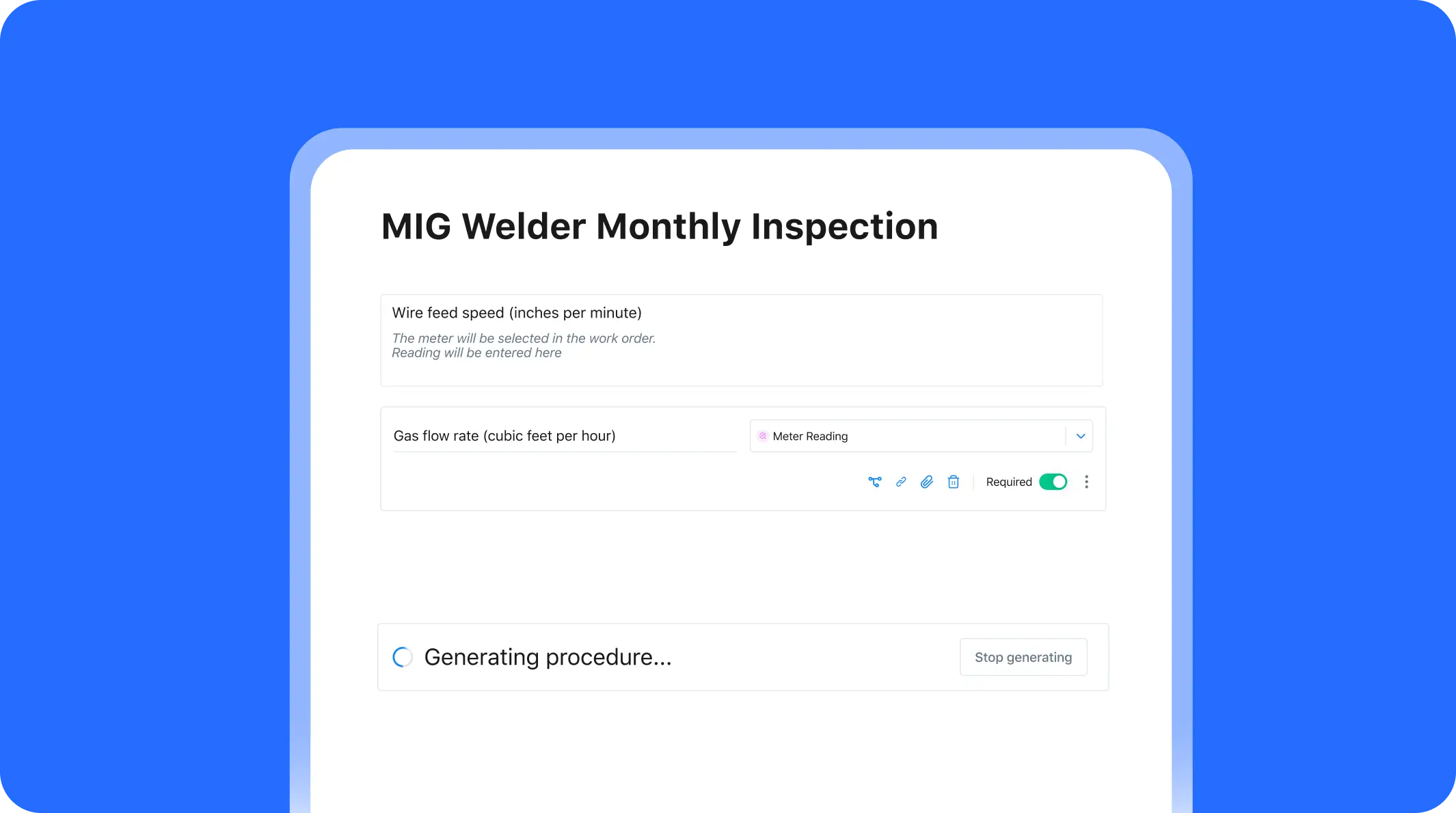
- A technician inputs a template: procedure title, asset type, maintenance frequency, manual reference, and task description.
- The AI outputs a full procedure with:
- Inspection tasks.
- Required tools and PPE.
- Safety checks.
- Fields for technician notes and sign-offs.
- Inspection tasks.
From there, procedures can be:
- Linked to assets in the CMMS.
- Assigned to teams.
- Turned into QR codes for quick access in the field.
- Scheduled automatically for future work orders.
Six more ways to use AI in maintenance
There are hundreds of maintenance teams using AI in their day-to-day tasks to help them work faster, reduce downtime, and eliminate obstacles. This includes:
- Building AI assistants for real-time repair support
- Analyzing maintenance data and KPIs
- Detecting anomalies in equipment
- Forecasting parts usage
- Conducting root cause analyses
- Collecting and actioning team knowledge
For a complete playbook on how to adopt these AI use cases, download the Maintenance Manager’s Quick Start Guide to AI, which includes templates and step-by-step instructions for building your own AI program.
Where to Go from Here
Procedures are one of the easiest and most impactful ways to start using AI. With the right inputs, AI-generated SOPs can improve safety, standardize work, and preserve decades of knowledge.
MaintainX Assist makes this seamless:
- Generate digital SOPs instantly from manuals, photos, or notes.
- Keep them linked to assets, teams, and PMs.
- Create QR codes for instant access in the field.
- Update and improve them continuously with technician feedback.
With AI-generated procedures, every technician works from the same playbook — one that’s always up-to-date, consistent, and built for the realities of your operations.

The MaintainX team is made up of maintenance and manufacturing experts. They’re here to share industry knowledge, explain product features, and help workers get more done with MaintainX!

.webp)


.webp)