

Work order management is the backbone of every successful maintenance team. While most organizations create hundreds or thousands of work orders every year, the best teams do it efficiently while ensuring their planned maintenance percentage and compliance is on target. This article includes everything you need to know to achieve this through corrective and preventive action (CAPA) work orders, including:
- What corrective and preventive action work orders are
- How to create CAPA work orders with effective standard operating procedures
- Ways to schedule corrective and preventive action, including automation and other methods
- How to create an action plan to track CAPA work orders so you can ensure they’re completed and fit compliance standards
- What technology you can use to make the corrective and preventive action process more effective and efficient
Key takeaways
- The best CAPA workflows start with standardized templates that include clear scope, safety steps, parts, documentation, and closure criteria.
- Prioritizing and scheduling corrective or preventive actions should be driven by a risk analysis that takes into account asset criticality and how equipment failure could adversely affect safety, production, and compliance.
- Dashboards help you manage CAPA at scale by revealing backlog growth, bottlenecks, assets with repeat problems, and whether work is shifting from reactive to preventive.
What are corrective and preventive action work orders?
Corrective and preventive action work orders are two methods of planning, scheduling, and executing maintenance activities in manufacturing and other industrial environments. Let’s look at the difference between the two and when to create them.
Corrective vs. preventive work orders
A corrective action work order is created when things go wrong—when equipment breaks, an inspection fails, or an asset isn’t working quite right. The purpose of a corrective action work order is to plan and schedule corrective action so equipment can be restored to full functionality. For example, if a variable speed conveyor stops working in the middle of a production cycle, a corrective work order will be created to troubleshoot and fix the issue.
A preventive action work order is created for maintenance tasks meant to reduce the likelihood that assets reach complete failure. These work orders are used when equipment is still functioning at or near full capacity. This can include routine inspections, regular maintenance tasks (like lubricating bearings), and parts or component replacements. If a preventive maintenance inspection fails or if something breaks during a PM, a corrective maintenance work order can be created and scheduled.
How do you create corrective and preventive action work orders?
How to create a corrective action work order
Here is a step-by-step guide to creating a workflow for corrective action work orders:
1. Create a standard corrective action work order template. You can see a full template below, but this should include all details a technician needs to complete corrective action, like priority level, a step-by-step procedure, a bill of materials, and asset documentation.
2. Build a trigger for corrective action. Corrective maintenance is in response to an event. Creating a trigger for that event is what allows you to act quickly, safely, and appropriately. Those triggers might include when a work request form is submitted by someone in the plant, when a maintenance inspection fails, or if a condition sensor crosses a predetermined threshold. Make sure these triggers result in corrective action, either by automatically generating a work order using the template from step one or by notifying the appropriate manager to create the work order.
In this example, a routine maintenance work order is being completed when one part of the inspection is marked as ‘failed’ in the computerized maintenance management system (CMMS).
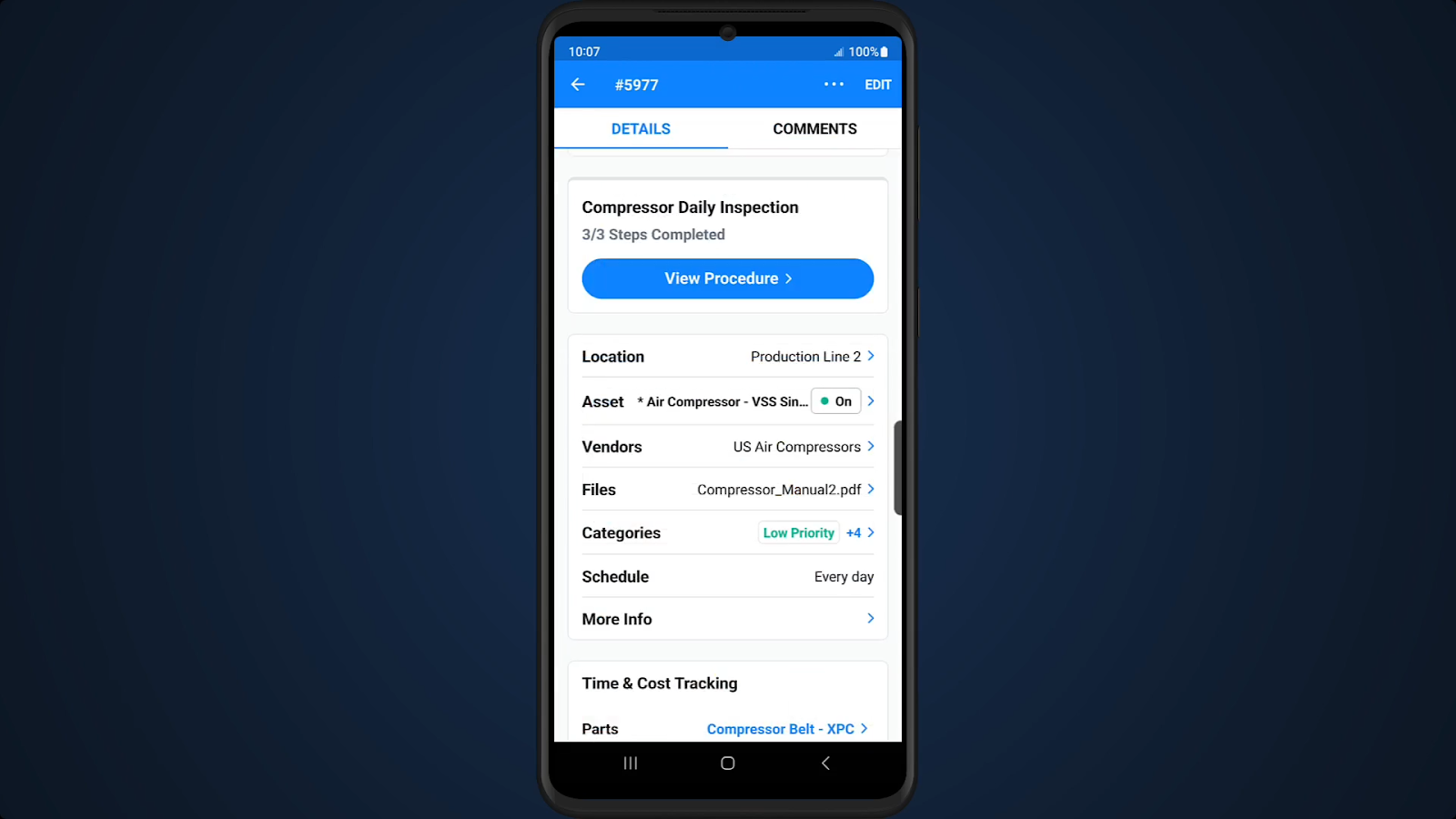

This action prompts the technician to create a corrective action work order for the failed inspection:
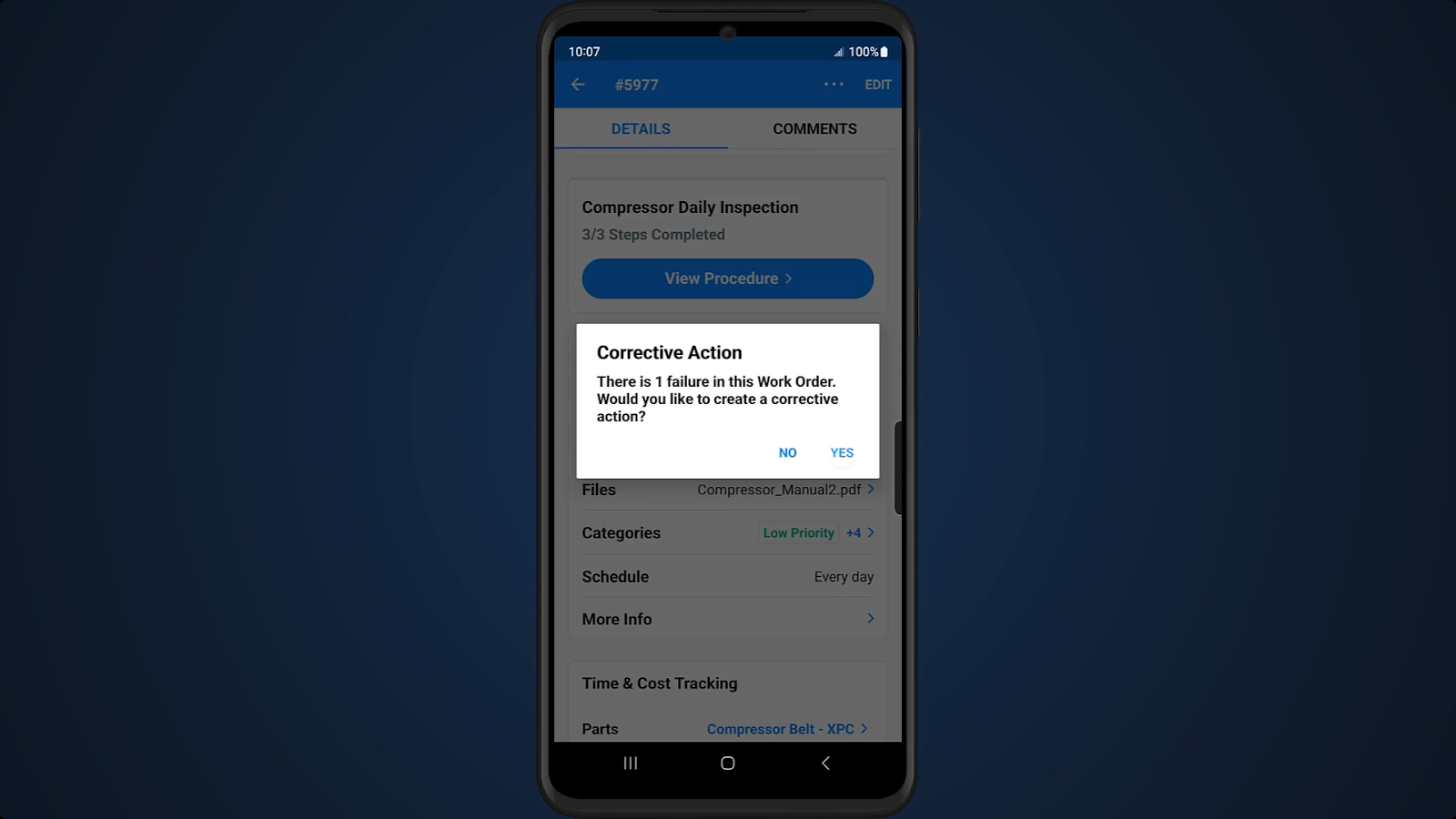
When the technician confirms that a corrective action is needed, a corrective work order is automatically created with a modified title to distinguish it in the CMMS:
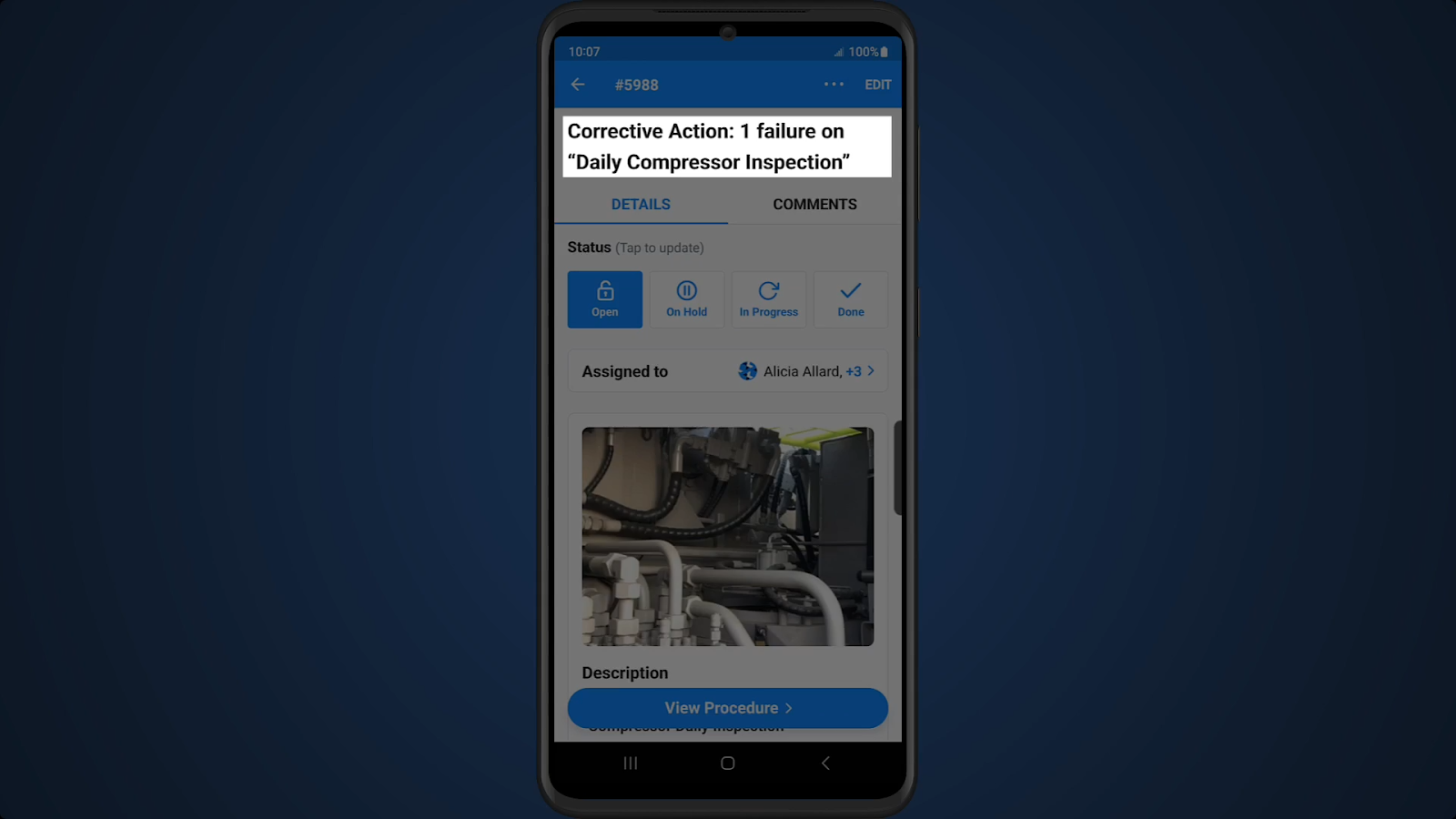
3. Review, schedule, and assign the work order. The last step is to review the corrective maintenance work order to ensure all fields and instructions are clear, correct, and complete. Once this is done, you can schedule the work order and assign it to the right technician, who is immediately notified of the task.
Continuing from the example above, information in the new corrective work order can be reviewed and edited by the maintenance manager, including the assignee, priority level, description, and parts needed:

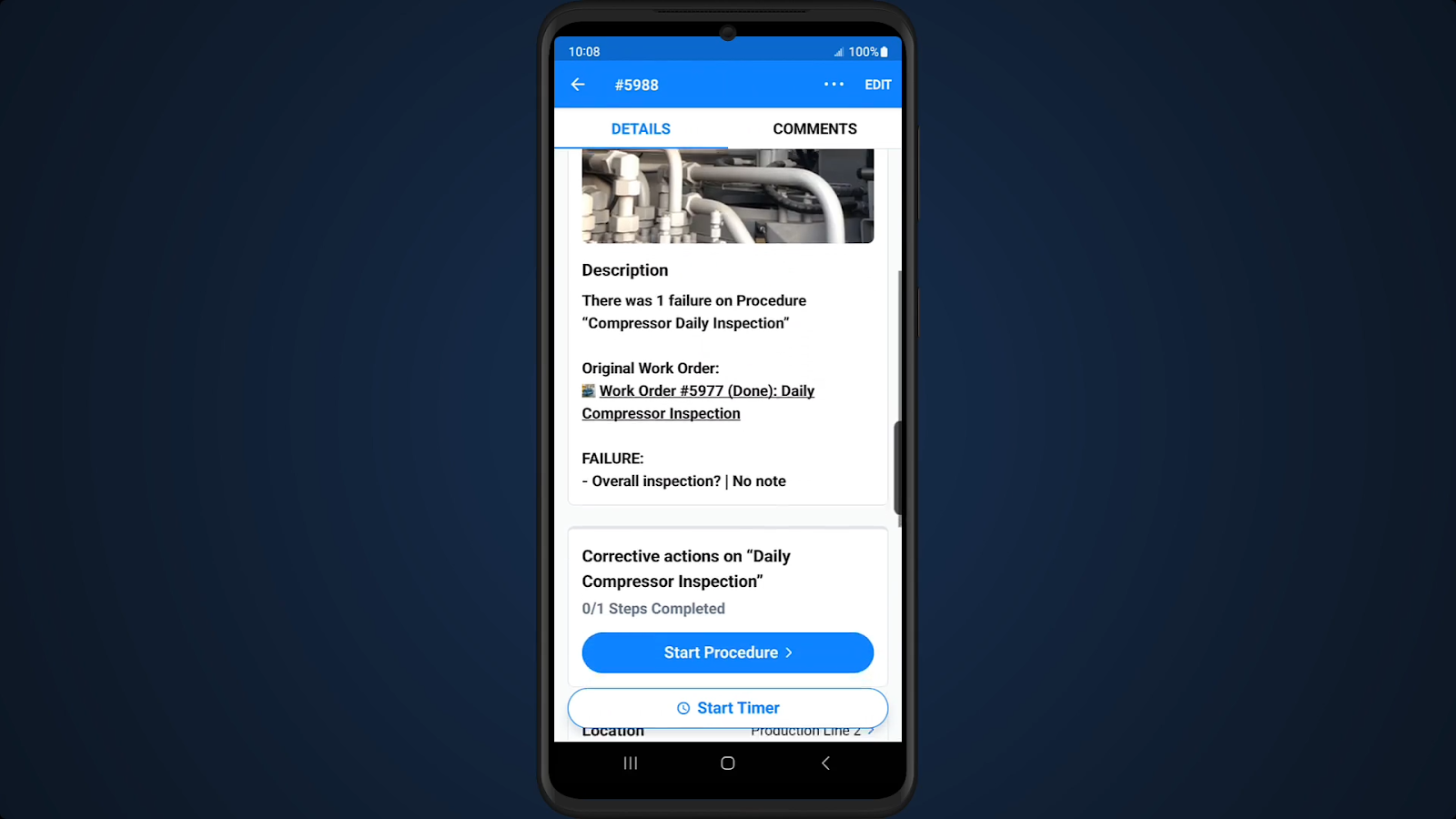
In this scenario, only the failed tasks or elements from the preventive maintenance work order carries over to the corrective task and are visible to technicians assigned to the new work order:

Corrective maintenance work order template
How to create a preventive action work order
These are the eight steps for creating a maintenance work order for preventive action:
1. Identify frequency. Review OEM documentation and asset repair history to determine how often the PM should occur. For example, the work order might be time-based (every 10 days), usage based (every 500 hours of run time), or event based (when the equipment is reconfigured).
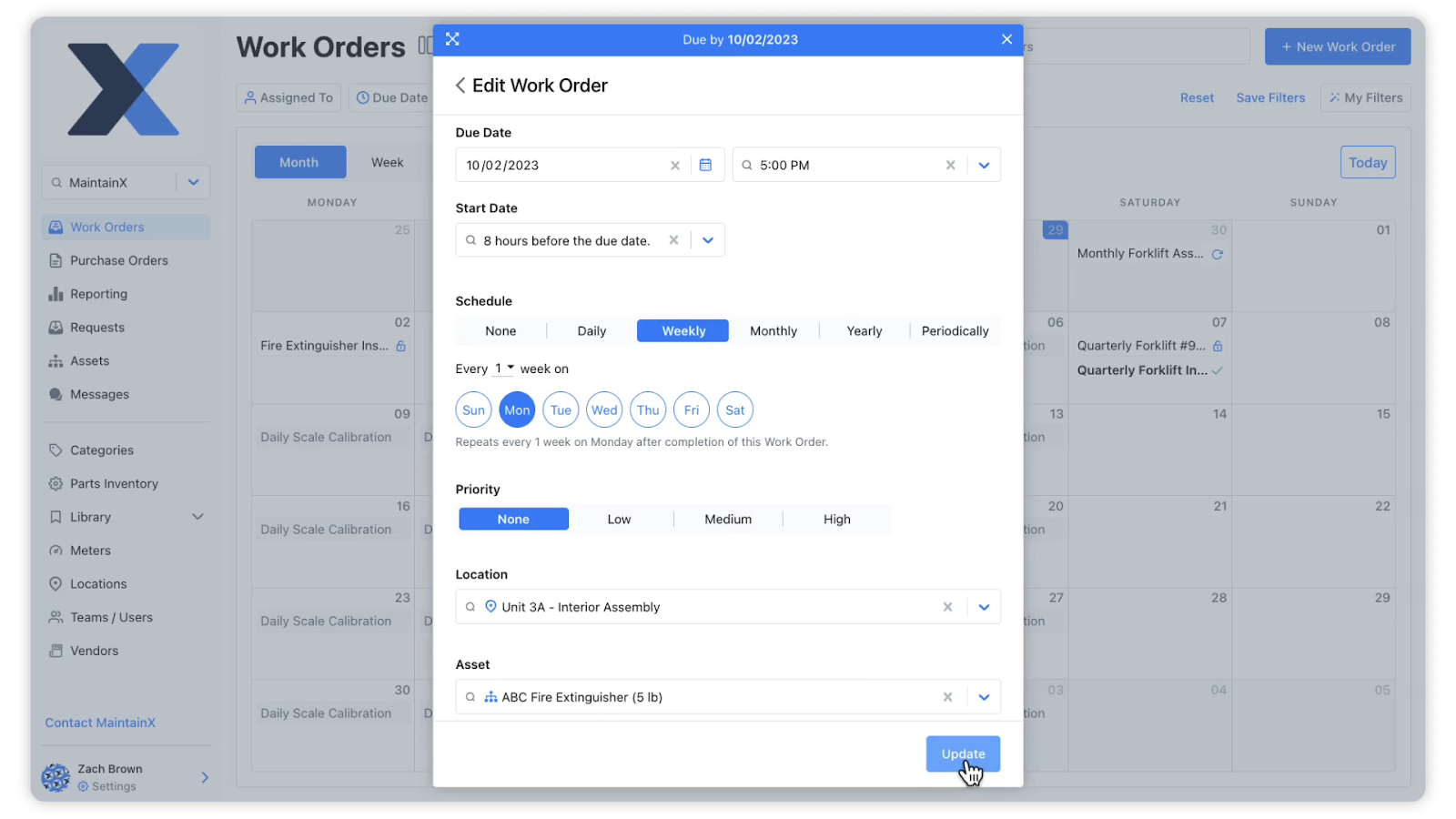
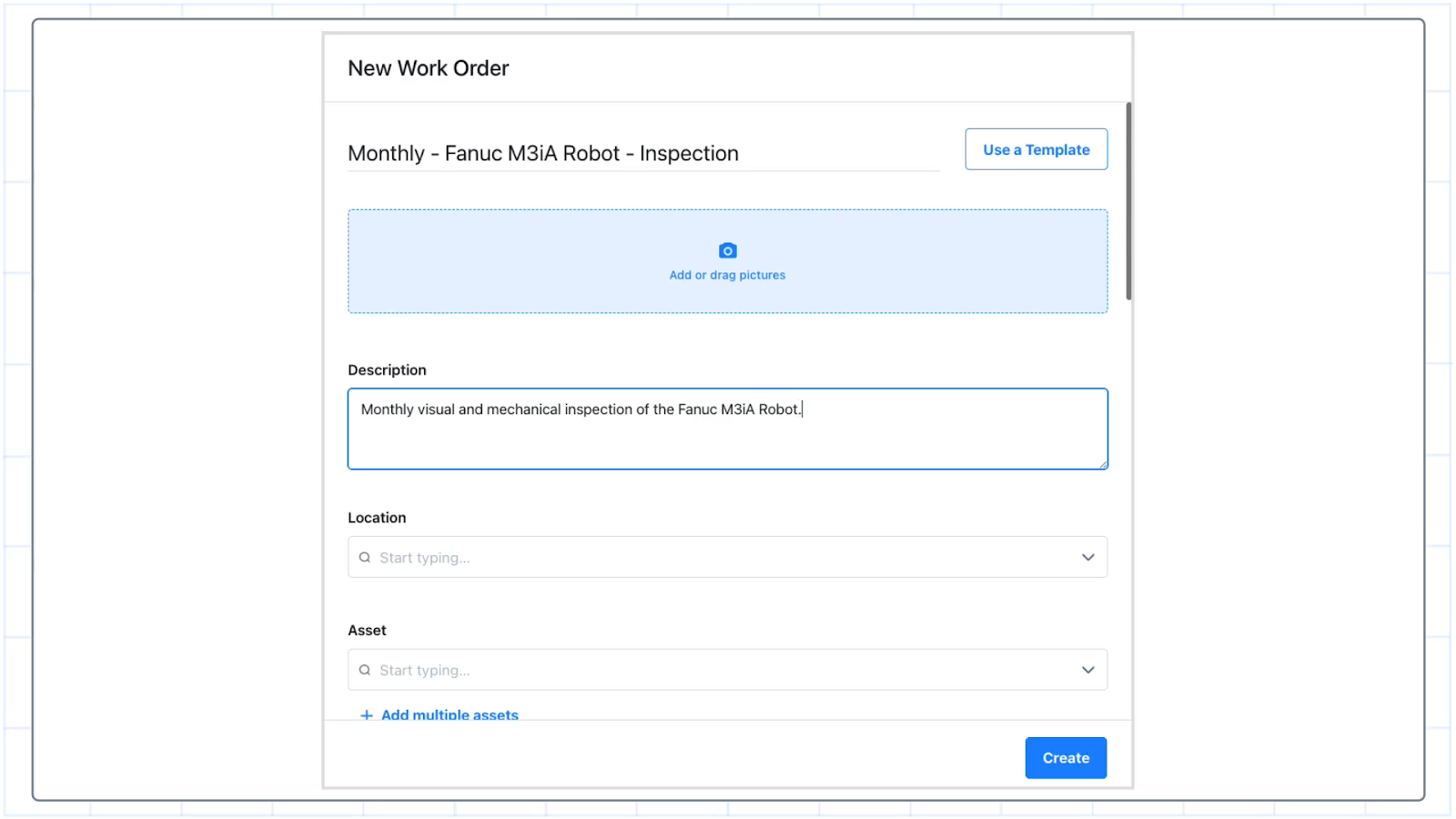
2. Fill out key details. Create a title for the work order that describes the asset, type of work, and a description of the work. For example, ‘Monthly PM - Compressor inspection and lubrication.’. Include key details, such as the location of the asset, priority level of the work order, and due date of the task.
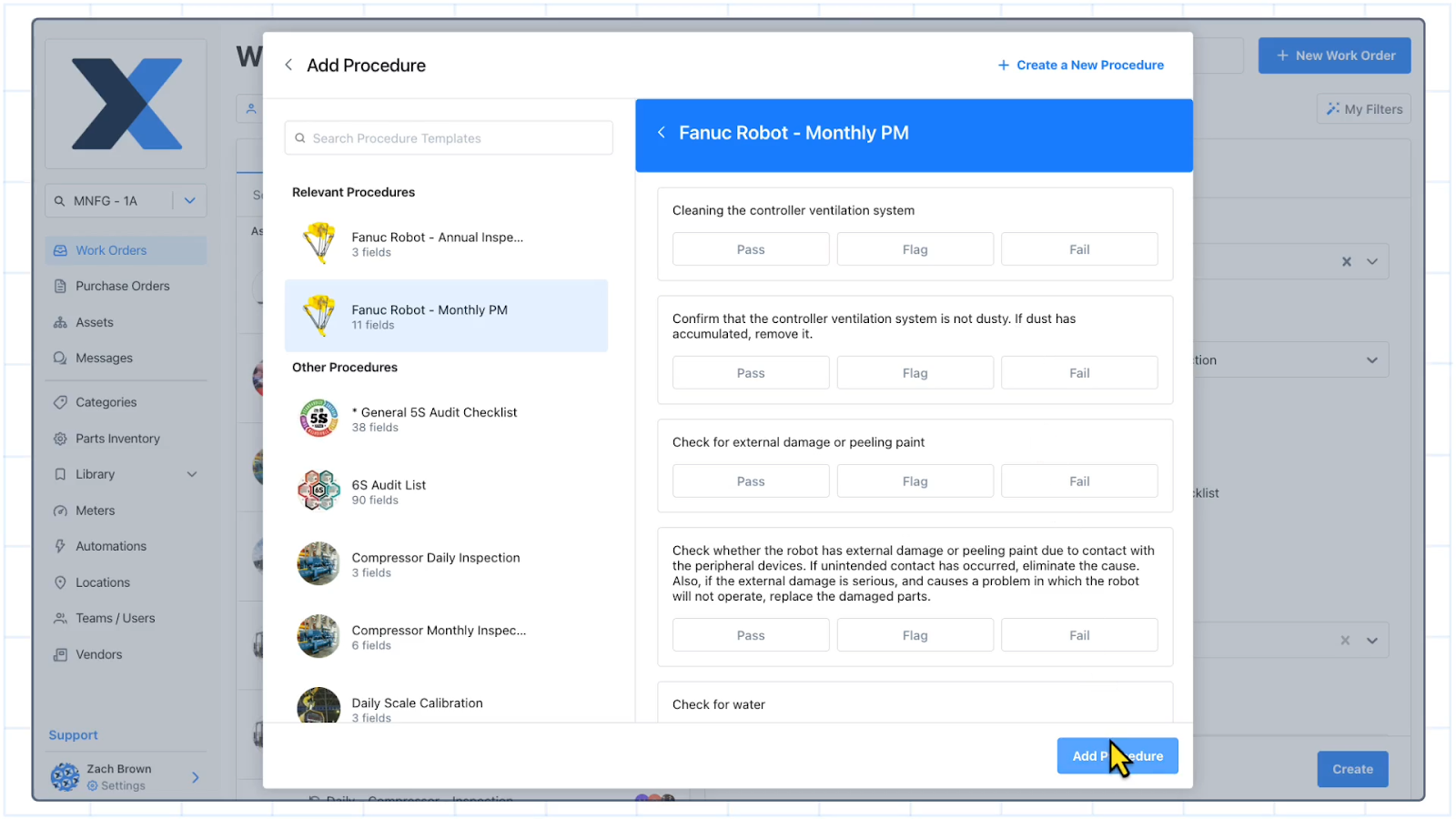
3. Create a procedure/checklist. Build a standard procedure for the preventive action This should include safety instructions and step-by-step instructions for how to do the PM. It can also include pass/fail checklists, meter reading inputs, and other tasks. Be concise but specific with your instructions. If they are too long, it will delay technicians. But if they are too general, it can lead to errors or safety risks.
4. Attach supporting documentation. This might include equipment manuals, past work orders, lubrication guides, pictures, or other resources that would help technicians.
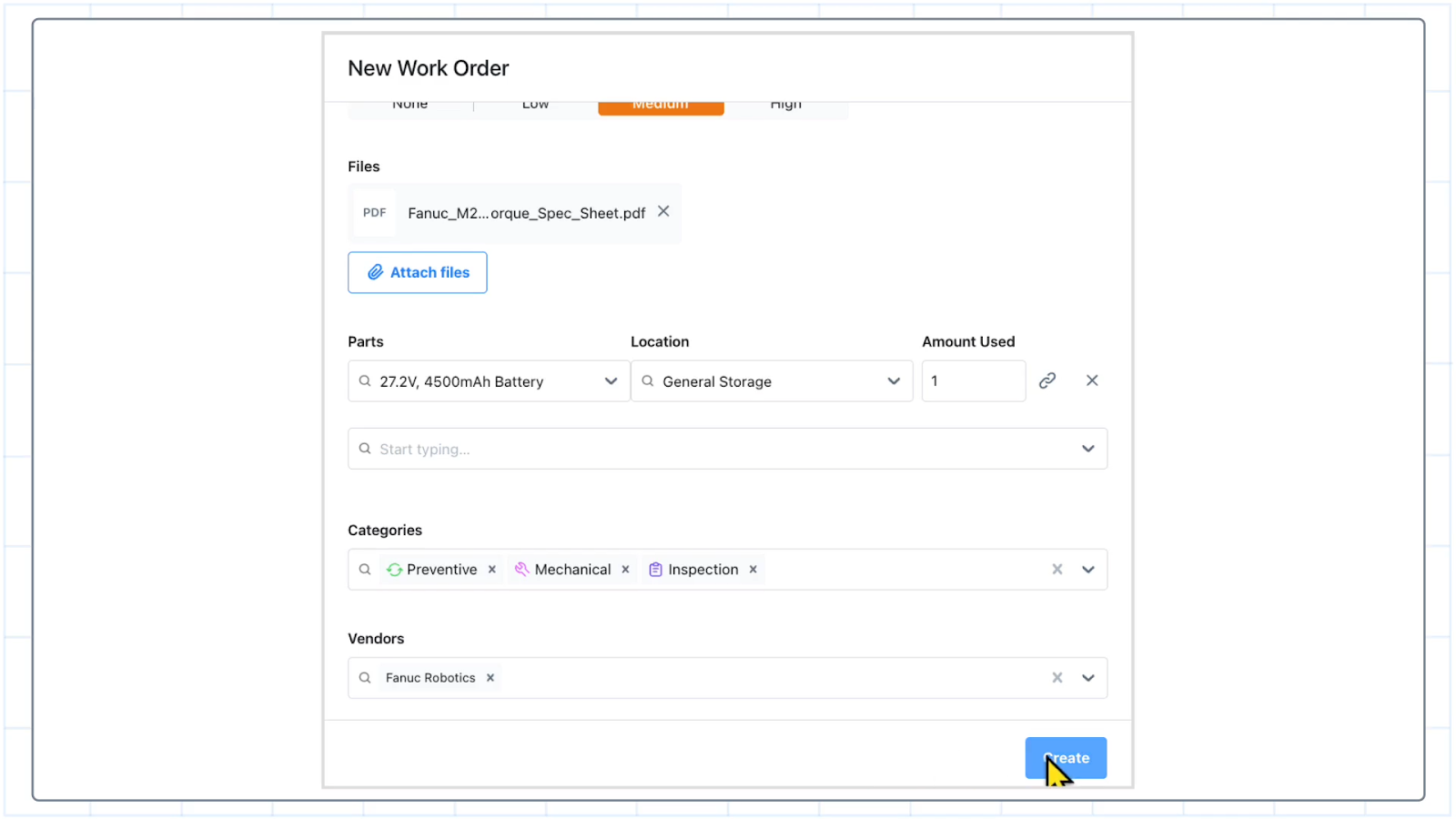
5. Outline required parts and PPE. Include everything that a technician might use during the job, including larger spare parts (like motors), consumables (like bearings or lubrication), tools (like wrenches), and safety equipment (like protective glasses).
6. Set up data capture fields and triggers. Add fields to capture data about the work order, such as completion time, parts consumed, and technician notes. At this point, you can set up triggers that automatically create new work orders based on the information generated by technicians. You can also make any fields mandatory so you can ensure the right work is completed and captured.
7. Add compliance/audit tracking. If regulatory guidelines require a manager sign-off or an audit trail, make sure it’s included as mandatory fields in the preventive maintenance work order.
8. Assign and schedule. Once you’ve completed the work order, make sure to put it in the calendar and assign it to a technician or technician group that has the capacity, the training, and the certifications to complete the work.
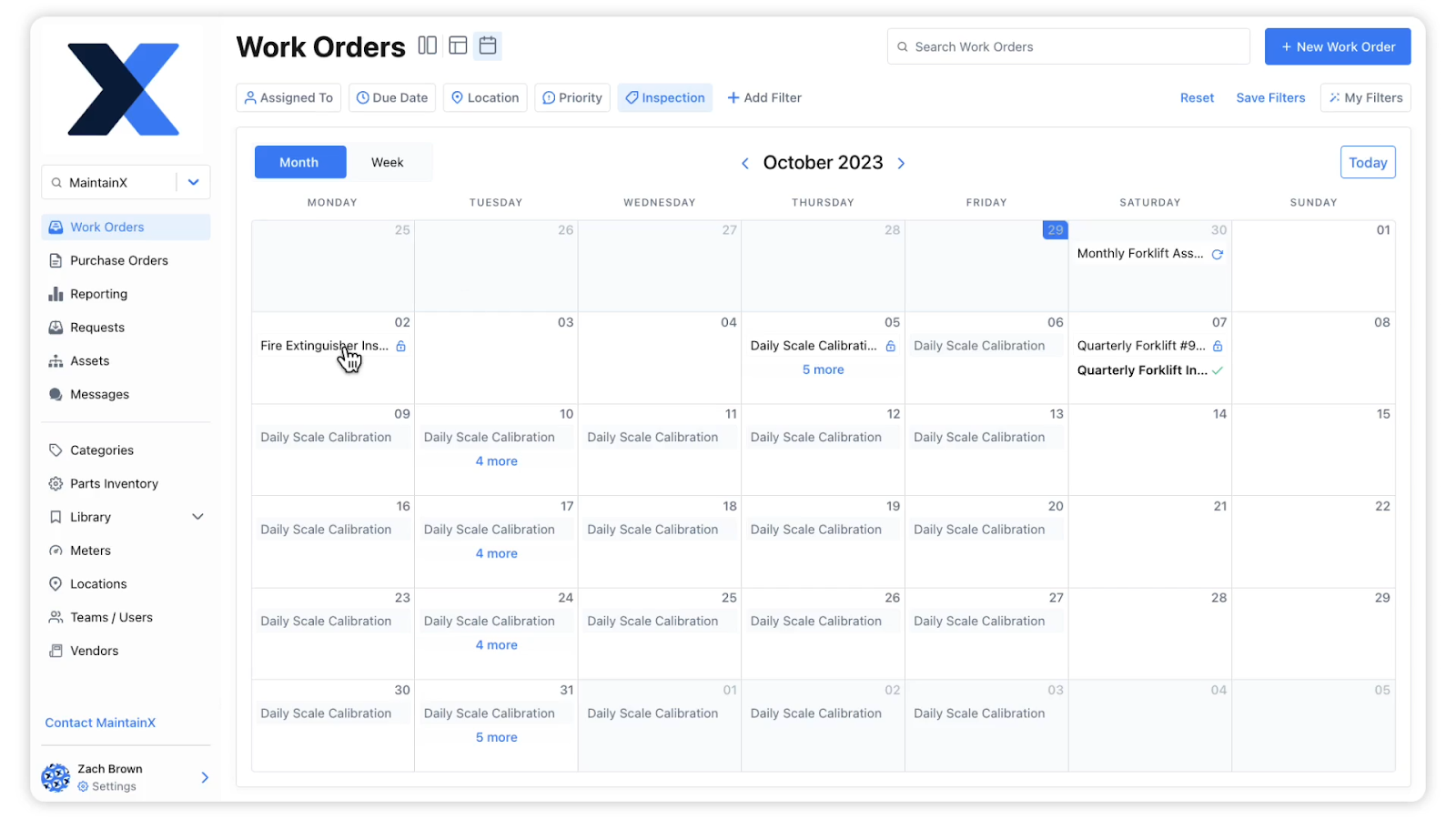
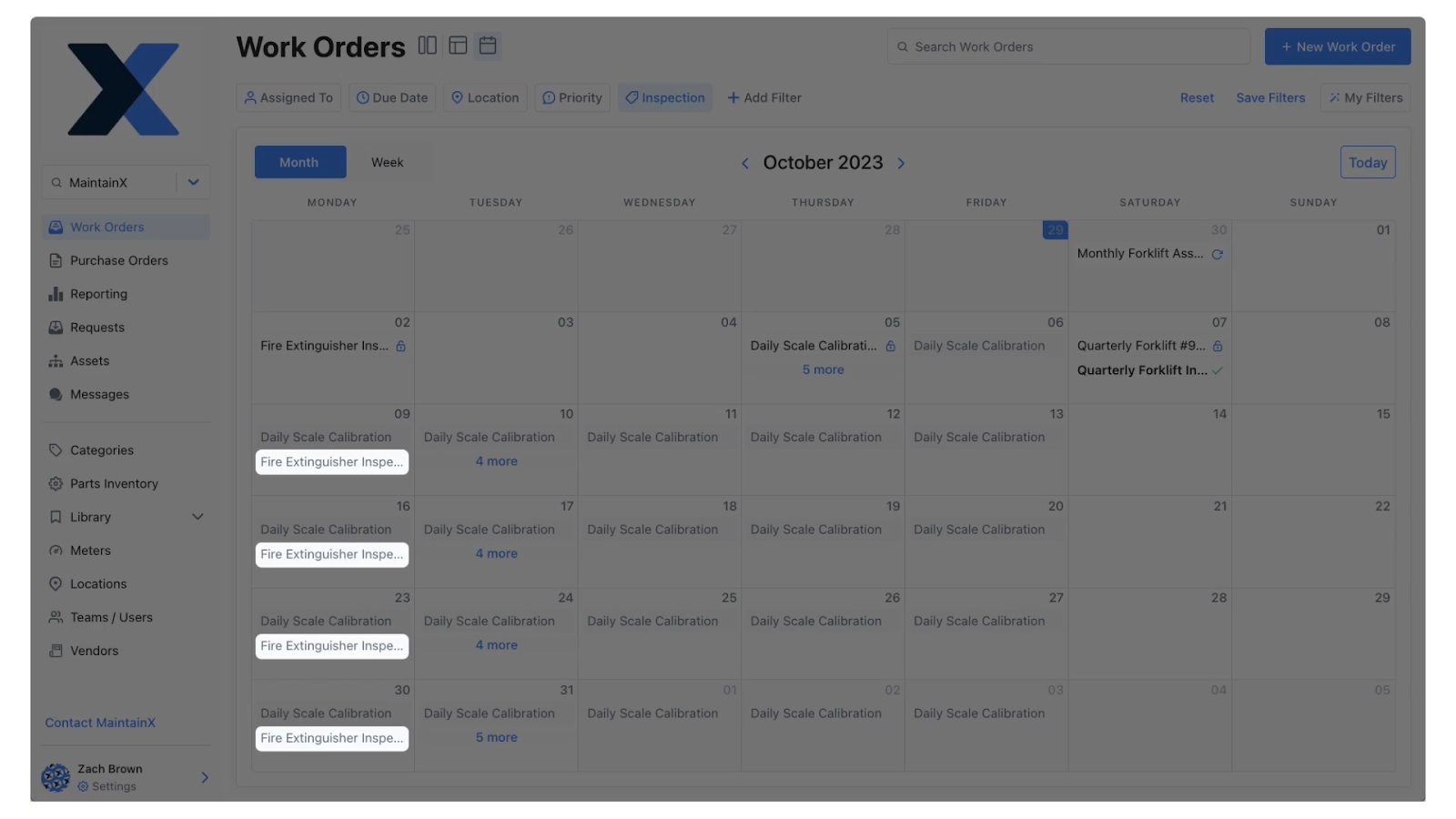
Preventive maintenance work order template
How to plan and schedule corrective and preventive action
This is a brief framework for how to plan and schedule work orders for corrective or preventive actions so you can increase asset availability and uptime while ensuring your maintenance team is as efficient and safe as possible.
1. Define the frequency of preventive maintenance. If you are creating a PM for the first time, follow OEM guidelines for preventive maintenance frequency. This will allow you to complete PMs while developing a baseline to adjust frequencies if needed.
For example, if after six months, you see the mean time between failure is 700 hours of run time, and you have scheduled PMs for every 500 hours, you might increase the frequency to 600 hours to save on time and resources while keeping risk at a minimum.
There are several types of frequencies to consider when planning a preventive action:
- Time-based/calendar-based: For example, every 10 days or on the first of every month
- Usage-based/meter-based: For example, every 500 hours of run time
- Event-based: For example, when the equipment is reconfigured
2. Prioritize and schedule based on criticality: Asset criticality is a type of risk assessment that takes into account impact to safety, production, and the environment. The bigger the impact, the higher the priority. The priority you assign to CAPA work orders differ based on the asset, but PMs can be anywhere from low priority (for low-use, low-risk assets) to high priority (for production-critical machines). Corrective work orders are often medium priority (for low-touch assets like light bulbs) to high priority (a failure that impacts production and safety on a high-volume machine).
3. Plan resources and dependencies. List the parts, tools, permits, and skills required. If the corrective action needs a shutdown or a contractor, schedule those constraints first. Add prerequisites to the work order, such as the requirement for a certain certification or permit for the type of work.
4. Schedule work orders with deadlines and escalation. Corrective action should have a target start and due dates tied to impact. Use short windows for high-risk failures (same shift or within 24 hours), and longer windows for low-risk issues. Build an escalation rule into your process, such as “If not started by the target date, notify the maintenance lead.” The same recommendation applies to preventive action, but the deadlines and escalation rules can be more flexible based on asset criticality.
5. Close the loop. Require evidence at closeout, including what was done, what was found, and what will change going forward. If the preventive action is new, set a review date in 30 to 90 days to confirm it is actually reducing repeat issues.
How to track corrective and preventive work orders
This six-step process for tracking corrective and preventive action for your maintenance team will ensure that work gets completed safely and on time.
1. Confirm that technicians have started the work order. Assign an owner for the work order and confirm they’ve accepted it. For example, require technicians to change the status of a work order to ‘In progress’ in maintenance software. If it sits in the ‘Open’ status too long, escalate it.
2. Track progress of the work order. For critical jobs, you can get notified when work order tasks are completed in real-time with a CMMS. You can also use an in-app chat to monitor updates.
3. Manage exceptions in real time. If a job is blocked, its status should reflect that, such as labelling it ‘on hold’ or ‘blocked’ with a reason code (like, ‘missing parts’) and a next action date. This helps you identify problems and take proactive steps to avoid overdue work orders from slipping through the cracks.
4. Verify completion. Set up notifications to alert you when a work order is closed out. You can make completing certain work order fields mandatory and add a manager sign off so that you can be sure that the maintenance task was completed the right way with the right documentation.
5. Trigger follow-up work if needed. If an inspection fails, a second repair is necessary, or if the full repair could not be completed, this should trigger a follow-up action.
7. Track effectiveness where appropriate. Set a date to review CAPA work orders to ensure you have the right frequency of PMs or that the fix on a corrective work order is sufficient. Run frequent risk assessments so you can adjust your maintenance strategy according to the current state of your equipment.
How to report on corrective and preventive action
Your maintenance team probably creates and completes hundreds, if not thousands, of corrective or preventive action work orders every year. The data you collect on these corrective and preventive actions is critical to determine root causes of inefficiency, breakdowns, and higher costs so you can reduce downtime, spending, and repair times. Here are seven maintenance work order reports to add to your dashboard and what you can learn from them:
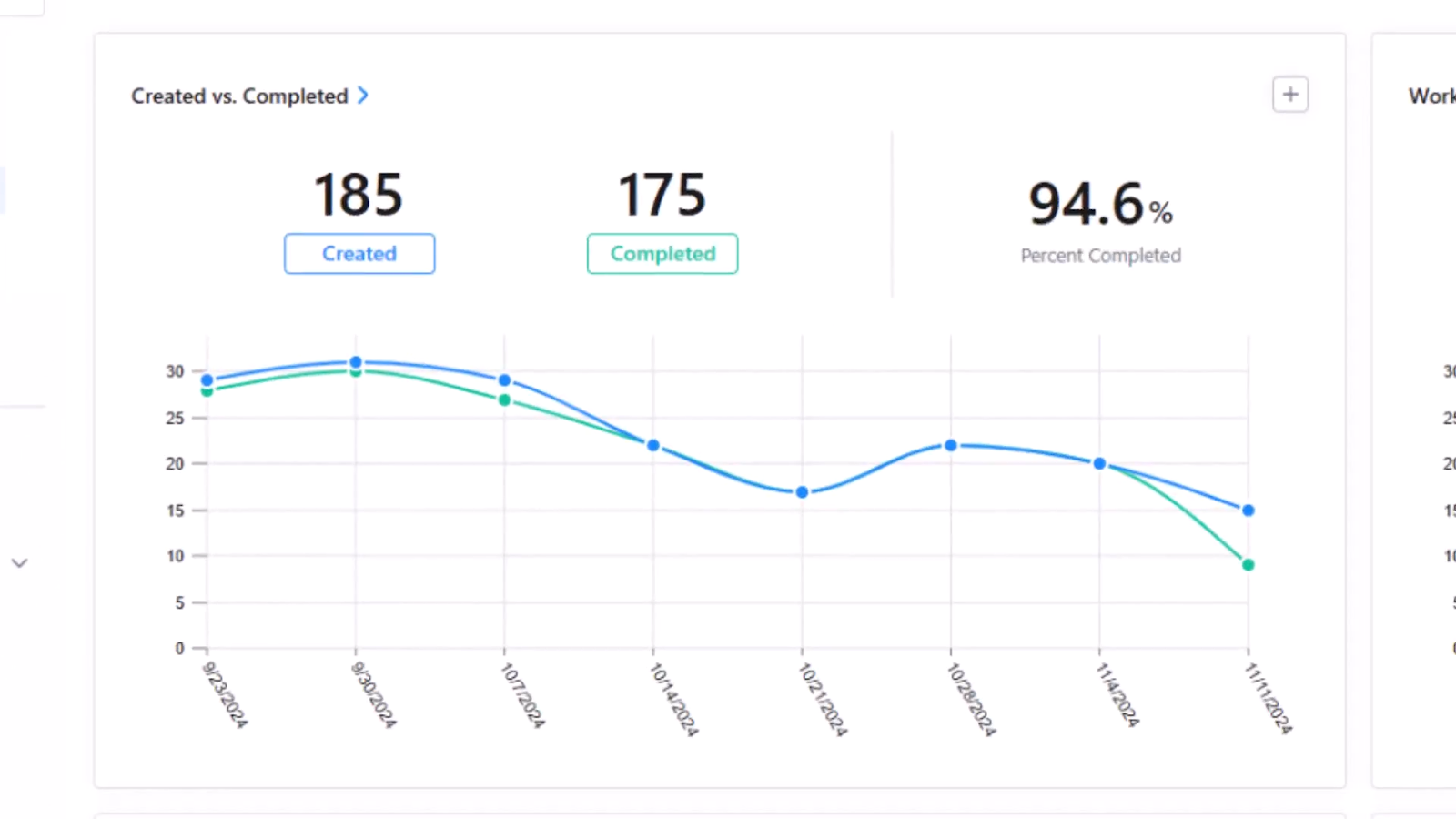
1. Created vs. completed work order: This report shows the size of your backlog and your planned maintenance compliance. If the “created” line regularly outpaces “completed,” you are accumulating CAPA debt and due dates will start slipping.
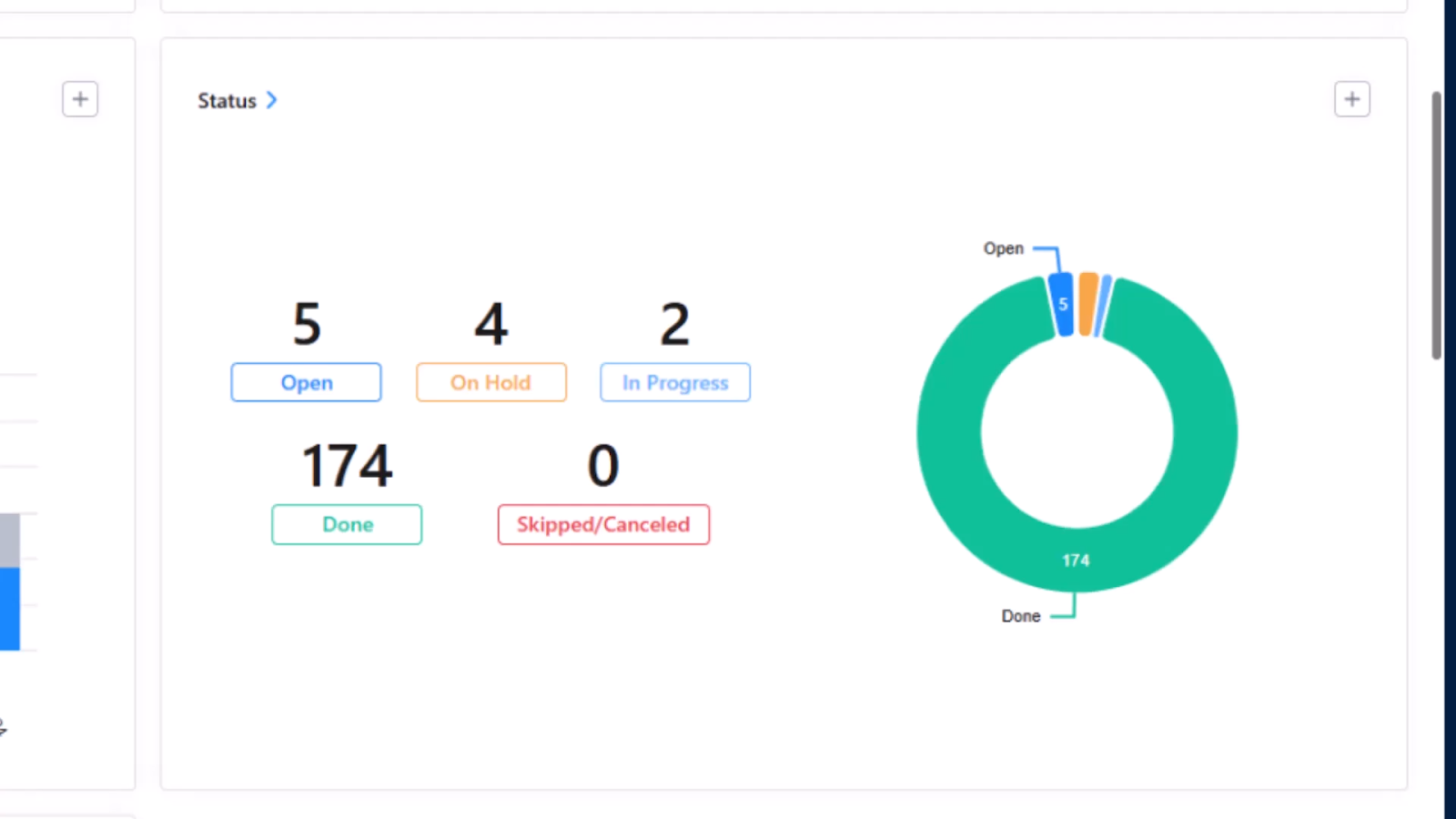
2. Work order status: This report is a live view of your CAPA work orders and can tell you what is blocking the day’s work. This can be used to allocate resources, troubleshoot dependency issues, and spot trends in daily completion over time.
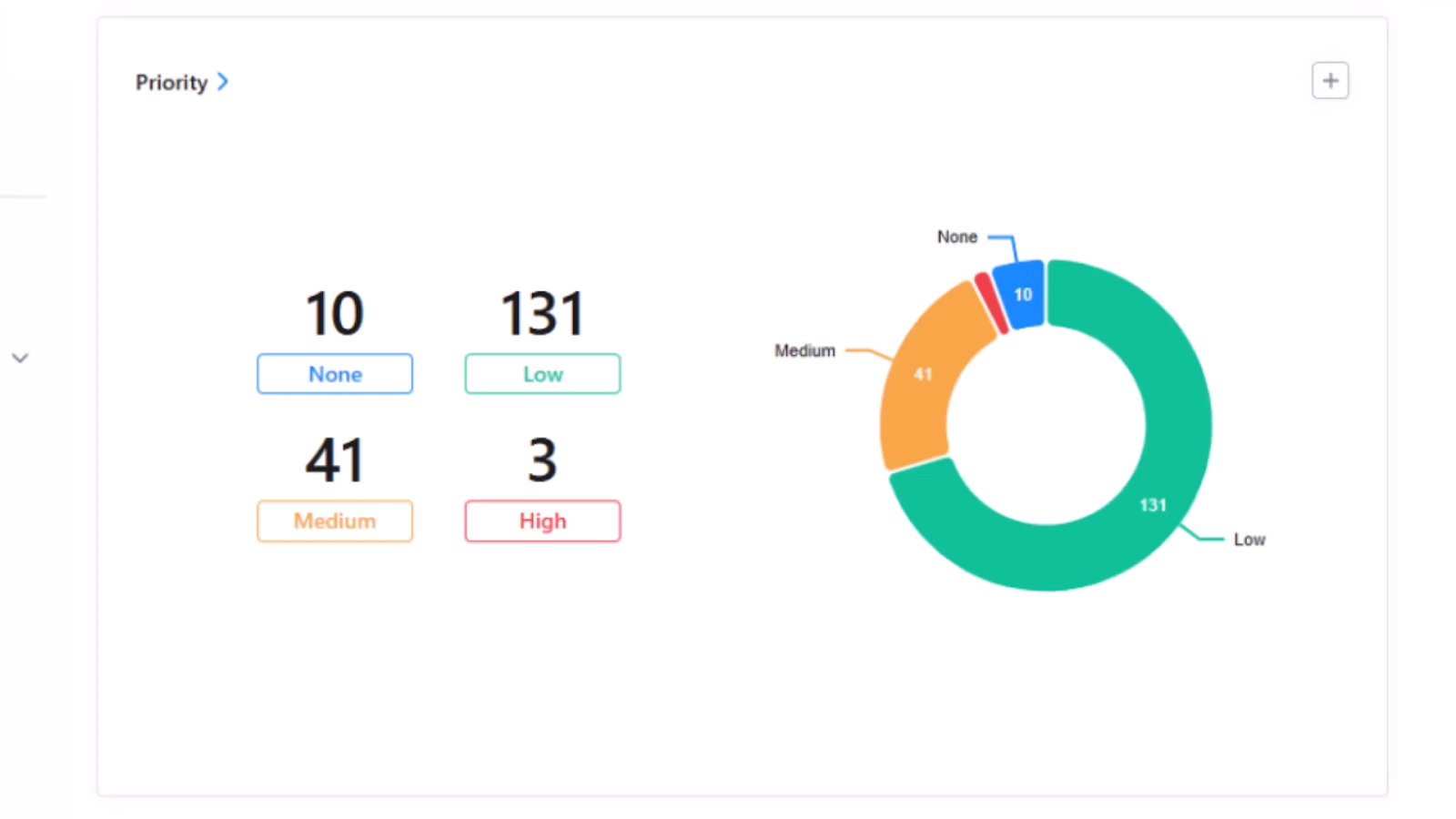
3. Work order priority: This report helps confirm if your scheduling is realistic. If everything is high priority, you have to reassess what is an actual risk and what can be relabeled as medium priority. Over the long term, priority can be used to understand if your team is moving toward a more proactive maintenance approach rather than reactive maintenance.
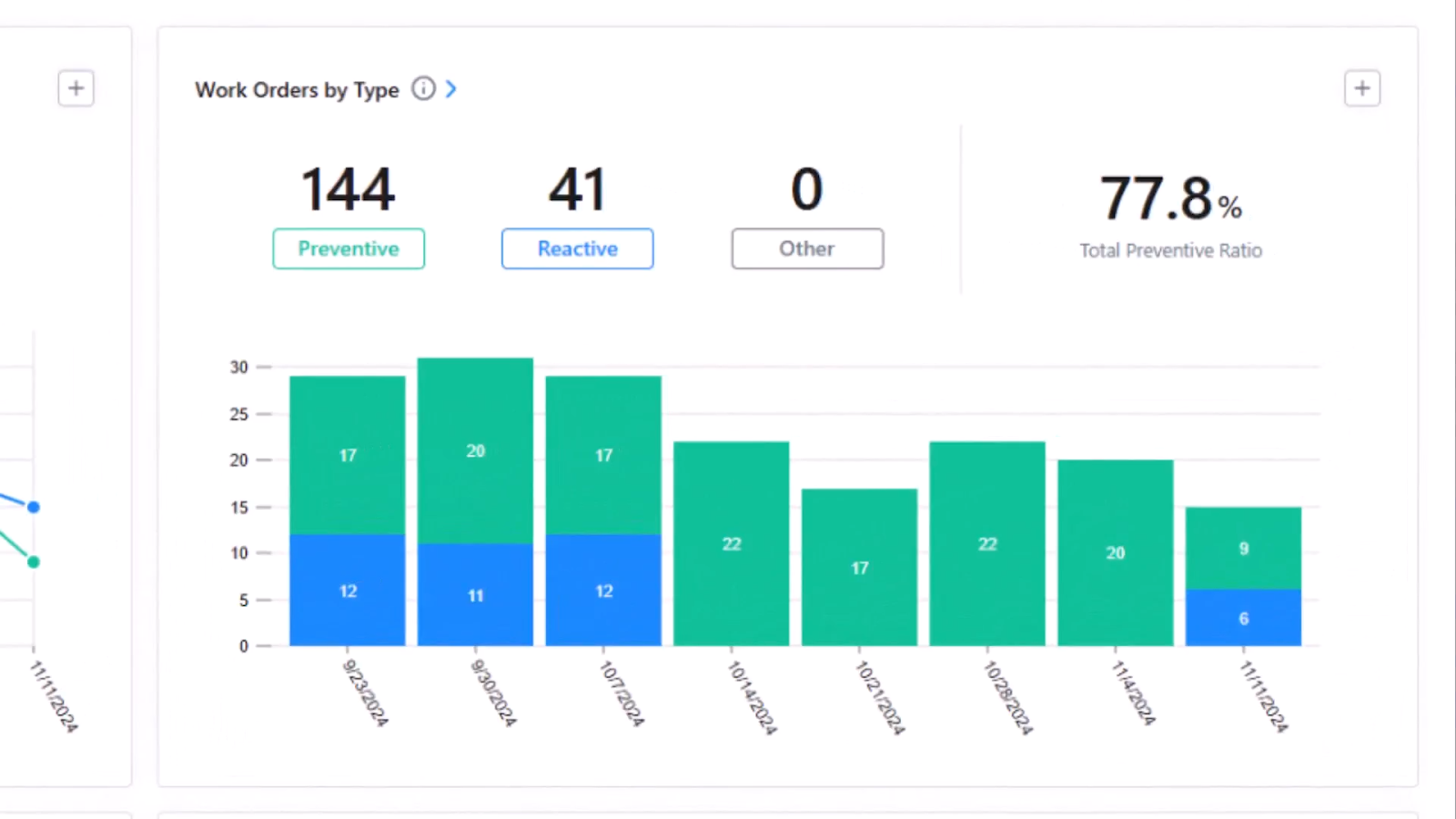
4. Work order by type: Over time, an effective corrective and preventive action strategy should shift work from reactive fixes to preventive actions like inspections, standard work, and recurring tasks.
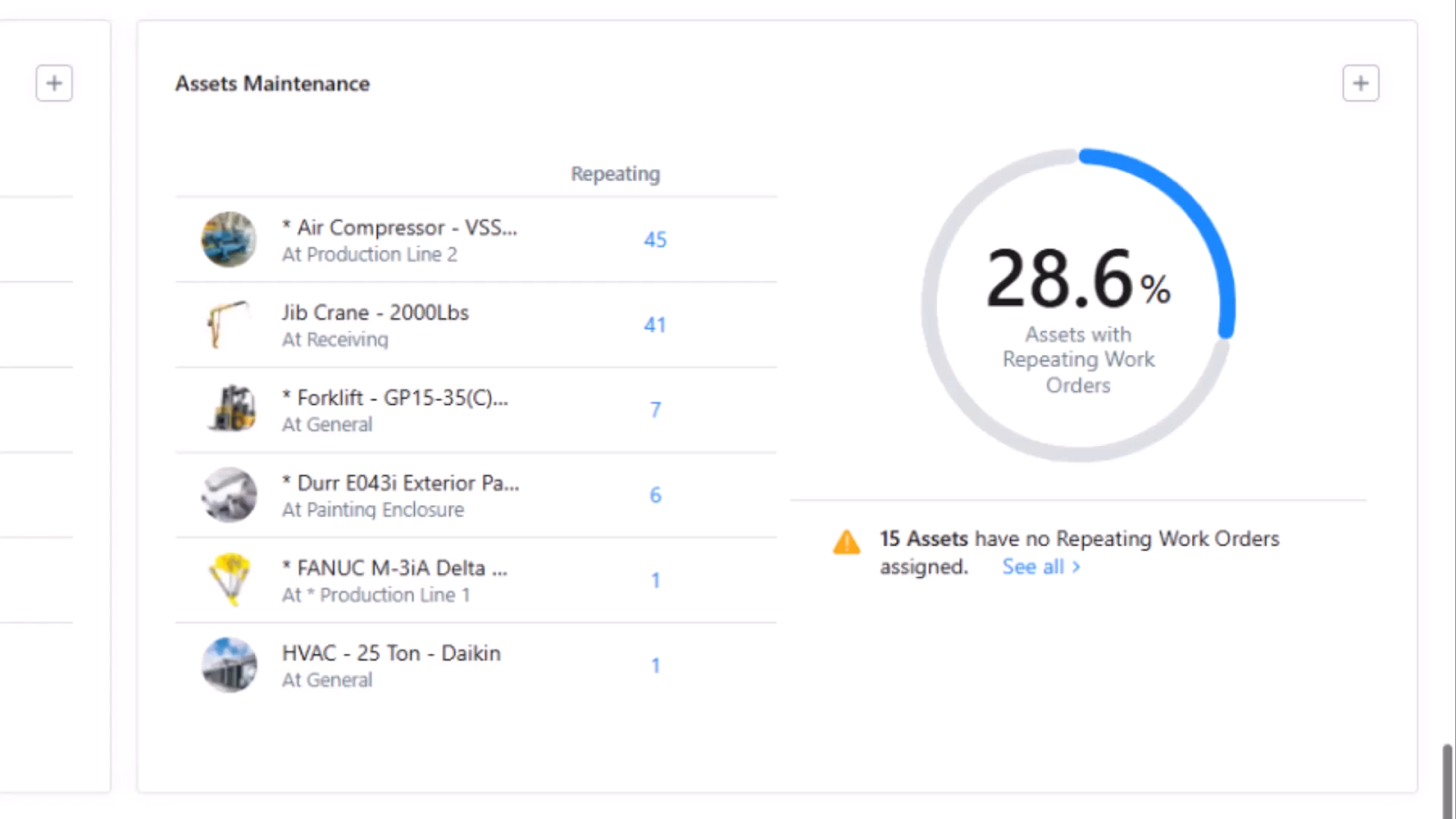
5. Assets with repeating work orders: This list helps you pinpoint which assets you are doing most of your preventive maintenance work orders on. This allows you to track and improve the maturity of your preventive maintenance strategy.
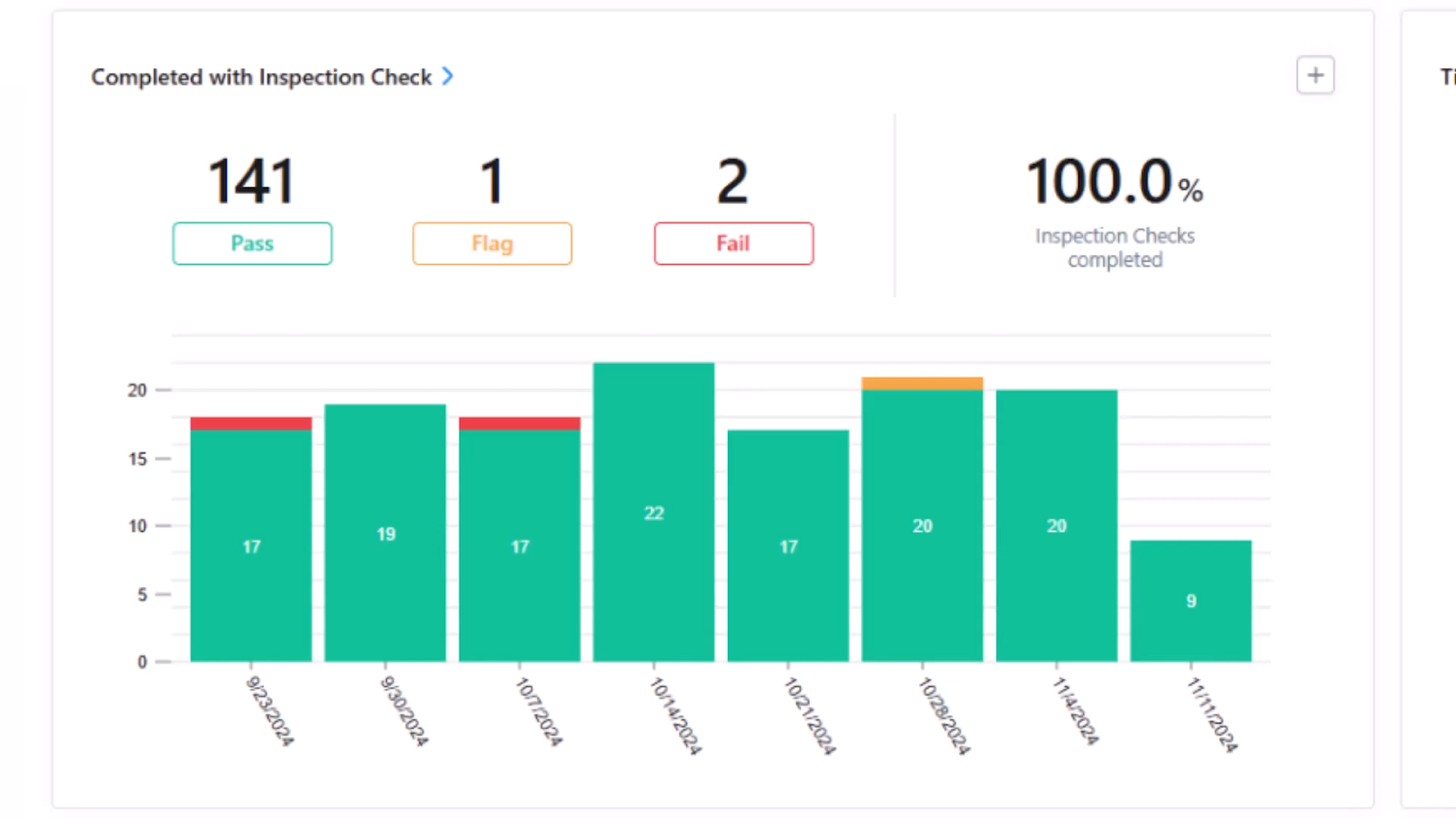
6. Work orders completed with inspection check: This report helps you understand if preventive action is allowing your team to find failures early, before they become breakdowns. It also shows you if there are any bad actors among your assets, if pencil whipping is a problem, and if the failed inspections are leading to corrective action. This kind of report is helpful in running a pareto analysis on your assets or prioritizing root cause analyses.
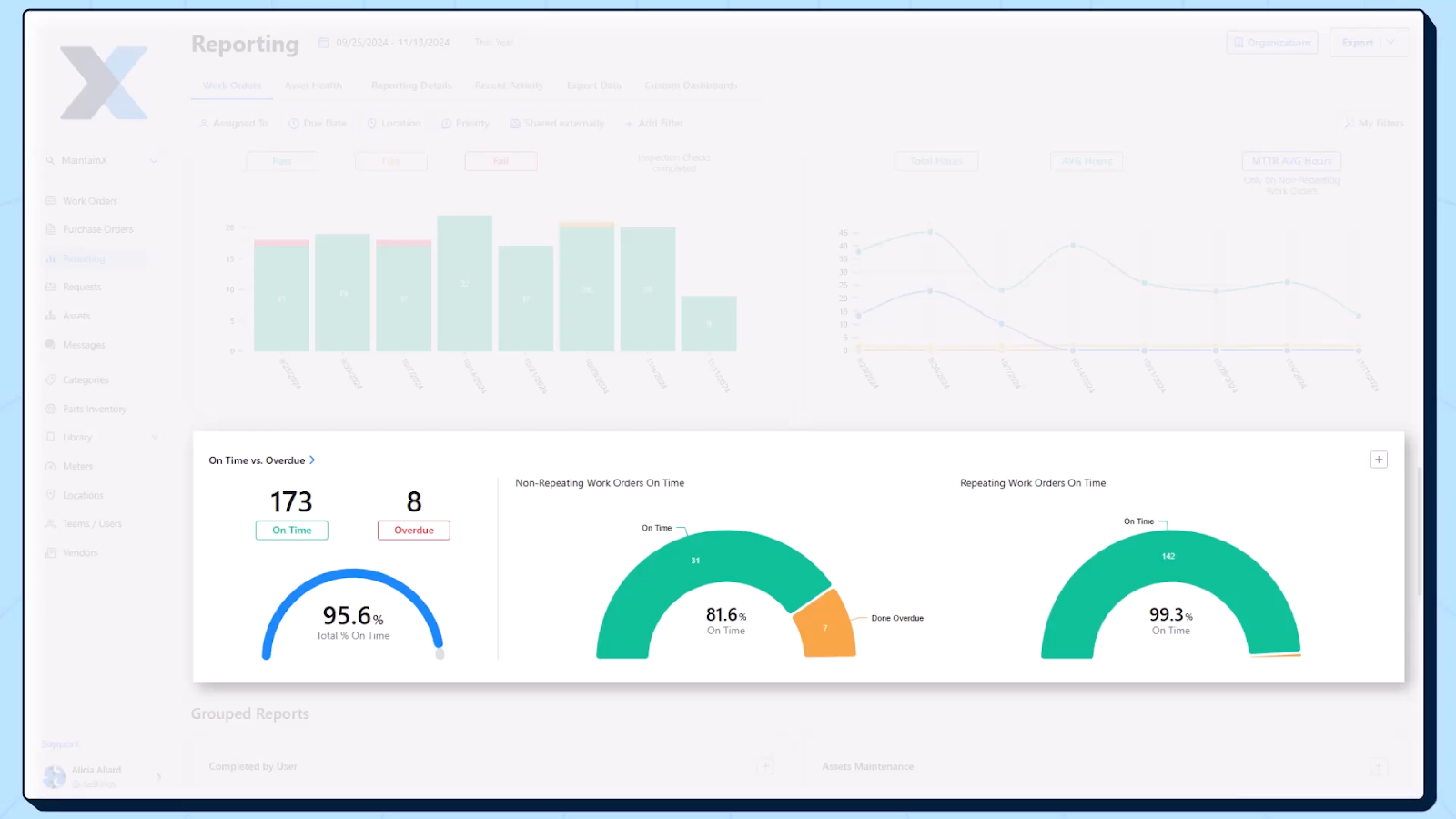
7. On-time vs overdue work orders: This trend shows you how big your backlog is and where to allocate your resources to target your backlog in the right way. It also highlights if overdue work clusters in certain teams, sites, or work types so you can find and fix the cause of these bottlenecks.
How to use CAPA work orders for regulatory compliance
One of the most critical parts of doing corrective and preventive action is to track the work being done for regulatory compliance or internal and external audits, which is especially important for maintenance teams in highly regulated industries. Here are the workflows you need to create and the data you need to capture in CAPA work orders so you can always comply with federal regulations and be prepared for internal audits or third-party audits:
- Closure criteria: Require specific fields before close, like failure code and corrective action.
- Sign-offs: Add required approvals based on risk to create an audit trail.
- Evidence and attachments: Photos, meter readings, inspection checklists, permits, certificates, and vendor reports all help when it comes to compliance.
- Audit trail: Track who changed status, when statuses changed, and what was done at each step.
- Effectiveness records: Store the follow-up result and what you did if it failed again.
Seven ways maintenance software can improve the CAPA process
1. Mobile accessibility for technicians
CAPA work depends on fast feedback from the floor. Mobile access lets technicians receive assignments, open procedures, and complete work orders on-site without walking to a workstation. They can add photos, meter readings, and notes in real time, which reduces data errors, information loss, and vague updates.
2. Standardized templates and procedures across shifts and sites
Corrective and preventive action breaks down when each site documents work differently. Templates enforce consistency in data throughout the preventive action process, like failure codes and closure criteria, so CAPA records are comparable across facilities. Standard SOPs also reduce variation in how corrective and preventive actions are performed, increasing efficiency and improving safety.
3. Cost tracking and maintenance impact
Software makes CAPA costs visible by tying labor time, parts consumed, contractor spend, and downtime notes to each work order. That helps you quantify the true cost of recurring issues and justify preventive actions that may look expensive upfront.
4. Audit and compliance readiness
Audits usually come down to proof: who did what, when, and using which procedure. Maintenance software centralizes timestamps, status history, sign-offs, and supporting documentation so you can produce an audit trail without scrambling through emails and binders.
5. In-app communication
CAPA work often needs coordination between maintenance, operations, quality, safety, and vendors. In-app comments and mentions keep the discussion attached to the work order, reducing lost context across texts and email threads. This is especially useful when work is blocked or scope changes.
6. Easy work request forms and routing
A CMMS allows you to build simple request forms that guide requesters to include key details and relevant information about a potential problem, like asset, location, description, urgency, and photos, which improves triage and prevents back-and-forth. A CMMS can also be used to automatically route requests to the right team, site, or approver.
7. Automated scheduling of work orders
With a maintenance work order software, corrective work can be automatically prioritized, assigned, and escalated based on pre-set rules that take into account risk and due dates. Preventive measures can be automatically scheduled by time-based, usage-based, condition-based, or event-based triggers.
Create a systematic CAPA process for continuous improvement
Corrective and preventive action work orders are where good maintenance organizations separate themselves from busy ones. When you define what corrective and preventive actions mean, standardize how work orders are built, and schedule them based on asset criticality and the right PM triggers, you stop reacting and start controlling risk. Then tracking becomes straightforward: confirm pickup, monitor progress, manage blockers, verify closeout, and review effectiveness so you can prevent recurrence of failures. With the right reporting and compliance guardrails, an effective CAPA system becomes a repeatable process that eliminates downtime, supports audits, improves quality records, and steadily improves how maintenance gets done.

Marc Cousineau es el gerente sénior de marketing de contenidos de MaintainX. Marc tiene más de una década de experiencia contando historias para marcas de tecnología, incluidos más de cinco años escribiendo sobre la industria del mantenimiento y la gestión de activos.



.webp)